
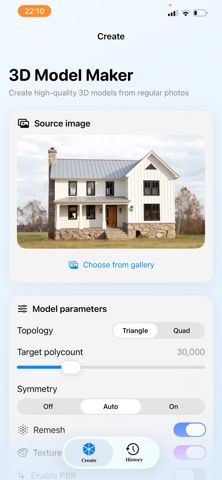
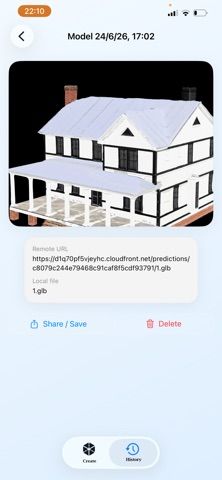
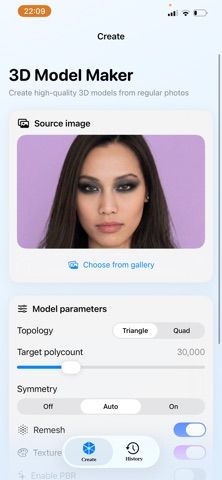
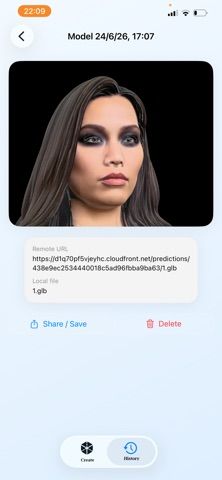
3D Model Maker Image to 3D converts a photo into a GLB model through cloud-based AI processing. Before generation, users can adjust settings such as triangle or quad topology, target polygon count, symmetry, remeshing, texturing, and pose options. A built-in viewer lets users rotate a model, and a history area keeps generated files available to preview, share, export, or delete. The app saves GLB files to the device for transfer to other 3D tools or game engines. The listing says a generation must be purchased, but it does not state the current generation price or whether bundles are available. Because images are sent for cloud processing, avoid submitting sensitive photos and review the developer's privacy terms before use. Generated geometry may need cleanup for production.

3D Model Maker Image to 3D
A cloud AI tool that converts photos into textured GLB models, with adjustable generation settings and export history.
Overview
A closer look at 3D Model Maker Image to 3D.
A closer look
App screenshots
Choose with confidence
The useful details.
What it does
- Generate a 3D GLB model from a photo using cloud processing
- Adjust topology, polygon count, symmetry, remeshing, and texture options
- Preview models in an integrated 3D viewer
- Save, export, share, or delete generated models from history
A good fit for
- Makers who want to experiment with turning a photo into a 3D asset
- Creators who need a GLB starting point for a game or 3D project
Worth knowing
- Model generation is a paid action and is processed in the cloud; the listing does not state generation prices or retention terms.
Frequently asked questions
Answers based on the app’s official listing and reviewed information.
What is 3D Model Maker Image to 3D used for?
A cloud AI tool that converts photos into textured GLB models, with adjustable generation settings and export history.
What can you do with 3D Model Maker Image to 3D?
Generate a 3D GLB model from a photo using cloud processing Adjust topology, polygon count, symmetry, remeshing, and texture options Preview models in an integrated 3D viewer Save, export, share, or delete generated models from history
Who is 3D Model Maker Image to 3D designed for?
Makers who want to experiment with turning a photo into a 3D asset Creators who need a GLB starting point for a game or 3D project
What should you know before downloading 3D Model Maker Image to 3D?
Model generation is a paid action and is processed in the cloud; the listing does not state generation prices or retention terms.
Does 3D Model Maker Image to 3D include paid features?
The US App Store lists a free download.
Which platforms support 3D Model Maker Image to 3D?
Greatooly's reviewed app information lists iOS.
Researched from official sources; this is not a hands-on review. Last checked 2026-11-04.
Keep exploring
More apps that might be a good fit.

Dreamy Room: AI Room Design
Dreamy Room uses a photo of a real room to generate AI interior concepts in styles, colors, and furnishing directions you can compare.

Roomture: AI Interior Design
Roomture redesigns interior, exterior and garden photos with AI, then lets users compare, refine and save design ideas.

Verde: AI Backyard Design Plan
Verde turns photos of gardens, balconies, and rooms into AI redesigns that account for existing structures and practical dimensions.