
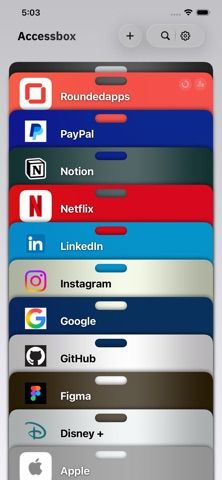
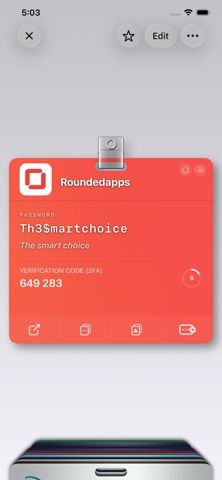
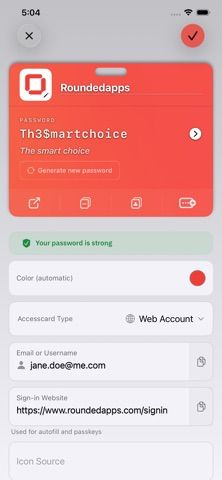
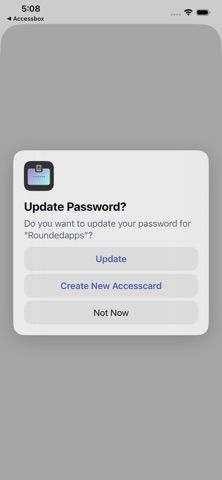
Accessbox is an Apple-device password manager that groups a login’s password, passkey, and verification code on one Accesscard. It supports AutoFill in Safari and apps, an integrated authenticator, Face ID or Touch ID unlocking, breach alerts, and imports from Apple Passwords or other managers. The developer says passwords are encrypted on device and synced through the user’s iCloud account; encrypted backups can also be kept under the user’s control. Free use includes up to 15 Accesscards with all listed features. Accessbox Pro removes that storage limit and adds unlimited website lookups. The retrieved Apple listing displays monthly and yearly Pro subscriptions at $2.99 and $19.99; storefront pricing can vary. Apple lists iPhone and iPad support from iOS 18.4 and Mac support from macOS 15.6. Apple Intelligence-assisted passphrase writing is limited to supported devices.

Accessbox - Password Manager
Accessbox stores passwords, passkeys and verification codes in encrypted Accesscards with AutoFill, breach alerts and optional iCloud sync.
Overview
A closer look at Accessbox - Password Manager.
A closer look
App screenshots
Choose with confidence
The useful details.
What it does
- Keep passwords, passkeys, and verification codes together in a visual Accesscard for each login.
- Use AutoFill and a built-in authenticator across supported Apple devices.
- Unlock with Face ID, Touch ID, or the device passcode, and receive alerts for known password breaches.
- Import saved logins, create encrypted backups, sync through iCloud, and share selected Accesscards.
A good fit for
- Apple users who want passwords, passkeys, and two-factor codes in one password manager.
- People who want a small free vault before deciding whether they need more than 15 Accesscards.
Worth knowing
- Requires iOS 18.4 or later; the Mac version requires macOS 15.6 or later. Apple Intelligence phrase generation works only on supported devices.
- The free plan is limited to 15 Accesscards. Pro adds unlimited website lookups and is listed with monthly and annual subscriptions; prices shown by the retrieved Apple listing are $2.99 monthly and $19.99 annually and may vary by storefront.
Frequently asked questions
Answers based on the app’s official listing and reviewed information.
What is Accessbox - Password Manager used for?
Accessbox stores passwords, passkeys and verification codes in encrypted Accesscards with AutoFill, breach alerts and optional iCloud sync.
What can you do with Accessbox - Password Manager?
Keep passwords, passkeys, and verification codes together in a visual Accesscard for each login. Use AutoFill and a built-in authenticator across supported Apple devices. Unlock with Face ID, Touch ID, or the device passcode, and receive alerts for known password breaches. Import saved logins, create encrypted backups, sync through iCloud, and share selected Accesscards.
Who is Accessbox - Password Manager designed for?
Apple users who want passwords, passkeys, and two-factor codes in one password manager. People who want a small free vault before deciding whether they need more than 15 Accesscards.
What should you know before downloading Accessbox - Password Manager?
Requires iOS 18.4 or later; the Mac version requires macOS 15.6 or later. Apple Intelligence phrase generation works only on supported devices. The free plan is limited to 15 Accesscards. Pro adds unlimited website lookups and is listed with monthly and annual subscriptions; prices shown by the retrieved Apple listing are $2.99 monthly and $19.99 annually and may vary by storefront.
What does Accessbox - Password Manager cost?
Free to download. Free plan supports up to 15 Accesscards and includes AutoFill, passkeys, verification codes, family sharing, and encrypted backups. Accessbox Pro removes the 15-card limit and adds unlimited website lookups. The retrieved Apple App Store listing shows $2.99 monthly and $19.99 yearly; confirm the current price in the user’s storefront.
Which platforms support Accessbox - Password Manager?
Greatooly's reviewed app information lists iOS, macOS.
Researched from official sources; this is not a hands-on review. Last checked 2026-11-10.
Keep exploring
More apps that might be a good fit.

CleanHaus: Airbnb Turnovers
CleanHaus automates short-term rental turnovers by connecting booking calendars with cleaners, schedules and property tasks.

GoalStar: Daily Goal Tracker
GoalStar makes daily goals visible with a gold-star chart, streaks, reminders, widgets and optional NFC tap tags.

Goal Timer: Time Track Goals
Goal Timer tracks time spent on personal goals with active timers, recurring targets, histories, streaks and visual progress insights.