
Actually Read combines an ebook reader, a book tracker, and tools for protecting reading time. Users can import EPUB and PDF files, track physical books or books read elsewhere, save highlights and bookmarks, and create reading lists. A focus session can use Apple's Screen Time controls to block selected apps, categories, or websites. Its AI companion answers questions using passages retrieved from a book and can include references back to the source text; on supported Apple devices, some answers can run on-device. The developer says Advanced AI sends only the question and relevant excerpts to cloud models, not the full book. Core tracking, reading, focus sessions, and supported on-device AI are free, while cloud AI requires a subscription. The current App Store listing requires iOS or iPadOS 26.2 or later, so check device compatibility before installing.

Actually Read: Focus Reader
An ebook reader and book tracker with timed reading sessions, Screen Time app blocking, and AI answers grounded in the reader's books.
Overview
A closer look at Actually Read: Focus Reader.
A closer look
App screenshots
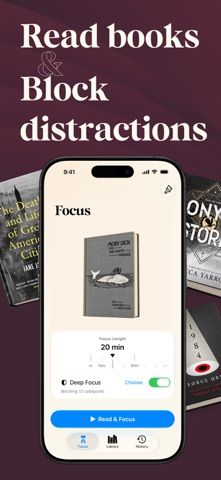
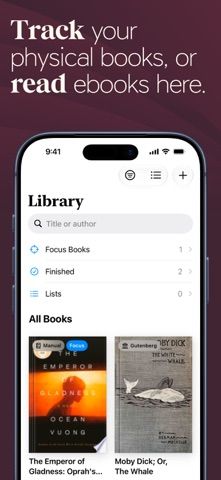
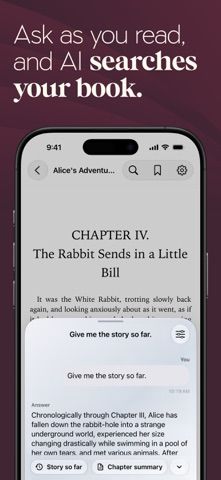
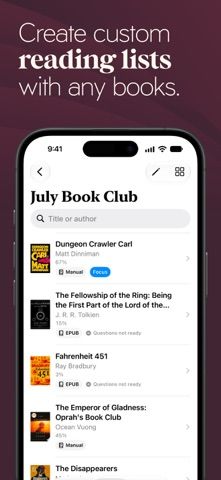
Choose with confidence
The useful details.
What it does
- Import and read EPUB or PDF books while tracking physical and digital reading.
- Use timed focus sessions and Screen Time controls to block distractions.
- Ask book-based questions and open supporting passages from AI responses.
- Save highlights, bookmarks, reading lists, and progress across books.
A good fit for
- Readers who want to combine ebook reading, reading logs, and distraction control.
Worth knowing
- The App Store currently requires iOS or iPadOS 26.2 or later; Screen Time features need permission, and cloud AI sends the question and relevant excerpts for processing.
Frequently asked questions
Answers based on the app’s official listing and reviewed information.
What is Actually Read: Focus Reader used for?
An ebook reader and book tracker with timed reading sessions, Screen Time app blocking, and AI answers grounded in the reader's books.
What can you do with Actually Read: Focus Reader?
Import and read EPUB or PDF books while tracking physical and digital reading. Use timed focus sessions and Screen Time controls to block distractions. Ask book-based questions and open supporting passages from AI responses. Save highlights, bookmarks, reading lists, and progress across books.
Who is Actually Read: Focus Reader designed for?
Readers who want to combine ebook reading, reading logs, and distraction control.
What should you know before downloading Actually Read: Focus Reader?
The App Store currently requires iOS or iPadOS 26.2 or later; Screen Time features need permission, and cloud AI sends the question and relevant excerpts for processing.
Does Actually Read: Focus Reader include paid features?
The developer says Advanced AI cloud models require a subscription; the US App Store lists Actually Read Plus at $9.99 but does not show the billing period in its public listing.
Which platforms support Actually Read: Focus Reader?
Greatooly's reviewed app information lists iOS.
Researched from official sources; this is not a hands-on review. Last checked 2026-11-04.
Keep exploring
More apps that might be a good fit.

Siftivo: What to Read Next
Siftivo suggests books from a reader’s taste and combines daily picks with reading shelves, reviews, reader follows, and a journal.

ReadFlow - Book Tracker
ReadFlow tracks print, ebook, and audiobook progress with session logs, quotes, shelves, and import tools.

Margin: Reading Streak
Margin is a reading streak tracker, EPUB and PDF reader, book library, and audiobook recorder with optional Plus storage.