
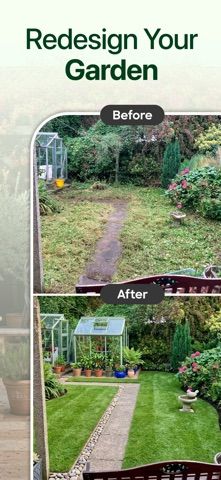
AI Garden Design - GardenAI is a photo-based concept tool for exploring changes to an outdoor space. Upload a picture of a garden, choose a landscaping style, and generate a preview that can add plants, flowers, paths, or lighting. The app is aimed at people who want to compare visual directions before planning a yard or garden redesign, then save or share the generated image. It is free to download and requires iOS 13.0 or later on iPhone or iPad. The US App Store lists weekly access at $3.99, yearly access at $29.99, and a 250-credit pack for $3.99; the listing says generation and editing may require a subscription. Apple’s unverified privacy label says photos or videos and product-interaction data may be collected without being linked to identity. Treat the generated image as a design preview and check plant suitability, measurements, and local conditions before starting physical work.

AI Garden Design - GardenAI
Preview landscaping ideas by transforming a garden photo with AI styles, plants, paths, flowers, and lighting.
Overview
A closer look at AI Garden Design - GardenAI.
A closer look
App screenshots


Choose with confidence
The useful details.
What it does
- Upload a garden photo and generate a redesigned visual concept.
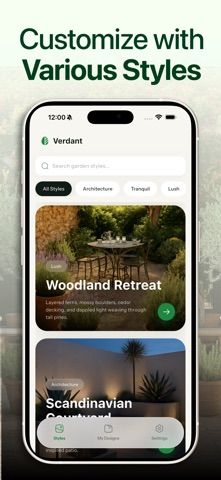
- Explore different landscape styles and add plants, flowers, paths, or lighting to a preview.
- Save or share generated garden concepts for discussion or reference.
- Use subscription access or purchase additional generation credits through the App Store.
- Run the app on iPhone or iPad with iOS or iPadOS 13.0 or later.
A good fit for
- Homeowners and gardeners comparing visual directions for an outdoor makeover.
- People who want to visualize a concept from a photo before discussing a project with a landscaper.
Worth knowing
- AI images are visual concepts; the listing does not describe measured plans or validate plant suitability for a local climate.
- Image generation or editing may require a subscription, and the developer's unverified privacy label lists photos or videos and usage data.
- Requires iOS 13.0 or later on iPhone or iPad.
Frequently asked questions
Answers based on the app’s official listing and reviewed information.
What is AI Garden Design - GardenAI used for?
It turns a photo of an outdoor space into an AI-generated landscaping concept with different styles and design elements.
Can I use a photo of my own garden?
Yes. The listing says you can upload a garden photo, choose a style, and generate a redesigned preview.
What can the AI add to a garden design?
The listing mentions plants, flowers, pathways, and lighting, along with different landscaping styles.
How much does GardenAI cost?
It is free to download. The US App Store lists weekly access for $3.99, yearly access for $29.99, and a 250-credit pack for $3.99.
Can I use GardenAI without a subscription?
The app is free to download, but its listing says image generation and editing may require a subscription. Check the in-app offer for current access terms.
Which devices support AI Garden Design - GardenAI?
The App Store lists iPhone and iPad support and requires iOS or iPadOS 13.0 or later. Greatooly's reviewed platform information lists iOS.
Researched from official sources; this is not a hands-on review. Last checked 2026-11-19.
Keep exploring
More apps that might be a good fit.

AI Song & Music Maker - Foxify
An AI music creation app for generating songs, lyrics, beats, voice-based covers, and remixes from ideas or audio.

Photo Collage EZ
Arrange photos in grid or creative layouts, customize backgrounds and borders, adjust crop and shadows, and export collages up to 4K.

GreyForge - Miniature painting
Preview paint schemes on a miniature photo, get step-by-step painting recipes, and organize projects for tabletop figures.