
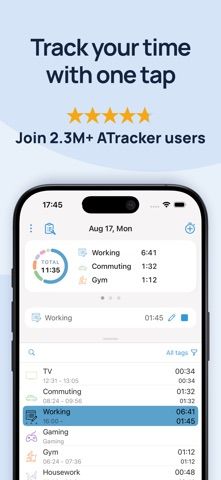
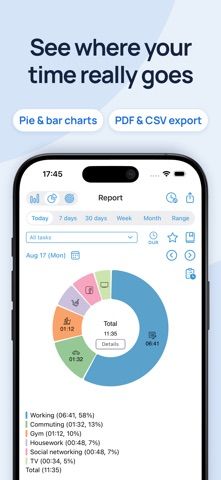
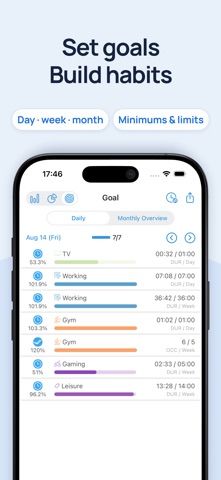
ATracker PRO is a manual time-tracking app for people who want to see where their day goes. Start or stop an activity with one tap, then review the day in a log or summarize time with bar and pie charts. The listing describes task tags, notes, goals, alarms, widgets, data export, and customizable activity colors and icons. The PRO app is listed as a US$4.99 download; an optional web subscription adds multi-device synchronization. It can support personal time reviews or project tracking, but records depend on starting and stopping timers consistently. Check export and sync details before making it the only copy of work records.
ATracker PRO Time Tracker
Track time across work, study, exercise, and personal projects with one-tap timers, tags, activity logs, goals, and charts. The iOS app is a paid download, with optional subscription sync.
By WonderApps ABApp Store rating 4.7 (720)Official store informationPublished 2026/11/03Checked 2026-11-03
Overview
A closer look at ATracker PRO Time Tracker.
A closer look
App screenshots
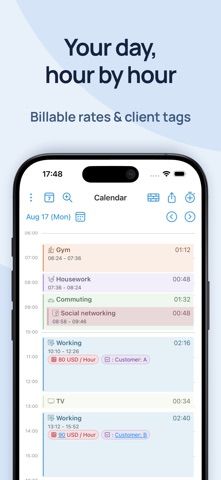
Choose with confidence
The useful details.
What it does
- Start and stop activity timers with one tap.
- Review time in daily logs, bar charts, and pie charts.
- Organize activities with tags, notes, goals, and alarms.
- Export records; optional subscription adds web and multi-device sync.
A good fit for
- People who want to track time spent on personal tasks or projects.
Worth knowing
- The PRO app is a paid download; confirm the current regional price.
- Multi-device and web synchronization require an optional subscription.
- Time reports are only as complete as the timers and entries you maintain.
Frequently asked questions
Answers based on the app’s official listing and reviewed information.
What is ATracker PRO Time Tracker used for?
Track time across work, study, exercise, and personal projects with one-tap timers, tags, activity logs, goals, and charts. The iOS app is a paid download, with optional subscription sync.
What can you do with ATracker PRO Time Tracker?
Start and stop activity timers with one tap. Review time in daily logs, bar charts, and pie charts. Organize activities with tags, notes, goals, and alarms. Export records; optional subscription adds web and multi-device sync.
Who is ATracker PRO Time Tracker designed for?
People who want to track time spent on personal tasks or projects.
What should you know before downloading ATracker PRO Time Tracker?
The PRO app is a paid download; confirm the current regional price. Multi-device and web synchronization require an optional subscription. Time reports are only as complete as the timers and entries you maintain.
Does ATracker PRO Time Tracker include paid features?
The US listing showed a US$4.99 paid download when checked; confirm the current price in your region. An optional monthly or yearly web subscription enables synchronization and web access; verify current plan prices and renewal terms.
Which platforms support ATracker PRO Time Tracker?
Greatooly's reviewed app information lists iOS.
Researched from official sources; this is not a hands-on review. Last checked 2026-11-03.
Keep exploring
More apps that might be a good fit.

HomeKeep Home Inventory
HomeKeep stores a private home inventory on iPhone, tracking item values and warranties with free CSV export and paid PDF reports.

Hold My Juice
Hold My Juice connects family email and calendars to surface school forms, activity changes, deadlines, and schedule conflicts.

Timen - Time Tracking
Timen tracks billable and non-billable work offline, then syncs hours to its web app for invoices, exports, and team reports.