
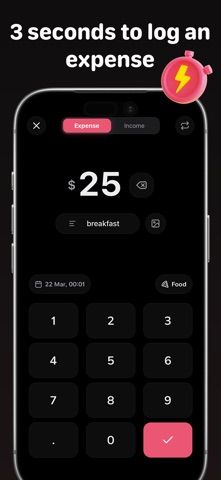
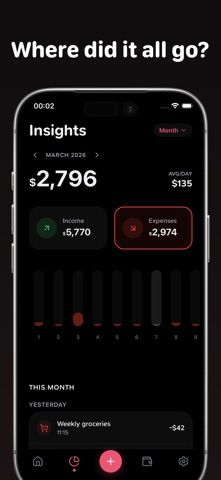
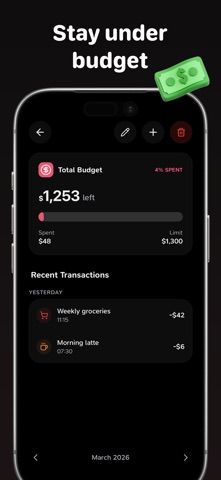
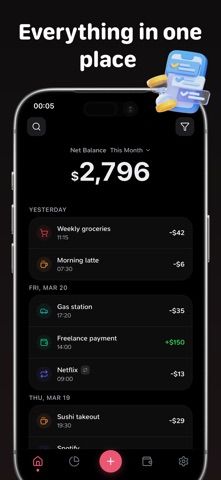
Qostly is a personal budget and expense tracker built around fast manual entry. Add an amount, choose a category, and optionally include a note or receipt photo; income can be recorded alongside spending. Set category limits on weekly, monthly, or yearly schedules, then review charts that compare income and expenses across categories and time periods. The listing also describes reminders for recurring bills and subscriptions, a home-screen budget widget, Face ID protection, and export to CSV or JSON. Users can sign in with Apple for backup and restore on another device, while the developer says the app does not collect or sell their data. The US App Store lists a free download, but it does not explain current paid features or trial terms. Reconcile entries and scheduled payments with bank statements before using budget totals for decisions.

Bills & Budget Tracker: Qostly
A budget and bill tracker for daily spending, recurring payments, income, and category limits.
Overview
A closer look at Bills & Budget Tracker: Qostly.
A closer look
App screenshots
Choose with confidence
The useful details.
What it does
- Record expenses, income, notes, and receipt photos
- Set weekly, monthly, or yearly category budgets
- Track bills and subscriptions with reminders
- Review spending charts and export transactions as CSV or JSON
A good fit for
- People who want quick manual expense entry and category limits
- Users who need a basic bill reminder and transaction export in one app
Worth knowing
- Budget totals depend on accurate user entries; the listing does not state current optional purchase terms.
Frequently asked questions
Answers based on the app’s official listing and reviewed information.
What is Bills & Budget Tracker: Qostly used for?
A budget and bill tracker for daily spending, recurring payments, income, and category limits.
What can you do with Bills & Budget Tracker: Qostly?
Record expenses, income, notes, and receipt photos Set weekly, monthly, or yearly category budgets Track bills and subscriptions with reminders Review spending charts and export transactions as CSV or JSON
Who is Bills & Budget Tracker: Qostly designed for?
People who want quick manual expense entry and category limits Users who need a basic bill reminder and transaction export in one app
What should you know before downloading Bills & Budget Tracker: Qostly?
Budget totals depend on accurate user entries; the listing does not state current optional purchase terms.
Does Bills & Budget Tracker: Qostly include paid features?
The US App Store lists a free download.
Which platforms support Bills & Budget Tracker: Qostly?
Greatooly's reviewed app information lists iOS.
Researched from official sources; this is not a hands-on review. Last checked 2026-11-04.
Keep exploring
More apps that might be a good fit.

VowFolio: Wedding Planner
VowFolio Planner organizes a couple’s guest list, seating chart, budget, checklist, vendors, wedding website, and guest photos.

LevelUp! Kids
LevelUp! Kids turns family chores into quests, letting children earn points for screen time or rewards that parents approve.

Wantd - Curated Wishlist
Wantd saves products from online shops into shareable wishlists, keeps gift reservations secret, and supports group gifts and a social feed.