
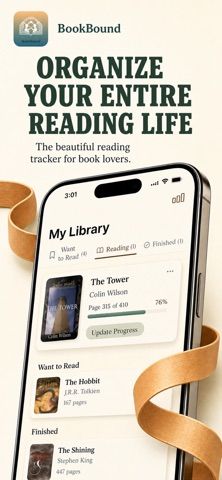
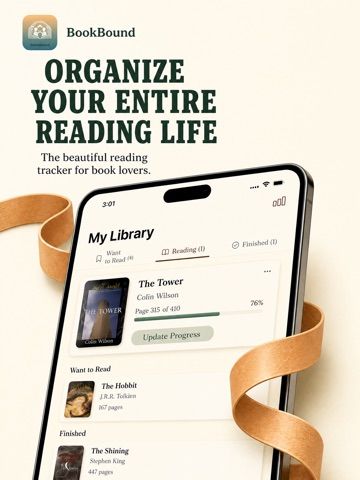
BookBound is a book tracker for readers who want a simple place for their wish list, current reads, and finished titles. Books move among three shelves—Want to Read, Reading, and Finished—while the app records start and finish dates and page-by-page progress. A yearly goal and stats dashboard show books completed and books in progress; star ratings and personal reviews form a private reading journal. BookBound searches the Google Books catalog, includes a taste quiz for genre preferences, and offers dark mode, VoiceOver support, and Dynamic Type. Recent version notes add optional account sign-in and cloud backup, while guest use remains available. The current US App Store lists the app as free with no in-app purchases, but requires iOS or iPadOS 26.0 or later.
BookBound: Reading Tracker
Organize your TBR, log pages, rate books, and review reading goals in BookBound.
Overview
A closer look at BookBound: Reading Tracker.
A closer look
App screenshots
Choose with confidence
The useful details.
What it does
- Organize titles into Want to Read, Reading, and Finished shelves.
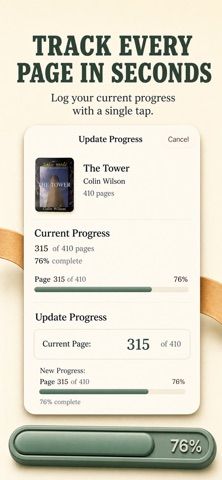
- Log page-by-page progress and automatically record book start and finish dates.
- Set a yearly reading goal and review counts for finished and in-progress books.
- Search Google Books for covers, descriptions, and page counts, then add books to a shelf.
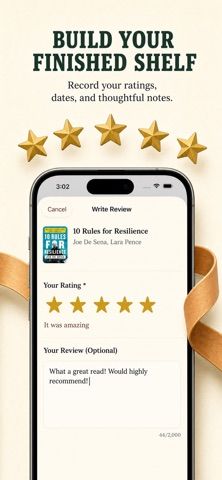
- Write star-rated reviews and use a genre taste quiz, dark mode, VoiceOver, and Dynamic Type.
A good fit for
- Readers who want a clean book log with page tracking, yearly goals, and personal reviews.
- People who want the option of cloud sync but prefer to try the app in guest mode first.
Worth knowing
- Requires iOS or iPadOS 26.0 or later, so older devices that cannot install this system version are not supported.
- Cloud backup and cross-device sync require an account; guest mode is available, but Apple's unverified privacy label lists email, name, user content, user ID, and usage data linked to identity when applicable.
- The app is free and the US App Store does not list in-app purchases; book discovery relies on the Google Books catalog and may not include every edition.
Frequently asked questions
Answers based on the app’s official listing and reviewed information.
Which book shelves does BookBound include?
The listing describes three shelves: Want to Read, Reading, and Finished. You can move a book between them as your reading changes.
Can I log page-by-page progress?
Yes. BookBound lets you enter your current page and displays a progress bar for the book.
Can I find books inside the app?
The app searches the Google Books catalog for titles, cover art, descriptions, and page counts that you can add to your shelves.
Do I need an account to use BookBound?
No. Recent version notes say you can continue as a guest. Creating an account or signing in with Apple enables cloud backup and cross-device sync.
Is BookBound free?
The current US App Store listing shows a free download and does not list in-app purchases.
Which iOS version does BookBound require?
Apple lists iOS 26.0 or later for iPhone and iPadOS 26.0 or later for iPad.
Researched from official sources; this is not a hands-on review. Last checked 2026-11-19.
Keep exploring
More apps that might be a good fit.

Reads. — EPUB & Book Reader
Read EPUB and PDF books with customizable typography, themes, highlights, and notes.
Bookus - track your reading
Track physical-book reading sessions, pages, streaks, goals, progress charts, weekly stats, NFC shortcuts, and a personal library.
Seekquel - Book Tracker
Track books, e-reader progress, reading goals, personalized recommendations, and book-club activity in one customizable app.