
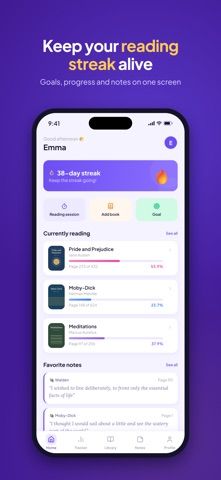
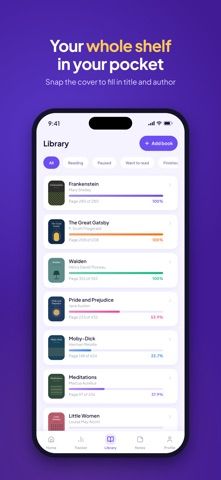
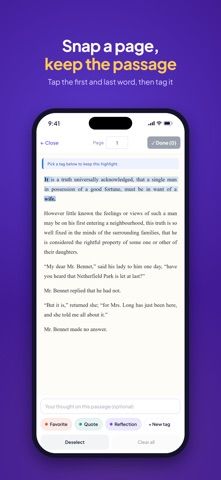
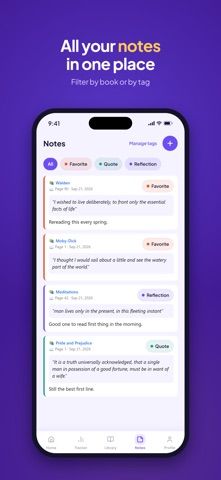
BookLens combines a book library with reading logs and notes. Users can scan a cover to add a title, sort books by reading status, and record pages or sessions for each book. A timer tracks reading time and optional page or minute goals, while weekly statistics summarize pages, hours, and pace. Readers can photograph a page to save a quote, add notes and tags, and turn selected notes into shareable cards. The listing says BookLens has no ads or tracking, and that page photos are read without being retained. The free version is available to start, while Pro adds unlimited notes, reminders, custom card backgrounds, and full period recaps through a monthly or yearly subscription.

BookLens: Reading Tracker
A book journal and reading tracker for logging pages and sessions, setting goals, saving quotes, and reviewing progress.
By Nguyen Manh CamReleased 2026/09/29No ratings yetOfficial store informationPublished 2026/11/04Checked 2026-11-04
Overview
A closer look at BookLens: Reading Tracker.
A closer look
App screenshots
Choose with confidence
The useful details.
What it does
- Add books by scanning covers and organize them by reading status.
- Log reading pages and timed sessions with optional goals and streaks.
- Save quotes from page photos, write notes, and organize them with tags.
- Review weekly stats and create shareable reading cards.
A good fit for
- Readers who want a book journal with page tracking, quotes, and reading-session statistics.
Worth knowing
- Unlimited notes, reminders, custom share-card backgrounds, and full recaps require Pro.
- Pro is offered monthly or yearly; current prices were not stated in the captured listing.
Frequently asked questions
Answers based on the app’s official listing and reviewed information.
What is BookLens: Reading Tracker used for?
A book journal and reading tracker for logging pages and sessions, setting goals, saving quotes, and reviewing progress.
What can you do with BookLens: Reading Tracker?
Add books by scanning covers and organize them by reading status. Log reading pages and timed sessions with optional goals and streaks. Save quotes from page photos, write notes, and organize them with tags. Review weekly stats and create shareable reading cards.
Who is BookLens: Reading Tracker designed for?
Readers who want a book journal with page tracking, quotes, and reading-session statistics.
What should you know before downloading BookLens: Reading Tracker?
Unlimited notes, reminders, custom share-card backgrounds, and full recaps require Pro. Pro is offered monthly or yearly; current prices were not stated in the captured listing.
Does BookLens: Reading Tracker include paid features?
BookLens Pro is offered as an auto-renewing monthly or yearly subscription; check the App Store for current pricing and terms.
Which platforms support BookLens: Reading Tracker?
Greatooly's reviewed app information lists iOS.
Researched from official sources; this is not a hands-on review. Last checked 2026-11-04.
Keep exploring
More apps that might be a good fit.

Reading Log XL — Book Tracker
Reading Log XL records reading time, pages, goals and streaks, organizes a three-shelf book list, and exports school-friendly reading reports.

MyBookShelf: Reading Log
MyBookShelf is a private reading catalog for scanning, organizing and tracking books, notes, ratings and reading progress.

Siftivo: What to Read Next
Siftivo suggests books from a reader’s taste and combines daily picks with reading shelves, reviews, reader follows, and a journal.