
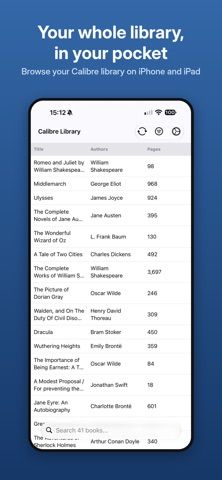
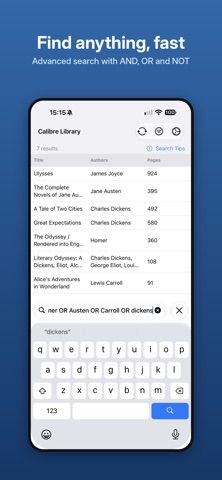
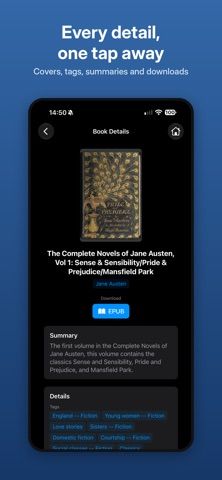
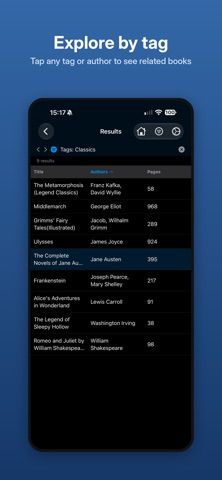
Calibre View brings an existing Calibre ebook collection to iPhone and iPad. It connects to libraries stored in Dropbox, Google Drive, OneDrive, WebDAV, iCloud, or the Files app, then lets readers search titles and metadata, sort by Calibre columns, and filter by authors, tags, series, or custom fields. Users can choose which columns appear, inspect book details, download books for offline use, and open or share files with another reading app. The app is free to download, with optional tip-jar purchases at $1.99, $4.99, and $9.99. It requires iOS 26.1 or later. The developer says it is independent and not affiliated with Calibre. Connecting a cloud library may involve the selected storage provider; the app can also browse metadata without downloading covers or books.

Calibre View
Browse, search, sort, and filter a Calibre ebook library on iPhone or iPad.
Overview
A closer look at Calibre View.
A closer look
App screenshots
Choose with confidence
The useful details.
What it does
- Connect a Calibre library from Dropbox, Google Drive, OneDrive, WebDAV, iCloud, or Files.
- Search, filter, and sort by standard or custom Calibre metadata fields.
- Choose visible columns and inspect book, author, series, and tag details.
- Download books to the device for offline browsing and open files in other reading apps.
A good fit for
- Readers who already maintain a Calibre library and want to browse it on iPhone or iPad.
- People who need advanced metadata search across large book collections.
Worth knowing
- Requires iOS 26.1 or later on iPhone or iPad.
- The app browses a Calibre library; it is not affiliated with or endorsed by Calibre or its developers.
- Optional tip-jar purchases are $1.99, $4.99, and $9.99; the App Store does not describe recurring billing, and these are presented as tips.
- Apple's unverified privacy label lists email, name, and user ID as potentially linked to the user.
Frequently asked questions
Answers based on the app’s official listing and reviewed information.
Which library sources can Calibre View connect to?
The listing names Dropbox, Google Drive, OneDrive, WebDAV, iCloud, and the Files app.
Can I search custom Calibre fields?
Yes. It supports searches and sorting by Calibre columns, including custom columns.
Can I browse my library offline?
Yes. Downloaded libraries can be browsed offline; covers and book downloads need a connection.
Is Calibre View made by the Calibre team?
No. The developer describes it as an independent app and says it is not affiliated with or endorsed by Calibre.
Is the app free?
The app is free to download. The US App Store lists optional tips of $1.99, $4.99, and $9.99.
What iOS version is required?
The US App Store requires iOS 26.1 or later on iPhone or iPad.
Researched from official sources; this is not a hands-on review. Last checked 2026-11-19.
Keep exploring
More apps that might be a good fit.

Reads. — EPUB & Book Reader
Read EPUB and PDF books with customizable typography, themes, highlights, and notes.

Bookus - track your reading
Track physical-book reading sessions, pages, streaks, goals, progress charts, weekly stats, NFC shortcuts, and a personal library.

Seekquel - Book Tracker
Track books, e-reader progress, reading goals, personalized recommendations, and book-club activity in one customizable app.