
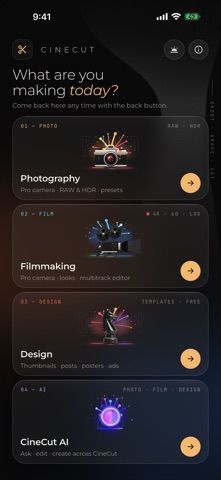
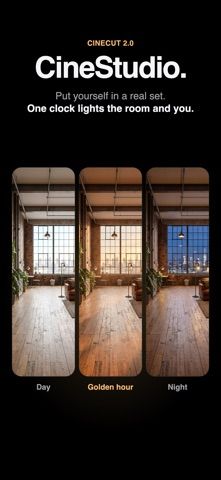
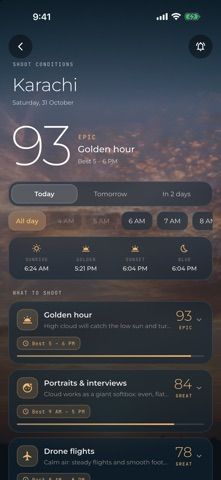
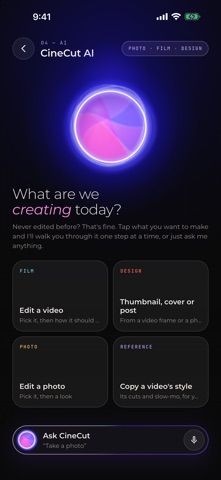
CineCut combines video editing, photo tools, camera controls, and design templates for iPhone and iPad. Users can apply calibrated colour looks, edit photos with masks and curves, create social thumbnails or posters, and record video in formats such as 4K and HDR where supported. Podcast Auto-Cut can sync cameras and microphones, switch to the active speaker, and trim pauses. The listing also describes AI-assisted editing and studio scenes, with Apple Intelligence features on iPhone 15 Pro and later. Free exports include a CineCut watermark and short ending; CineCut Pro removes those and unlocks additional tools through monthly or yearly subscriptions, with a trial on the yearly plan.

CreativityGraphic design appsPodcast recording appsShort-form video editing appsSocial media post design appsVideo editing apps
CineCut: Video Editor & LUTs
A video and photo editor with cinematic looks, camera tools, templates, AI editing features, and podcast auto-cut.
By Umair WadoodReleased 2026/10/01App Store rating 5.0 (3)Official store informationPublished 2026/11/04Checked 2026-11-04
Overview
A closer look at CineCut: Video Editor & LUTs.
A closer look
App screenshots
Choose with confidence
The useful details.
What it does
- Edit video with colour looks, cuts, titles, and supported HDR recording tools.
- Adjust photos with curves, masks, presets, and export controls.
- Create thumbnails and social graphics from templates.
- Use podcast auto-cut and selected AI editing tools on supported devices.
A good fit for
- Creators who want video, photo, camera, and social graphic tools in one iPhone or iPad app.
Worth knowing
- Free video exports include a watermark and short ending; removing them and unlocking advanced tools requires Pro.
- Some Apple Intelligence editing features require iPhone 15 Pro or later; Pro pricing varies by plan and region.
Frequently asked questions
Answers based on the app’s official listing and reviewed information.
What is CineCut: Video Editor & LUTs used for?
A video and photo editor with cinematic looks, camera tools, templates, AI editing features, and podcast auto-cut.
What can you do with CineCut: Video Editor & LUTs?
Edit video with colour looks, cuts, titles, and supported HDR recording tools. Adjust photos with curves, masks, presets, and export controls. Create thumbnails and social graphics from templates. Use podcast auto-cut and selected AI editing tools on supported devices.
Who is CineCut: Video Editor & LUTs designed for?
Creators who want video, photo, camera, and social graphic tools in one iPhone or iPad app.
What should you know before downloading CineCut: Video Editor & LUTs?
Free video exports include a watermark and short ending; removing them and unlocking advanced tools requires Pro. Some Apple Intelligence editing features require iPhone 15 Pro or later; Pro pricing varies by plan and region.
Does CineCut: Video Editor & LUTs include paid features?
CineCut Pro is offered monthly or yearly, with a free trial on the yearly plan. Check the App Store for current regional pricing and renewal terms.
Which platforms support CineCut: Video Editor & LUTs?
Greatooly's reviewed app information lists iOS.
Researched from official sources; this is not a hands-on review. Last checked 2026-11-04.
Keep exploring
More apps that might be a good fit.

Verde: AI Backyard Design Plan
Verde turns photos of gardens, balconies, and rooms into AI redesigns that account for existing structures and practical dimensions.

RoomMakeover: AI Room Design
RoomMakeover previews AI interior-design ideas from room photos, with style controls, credit packs, and Pro plans.

Zu3D
Zu3D combines stop-motion capture, drawing, video editing, green-screen effects, sound, and export tools for animated films.