
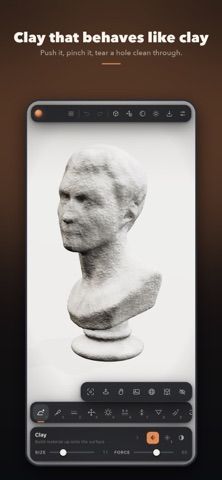
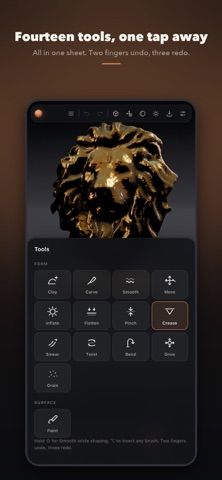
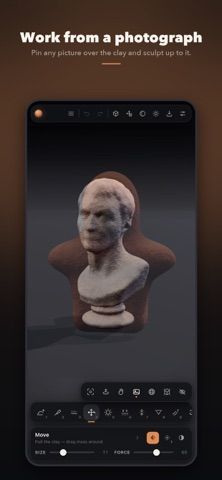
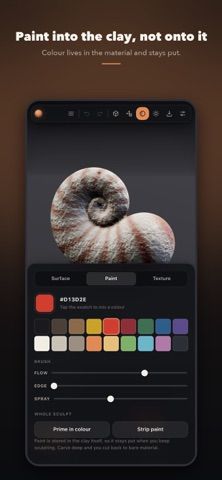
Clay Shaper is a touch-first 3D sculpting app built around shaping a digital volume rather than editing a fixed mesh. Users can build, carve, smooth, pinch, bend, twist, and grow forms with a set of sculpting brushes, then paint into the material and continue editing. Mirror and radial symmetry support repeated patterns, while AR Quick Look can place a sculpture at a chosen real-world size. Projects can be saved in the app's own .clay format or exported as GLB, STL, OBJ, or USDZ for other tools and 3D printing. The developer says all sculpting tools and paint modes are free, with limits on saves, resolution, featured pieces, and watermarked renders. A one-time Pro purchase unlocks additional resolution, import/export formats, hollowing, unlimited saves, and unwatermarked renders. Work stays on-device, with no account, ads, or tracking according to the listing.

Clay Shaper: 3D Sculpting
Clay Shaper is a 3D sculpting app that models objects as volumes of digital clay. It offers sculpting brushes, paint, symmetry, AR previews, and exports for printers and 3D tools. The free tier includes core sculpting with limits; a one-time Pro purchase unlocks more resolution, imports, exports, and saves, with no account or ads.
Overview
A closer look at Clay Shaper: 3D Sculpting.
A closer look
App screenshots
Choose with confidence
The useful details.
What it does
- Volume-based sculpting brushes and symmetry tools
- Paint directly into the digital clay material
- AR preview and export to GLB, STL, OBJ, or USDZ
- One-time Pro unlock for higher resolution, imports, and unlimited saves
A good fit for
- Artists who want to sculpt 3D forms on a touch screen
- Makers preparing small models for 3D printing or AR
Worth knowing
- The free tier limits resolution, saved sculptures, and exports; Pro is required for several production features.
Frequently asked questions
Answers based on the app’s official listing and reviewed information.
What is Clay Shaper: 3D Sculpting used for?
Clay Shaper is a 3D sculpting app that models objects as volumes of digital clay. It offers sculpting brushes, paint, symmetry, AR previews, and exports for printers and 3D tools. The free tier includes core sculpting with limits; a one-time Pro purchase unlocks more resolution, imports, exports, and saves, with no account or ads.
What can you do with Clay Shaper: 3D Sculpting?
Volume-based sculpting brushes and symmetry tools Paint directly into the digital clay material AR preview and export to GLB, STL, OBJ, or USDZ One-time Pro unlock for higher resolution, imports, and unlimited saves
Who is Clay Shaper: 3D Sculpting designed for?
Artists who want to sculpt 3D forms on a touch screen Makers preparing small models for 3D printing or AR
What should you know before downloading Clay Shaper: 3D Sculpting?
The free tier limits resolution, saved sculptures, and exports; Pro is required for several production features.
Does Clay Shaper: 3D Sculpting include paid features?
Core sculpting, tools, materials, and lights are free with limits on resolution, saves, featured pieces, and render watermarks. Clay Shaper Pro is a one-time purchase; check the app for the current price.
Which platforms support Clay Shaper: 3D Sculpting?
Greatooly's reviewed app information lists iOS.
Researched from official sources; this is not a hands-on review. Last checked 2026-11-04.
Keep exploring
More apps that might be a good fit.

Verde: AI Backyard Design Plan
Verde turns photos of gardens, balconies, and rooms into AI redesigns that account for existing structures and practical dimensions.

RoomMakeover: AI Room Design
RoomMakeover previews AI interior-design ideas from room photos, with style controls, credit packs, and Pro plans.

Zu3D
Zu3D combines stop-motion capture, drawing, video editing, green-screen effects, sound, and export tools for animated films.