
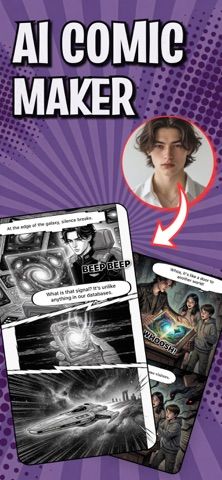
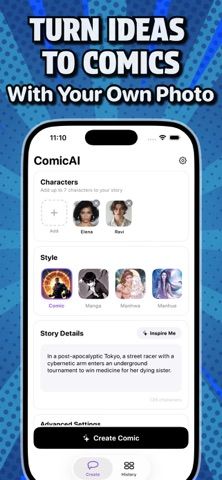
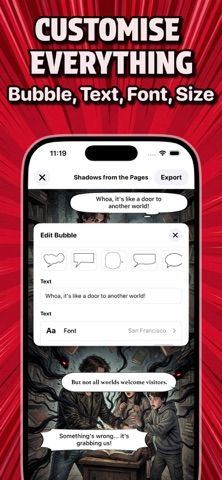
Comica is an AI comic-making app for turning a story concept into sequential illustrated pages. The App Store says users can add characters using photos, choose genres and visual styles, and ask the AI to structure a synopsis into a graphic story. Speech and thought bubbles can be edited, including their text and font size. The listing describes manga, romance, superhero, science-fiction, fantasy, and other styles, but does not specify generation limits or export formats. Comica is free to download and offers weekly and yearly subscriptions with a trial; its current US in-app purchase list shows two “Unlimited Access” prices, $9.99 and $49.99, without matching billing periods. The app requires iOS 17 or later. Apple’s unverified privacy label lists a user ID not linked to identity for analytics.

Comica: AI Comic Maker Story
Turn story ideas and character photos into AI-generated comic pages, then edit dialogue and visual styles in Comica.
Overview
A closer look at Comica: AI Comic Maker Story.
A closer look
App screenshots

Choose with confidence
The useful details.
What it does
- Build comic stories from a synopsis with AI-generated sequential art.
- Add characters using photos and describe character details for the story.
- Edit speech and thought bubbles, including the wording and font size.
- Choose from manga, romance, superhero, science-fiction, fantasy, and other styles.
- Create original stories or fan-fiction concepts in a comic format.
A good fit for
- Writers who want to turn a short premise into a visual comic draft.
- Hobby creators who want editable dialogue bubbles and several comic styles.
Worth knowing
- Requires iOS 17 or later; the current listing is designed for iPhone.
- The listing does not state generation quotas, image export formats, or the exact trial length.
- The store describes weekly and yearly subscriptions, while its current purchase list does not map the $9.99 and $49.99 products to billing periods.
Frequently asked questions
Answers based on the app’s official listing and reviewed information.
What does Comica do?
It uses AI to help structure story ideas into comic pages, with character and dialogue editing tools described in the App Store listing.
Can I add my own characters?
The listing says you can add characters with photos and describe them for use in a comic. Check the app’s current permissions and privacy policy before uploading personal images.
Can I edit the comic dialogue?
Yes. The store page says speech and thought bubbles, their text, and font size can be adjusted.
What comic styles are available?
The listing names manga, romance and manhwa, superhero, science fiction, fantasy, and several other genres and styles.
What are Comica’s subscription prices?
The US purchase list shows two “Unlimited Access” prices, $9.99 and $49.99, but does not label their billing periods. The page separately describes weekly and yearly subscriptions with a free trial.
What privacy details are listed for Comica?
Apple’s unverified privacy label lists a user ID that may be collected but not linked to identity for analytics. Review the current App Store label and developer policy for details.
Researched from official sources; this is not a hands-on review. Last checked 2026-11-19.
Keep exploring
More apps that might be a good fit.

Uniform MPJE Exam Prep
Prepare for the 2026 Uniform MPJE with pharmacy-law practice questions, timed mock exams, and federal-law review sets.

Plant Identifier Care
Identify plants from photos, set watering reminders, check light levels, and browse care guides in an ad-supported iPhone app.

KidSpark Code Academy
Learn coding through short lessons, streaks, and weekly challenges across seven beginner-friendly programming languages.