
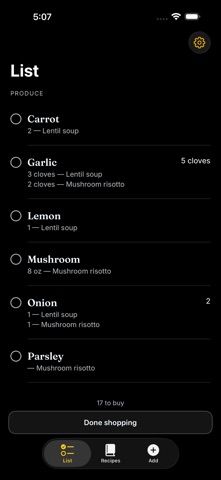
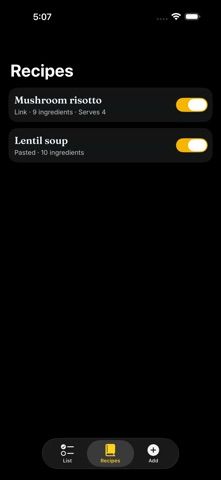
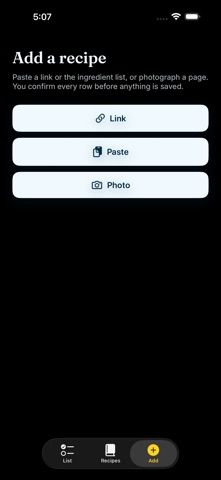
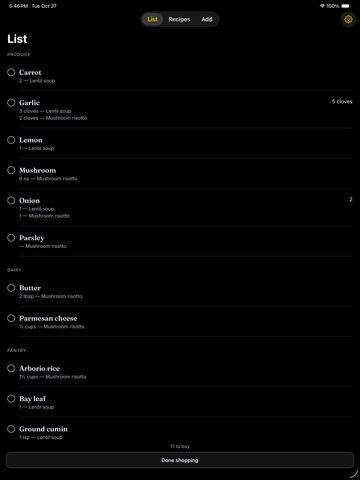
Convert Recipe to Grocery List turns ingredients from selected recipes into a consolidated shopping list. The listing describes importing a recipe link, pasting an ingredient list, or photographing a cookbook page. Before saving, users can review and correct the parsed ingredient names, amounts, units, and notes. Multiple recipes can be combined into a list grouped by aisle, and matching units can be added together; the app says it does not convert or guess quantities. Unrecognized lines remain visible for the user to resolve. The developer says recipes and lists stay on the iPhone, with no account, server, ads, or analytics, and that the app works without Apple Intelligence. It is a focused grocery-list utility rather than a recipe discovery service. The listing describes it as free and had no ratings when checked.

Convert Recipe to Grocery List
Turn recipe links, pasted ingredients, or cookbook photos into one editable grocery list grouped by aisle.
Overview
A closer look at Convert Recipe to Grocery List.
A closer look
App screenshots
Choose with confidence
The useful details.
What it does
- Import recipe ingredients from a web link, pasted text, or a cookbook photo.
- Review parsed lines before saving and edit quantities, units, and names.
- Combine ingredients from selected recipes into one list grouped by aisle.
- Check off items and add additional groceries manually.
A good fit for
- People who already choose recipes elsewhere and want to turn them into a checked grocery list.
Worth knowing
- Ingredient quantities are combined only when units match; the app says it does not convert units.
- Users should review every parsed line and resolve items the app cannot match.
- The listing had no ratings when checked; confirm support for your iPhone and current store terms.
Frequently asked questions
Answers based on the app’s official listing and reviewed information.
What is Convert Recipe to Grocery List used for?
Turn recipe links, pasted ingredients, or cookbook photos into one editable grocery list grouped by aisle.
What can you do with Convert Recipe to Grocery List?
Import recipe ingredients from a web link, pasted text, or a cookbook photo. Review parsed lines before saving and edit quantities, units, and names. Combine ingredients from selected recipes into one list grouped by aisle. Check off items and add additional groceries manually.
Who is Convert Recipe to Grocery List designed for?
People who already choose recipes elsewhere and want to turn them into a checked grocery list.
What should you know before downloading Convert Recipe to Grocery List?
Ingredient quantities are combined only when units match; the app says it does not convert units. Users should review every parsed line and resolve items the app cannot match. The listing had no ratings when checked; confirm support for your iPhone and current store terms.
Does Convert Recipe to Grocery List include paid features?
The reviewed listing reports no in-app purchases.
Which platforms support Convert Recipe to Grocery List?
Greatooly's reviewed app information lists iOS.
Researched from official sources; this is not a hands-on review. Last checked 2026-11-04.
Keep exploring
More apps that might be a good fit.

GroceryGret: Grocery List
Share a grocery list, scan recipe ingredients, and compare nearby stores using community receipt prices.
Clean Plate Meal Prep
A local meal-prep ordering app for checking menus, finding nearby locations, ordering ahead, and collecting loyalty rewards.

The Bento Co.
A meal-ordering app for browsing menu items, checking nutrition and allergen details, and managing meal subscriptions.