
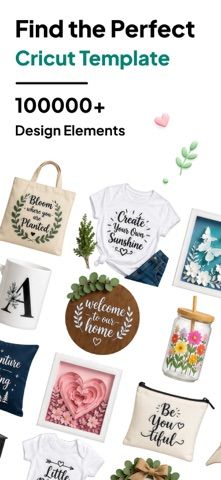
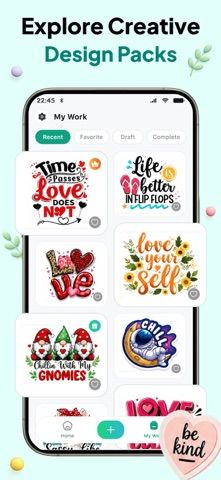
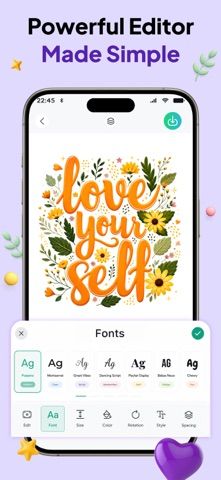
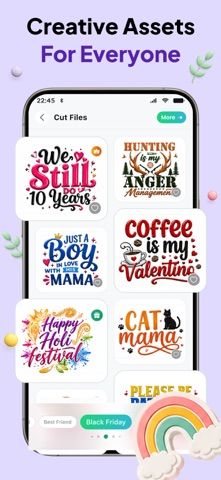
Craft Space helps makers prepare designs for vinyl cutters, cutting machines, and sublimation projects. Choose from templates for shirts, stickers, monograms, signs, and gifts, or begin with a blank canvas. The editor supports text, shapes, colors, resizing, rotation, undo, and redo. Designs can be previewed on product mockups and exported as SVG, transparent PNG, or JPG. The developer lists more than 10,000 fonts and monogram styles. Drafts stay on the device and no sign-in is required. The free download has a Pro plan that unlocks the full template and font library, unlimited sharing, and an ad-free experience through weekly or yearly subscriptions; the weekly plan includes a three-day trial. The current US prices are not specified in the description, so check them before subscribing. Verify that exports work with a particular cutter or design program before preparing a large batch of products.
Craft Space: SVG Design Maker
An SVG design maker for cut files, monograms, stickers, sublimation art, and print-ready craft projects.
Overview
A closer look at Craft Space: SVG Design Maker.
A closer look
App screenshots
Choose with confidence
The useful details.
What it does
- Browse templates for cut files, stickers, monograms, apparel, and sublimation projects.
- Edit text, shapes, color, size, and layout on a blank or template canvas.
- Preview designs on product mockups and export SVG, transparent PNG, or JPG.
- Save drafts locally without creating an account.
A good fit for
- Crafters and small shops preparing designs for cutters, vinyl, and sublimation printing.
Worth knowing
- Pro is required for the full library, unlimited sharing, and ad-free use. Weekly and yearly subscriptions are offered; the weekly plan has a three-day trial, but current prices should be checked in the App Store. Confirm export compatibility with the target machine.
Frequently asked questions
Answers based on the app’s official listing and reviewed information.
What is Craft Space: SVG Design Maker used for?
An SVG design maker for cut files, monograms, stickers, sublimation art, and print-ready craft projects.
What can you do with Craft Space: SVG Design Maker?
Browse templates for cut files, stickers, monograms, apparel, and sublimation projects. Edit text, shapes, color, size, and layout on a blank or template canvas. Preview designs on product mockups and export SVG, transparent PNG, or JPG. Save drafts locally without creating an account.
Who is Craft Space: SVG Design Maker designed for?
Crafters and small shops preparing designs for cutters, vinyl, and sublimation printing.
What should you know before downloading Craft Space: SVG Design Maker?
Pro is required for the full library, unlimited sharing, and ad-free use. Weekly and yearly subscriptions are offered; the weekly plan has a three-day trial, but current prices should be checked in the App Store. Confirm export compatibility with the target machine.
Does Craft Space: SVG Design Maker include paid features?
Pro offers weekly and yearly plans; the weekly plan includes a three-day trial. Confirm the current US price and renewal terms before purchase.
Which platforms support Craft Space: SVG Design Maker?
Greatooly's reviewed app information lists iOS.
Researched from official sources; this is not a hands-on review. Last checked 2026-11-04.
Keep exploring
More apps that might be a good fit.

Verde: AI Backyard Design Plan
Verde turns photos of gardens, balconies, and rooms into AI redesigns that account for existing structures and practical dimensions.

RoomMakeover: AI Room Design
RoomMakeover previews AI interior-design ideas from room photos, with style controls, credit packs, and Pro plans.

Zu3D
Zu3D combines stop-motion capture, drawing, video editing, green-screen effects, sound, and export tools for animated films.