
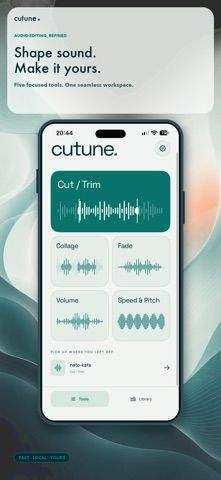
Cutune is an iPhone audio editor for cleaning up a recording before sharing or saving it. Users can trim a file on a waveform, join selected sections from one recording, remove unwanted parts, and soften joins with a crossfade. Separate fade-in and fade-out controls, volume adjustments, and a clipping warning help refine the result. Playback speed can be changed independently from pitch, which is useful for slowing a rehearsal or adjusting spoken audio. Finished edits can be exported as WAV or MP3 at several bitrates and saved to Files or shared from the app. The editing tools are free to use, with ads and an optional one-time purchase to remove them permanently. Cutune focuses on single-file editing and does not present itself as a multitrack production suite.

Cutune: Audio Editor & Trimmer
An audio editor for trimming recordings, joining sections, adjusting fades and levels, changing speed or pitch, and exporting WAV or MP3.
Overview
A closer look at Cutune: Audio Editor & Trimmer.
A closer look
App screenshots



Choose with confidence
The useful details.
What it does
- Trim a recording and select sections on a waveform.
- Join or remove sections, add crossfades, and set fade-in or fade-out.
- Adjust volume and change playback speed independently from pitch.
- Export edited audio as WAV or MP3 and save or share the result.
A good fit for
- People who need quick edits to a voice memo, rehearsal, or other single audio file.
Worth knowing
- The free editor includes ads; an optional one-time purchase removes them, and the app is aimed at single-file edits rather than full multitrack production.
Frequently asked questions
Answers based on the app’s official listing and reviewed information.
What is Cutune: Audio Editor & Trimmer used for?
An audio editor for trimming recordings, joining sections, adjusting fades and levels, changing speed or pitch, and exporting WAV or MP3.
What can you do with Cutune: Audio Editor & Trimmer?
Trim a recording and select sections on a waveform. Join or remove sections, add crossfades, and set fade-in or fade-out. Adjust volume and change playback speed independently from pitch. Export edited audio as WAV or MP3 and save or share the result.
Who is Cutune: Audio Editor & Trimmer designed for?
People who need quick edits to a voice memo, rehearsal, or other single audio file.
What should you know before downloading Cutune: Audio Editor & Trimmer?
The free editor includes ads; an optional one-time purchase removes them, and the app is aimed at single-file edits rather than full multitrack production.
Does Cutune: Audio Editor & Trimmer include paid features?
The App Store describes a one-time purchase that removes ads permanently; the current US price was not clear in the public listing.
Which platforms support Cutune: Audio Editor & Trimmer?
Greatooly's reviewed app information lists iOS.
Researched from official sources; this is not a hands-on review. Last checked 2026-11-04.
Keep exploring
More apps that might be a good fit.

VocaBurst: Language Learning
VocaBurst teaches vocabulary through typing, spoken recall, quizzes and spaced repetition in a language-learning arcade game.

Songmo: AI Song & Music Maker
Songmo turns a text prompt or lyrics into two AI-produced song takes with vocals, stereo mixing and shareable lyric videos.

Friday: Movie & TV Recs
Friday builds movie and TV recommendations from the titles you rate, with taste predictions and streaming availability.