
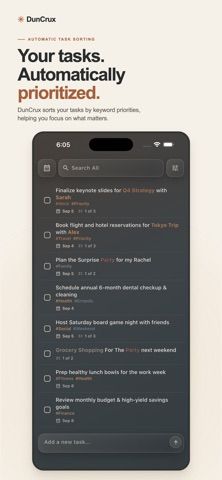
DunCrux: Smart Task Manager organizes work using keywords whose priority can change as the user adjusts tasks. A task can include due dates, snoozes, nested subtasks, @keywords, and #tags. Users can search and filter tasks, save views, and review upcoming or completed work. Insights summarize completed tasks, open workload, keyword priorities, and activity patterns. Core task management works without an account, and the workspace remains available locally when offline. Cloud sync is optional and requires sign-in. The free version allows unlimited tasks but limits priority tracking to ten keywords. DunCrux Pro unlocks saved views, while DunCrux Pro+Sync adds multi-device cloud sync through a subscription. The listing also refers to Pro as purchasable or subscription-based but does not state the purchase price, subscription frequency, or exact plan structure. Users should review the in-app plan options before upgrading.

DunCrux: Smart Task Manager
DunCrux ranks tasks using adaptive keyword priorities and offers nested tasks, saved views, insights, and optional cloud sync.
Overview
A closer look at DunCrux: Smart Task Manager.
A closer look
App screenshots
Choose with confidence
The useful details.
What it does
- Create tasks with due dates, snoozes, nested subtasks, @keywords, and #tags.
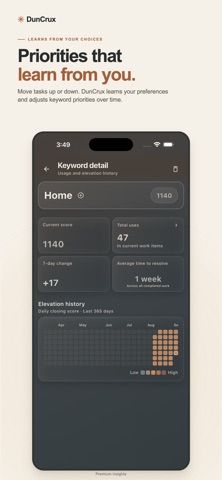
- Let keyword priority adjust as task order is changed over time.
- Search and filter work, save custom views, and review upcoming or completed tasks.
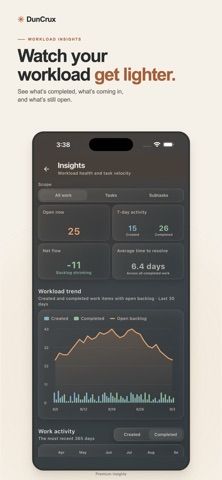
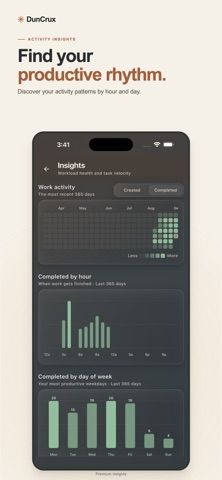
- View workload and activity insights for tasks and keyword priorities.
- Use core features offline or sign in for optional multi-device cloud sync.
A good fit for
- People who manage changing priorities and want tasks organized around keywords.
- Users who want a local-first task manager with optional multi-device sync.
Worth knowing
- The free version limits priority tracking to ten keywords; saved views and cloud sync require paid plans.
- The listing does not state plan prices, Pro billing frequency, or exact purchase terms.
Frequently asked questions
Answers based on the app’s official listing and reviewed information.
What is DunCrux: Smart Task Manager used for?
DunCrux ranks tasks using adaptive keyword priorities and offers nested tasks, saved views, insights, and optional cloud sync.
What can you do with DunCrux: Smart Task Manager?
Create tasks with due dates, snoozes, nested subtasks, @keywords, and #tags. Let keyword priority adjust as task order is changed over time. Search and filter work, save custom views, and review upcoming or completed tasks. View workload and activity insights for tasks and keyword priorities.
Who is DunCrux: Smart Task Manager designed for?
People who manage changing priorities and want tasks organized around keywords. Users who want a local-first task manager with optional multi-device sync.
What should you know before downloading DunCrux: Smart Task Manager?
The free version limits priority tracking to ten keywords; saved views and cloud sync require paid plans. The listing does not state plan prices, Pro billing frequency, or exact purchase terms.
What does DunCrux: Smart Task Manager cost?
Free to download. The free version includes unlimited tasks and local task management, with priority tracking limited to ten keywords. DunCrux Pro unlocks saved views, and Pro+Sync adds cloud sync across devices. The listing mentions purchase or subscription options but does not state current prices or exact terms.
Which platforms support DunCrux: Smart Task Manager?
Greatooly's reviewed app information lists iOS.
Researched from official sources; this is not a hands-on review. Last checked 2026-11-10.
Keep exploring
More apps that might be a good fit.

HomeKeep Home Inventory
HomeKeep stores a private home inventory on iPhone, tracking item values and warranties with free CSV export and paid PDF reports.

Hold My Juice
Hold My Juice connects family email and calendars to surface school forms, activity changes, deadlines, and schedule conflicts.

Timen - Time Tracking
Timen tracks billable and non-billable work offline, then syncs hours to its web app for invoices, exports, and team reports.