
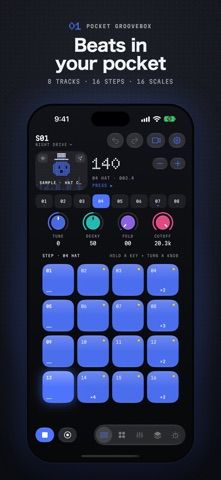
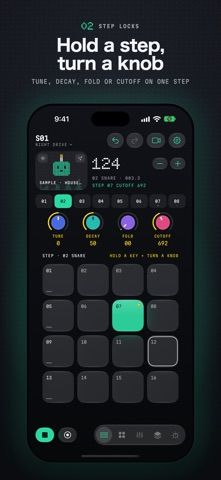
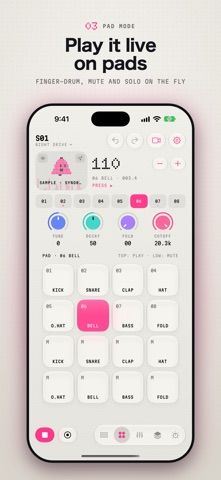
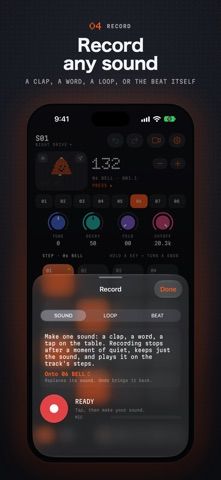
DuoBeat is a compact music-making app built around an eight-track drum machine, sampler, and step sequencer. Users can tap in patterns, adjust track controls, build longer arrangements, record or resample audio, and export finished beats in common audio formats. The app includes sound packs, a mixer, MIDI-related tools in Pro, and video clips for sharing performances. It supports iPhone and iPad, with special layouts for iPhone Duo. The developer says the free version includes small ads in the project list and while rendering a clip; DuoBeat Pro is a one-time purchase that removes ads and adds stem and MIDI export, controller input, and other options. The listing does not state the Pro price. Music projects can sync through iCloud, and collaborators can share files or links.

DuoBeat Music Maker
An eight-track mobile groovebox with drum sequencing, sampling, sound design, and beat export.
Overview
A closer look at DuoBeat Music Maker.
A closer look
App screenshots
Choose with confidence
The useful details.
What it does
- Build beats with eight tracks, step sequencing, sound packs, and per-step controls.
- Record or resample audio and arrange patterns into longer projects.
- Export audio formats and create vertical video clips for social platforms.
- Use Pro for stem and MIDI export, controller input, and an ad-free workspace.
A good fit for
- Beatmakers who want a portable sequencer and sampler for sketching and sharing ideas.
Worth knowing
- The free version shows ads in the project list and during clip rendering.
- Stem and MIDI export and other advanced options require DuoBeat Pro; its price is not stated in the listing.
- iCloud sync requires the user's Apple account and may need conflict resolution after offline edits.
Frequently asked questions
Answers based on the app’s official listing and reviewed information.
What is DuoBeat Music Maker used for?
An eight-track mobile groovebox with drum sequencing, sampling, sound design, and beat export.
What can you do with DuoBeat Music Maker?
Build beats with eight tracks, step sequencing, sound packs, and per-step controls. Record or resample audio and arrange patterns into longer projects. Export audio formats and create vertical video clips for social platforms. Use Pro for stem and MIDI export, controller input, and an ad-free workspace.
Who is DuoBeat Music Maker designed for?
Beatmakers who want a portable sequencer and sampler for sketching and sharing ideas.
What should you know before downloading DuoBeat Music Maker?
The free version shows ads in the project list and during clip rendering. Stem and MIDI export and other advanced options require DuoBeat Pro; its price is not stated in the listing. iCloud sync requires the user's Apple account and may need conflict resolution after offline edits.
Does DuoBeat Music Maker include paid features?
DuoBeat Pro is described as a one-time purchase for removing ads and unlocking extra export and MIDI features. Check its current price in the app.
Which platforms support DuoBeat Music Maker?
Greatooly's reviewed app information lists iOS.
Researched from official sources; this is not a hands-on review. Last checked 2026-11-04.
Keep exploring
More apps that might be a good fit.

VocaBurst: Language Learning
VocaBurst teaches vocabulary through typing, spoken recall, quizzes and spaced repetition in a language-learning arcade game.

Songmo: AI Song & Music Maker
Songmo turns a text prompt or lyrics into two AI-produced song takes with vocals, stereo mixing and shareable lyric videos.

Friday: Movie & TV Recs
Friday builds movie and TV recommendations from the titles you rate, with taste predictions and streaming availability.