
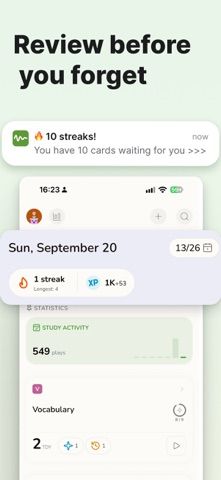
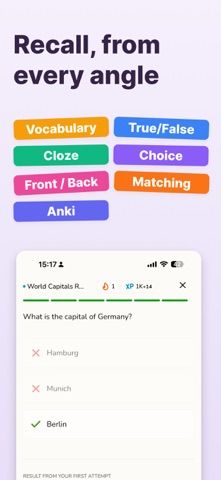
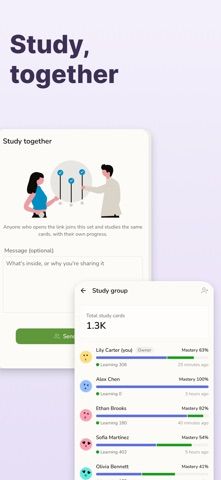
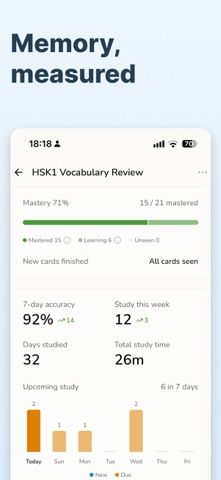
Ebbin is a flashcard and study app that tries to make spaced repetition easier to start. Learners can write notes in a simple editor, turn material into cards with AI assistance, or import existing Anki decks. Card formats include front-and-back, vocabulary, multiple choice, true-or-false, matching, and fill-in-the-blank. A review scheduler adapts repetition over time, while streaks, activity charts, accuracy, and upcoming reviews help make study progress visible. The app syncs notes and study history across iPhone, iPad, and web, and its community tools let users share notes or study with a group. Ebbin is listed as free with no features behind a paywall. Apple reports that contact information, user content, identifiers, and usage data may be linked to the user or used for tracking, so review privacy settings before sharing study materials.

Ebbin: Flashcards & Study
A cross-device flashcard and spaced-repetition app with multiple recall formats, Anki import, AI-assisted card creation, and study groups.
Overview
A closer look at Ebbin: Flashcards & Study.
A closer look
App screenshots
Choose with confidence
The useful details.
What it does
- Create several card types from notes or use AI-assisted study-card creation.
- Import Anki decks and review with an adaptive spaced-repetition schedule.
- Track streaks, study activity, accuracy, and upcoming reviews.
- Sync across iPhone, iPad, and web, and share notes or join study groups.
A good fit for
- Students who want to create and review flashcards across devices without configuring a complex system.
Worth knowing
- Cloud sync and community sharing require an account; Apple reports that some user data may be linked or used for tracking, and AI-generated cards should be reviewed.
Frequently asked questions
Answers based on the app’s official listing and reviewed information.
What is Ebbin: Flashcards & Study used for?
A cross-device flashcard and spaced-repetition app with multiple recall formats, Anki import, AI-assisted card creation, and study groups.
What can you do with Ebbin: Flashcards & Study?
Create several card types from notes or use AI-assisted study-card creation. Import Anki decks and review with an adaptive spaced-repetition schedule. Track streaks, study activity, accuracy, and upcoming reviews. Sync across iPhone, iPad, and web, and share notes or join study groups.
Who is Ebbin: Flashcards & Study designed for?
Students who want to create and review flashcards across devices without configuring a complex system.
What should you know before downloading Ebbin: Flashcards & Study?
Cloud sync and community sharing require an account; Apple reports that some user data may be linked or used for tracking, and AI-generated cards should be reviewed.
Does Ebbin: Flashcards & Study include paid features?
The reviewed listing reports no in-app purchases.
Which platforms support Ebbin: Flashcards & Study?
Greatooly's reviewed app information lists iOS.
Researched from official sources; this is not a hands-on review. Last checked 2026-11-04.
Keep exploring
More apps that might be a good fit.

Garden Planner: Landscape AI
Garden Planner: Landscape AI redesigns a yard or patio photo in 24 styles, with before-and-after comparison and private local designs.

Homefolio: Home Inventory
Homefolio records household belongings, values, receipts, serial numbers, and warranties, then exports a claim-ready inventory report.

Reading Log: Nightly Minutes
Reading Log: Nightly Minutes tracks children’s reading minutes or pages, streaks, and weekly summaries for school logs.