
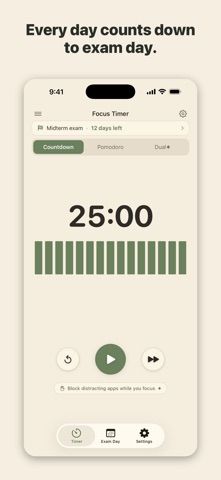
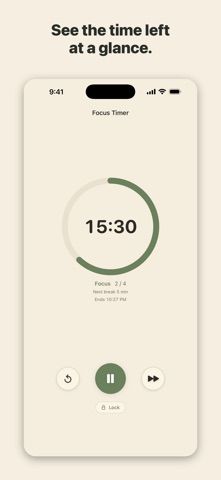
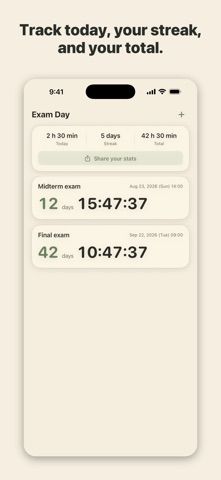
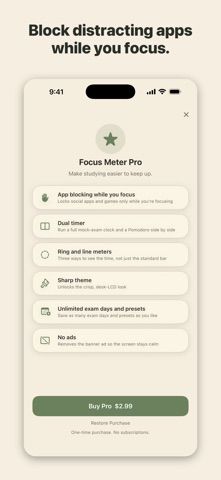
Focus Meter: Study Timer is a desk-friendly timer for study blocks, reading, work, or timed practice. It offers countdown and Pomodoro modes, plus a dual mode that can run a Pomodoro cycle inside a longer session. The display can use bars, a line, or a ring, while an exam countdown keeps the remaining days visible. Home Screen and Lock Screen widgets, a Live Activity, landscape desk mode, and saved session totals are also described. Pro is a one-time purchase that removes ads and unlocks dual timing, additional displays and a theme, app blocking during a focus session, and unlimited exam dates and presets. The US listing does not include a purchase price. App blocking is limited to active sessions and has an emergency-unlock option; phone calls and emergency features are not blocked.

Focus Meter: Study Timer
A study timer with countdown, Pomodoro, dual sessions, exam dates, widgets, and optional one-time Pro unlock.
Overview
A closer look at Focus Meter: Study Timer.
A closer look
App screenshots
Choose with confidence
The useful details.
What it does
- Use countdown, Pomodoro, or dual timer modes
- View time with bar, line, or ring displays and track days until an exam
- Keep a timer visible with widgets and a Live Activity
- Temporarily block selected distracting apps during focus sessions with Pro
A good fit for
- Students preparing for exams and people who work in timed focus blocks
- Users who want an iPhone timer that can stay visible on a desk
Worth knowing
- Several timer displays, dual mode, app blocking, unlimited exam dates, and ad removal require a one-time Pro purchase; the US listing does not state the price.
Frequently asked questions
Answers based on the app’s official listing and reviewed information.
What is Focus Meter: Study Timer used for?
A study timer with countdown, Pomodoro, dual sessions, exam dates, widgets, and optional one-time Pro unlock.
What can you do with Focus Meter: Study Timer?
Use countdown, Pomodoro, or dual timer modes View time with bar, line, or ring displays and track days until an exam Keep a timer visible with widgets and a Live Activity Temporarily block selected distracting apps during focus sessions with Pro
Who is Focus Meter: Study Timer designed for?
Students preparing for exams and people who work in timed focus blocks Users who want an iPhone timer that can stay visible on a desk
What should you know before downloading Focus Meter: Study Timer?
Several timer displays, dual mode, app blocking, unlimited exam dates, and ad removal require a one-time Pro purchase; the US listing does not state the price.
Does Focus Meter: Study Timer include paid features?
The app is free to download with core timer and tracking features. Focus Meter Pro is a one-time purchase that removes ads and unlocks additional timer, display, app-blocking, exam-date, and preset features; price is shown in the app.
Which platforms support Focus Meter: Study Timer?
Greatooly's reviewed app information lists iOS.
Researched from official sources; this is not a hands-on review. Last checked 2026-11-04.
Keep exploring
More apps that might be a good fit.

Garden Planner: Landscape AI
Garden Planner: Landscape AI redesigns a yard or patio photo in 24 styles, with before-and-after comparison and private local designs.

Homefolio: Home Inventory
Homefolio records household belongings, values, receipts, serial numbers, and warranties, then exports a claim-ready inventory report.

Reading Log: Nightly Minutes
Reading Log: Nightly Minutes tracks children’s reading minutes or pages, streaks, and weekly summaries for school logs.