
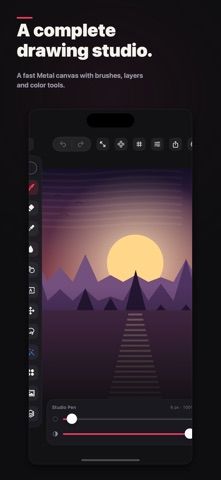
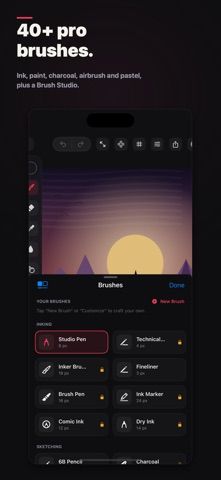
FORMA is a drawing studio for iPhone, iPad, and Mac. It offers pressure-sensitive brushes, layers, selection and transform tools, color adjustments, photo references, and time-lapse exports. Users can move between devices and work with Apple Pencil, touch, mouse, or trackpad. On supported devices, the listing describes using Image Playground to generate an on-device reference image from a prompt or sketch. A free tier is included; Premium unlocks a full brush set and professional tools, with a one-time lifetime option rather than a required subscription. The current purchase price is shown in the app. The developer says the app works on device without an account or tracking. Some tools depend on device and input compatibility, so confirm support before building a cross-device workflow.

FORMA: Draw, Paint & Sketch
A drawing and illustration studio with brushes, layers, cross-device canvases, on-device reference generation, and export tools.
Overview
A closer look at FORMA: Draw, Paint & Sketch.
A closer look
App screenshots
Choose with confidence
The useful details.
What it does
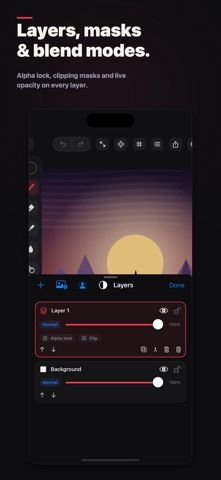
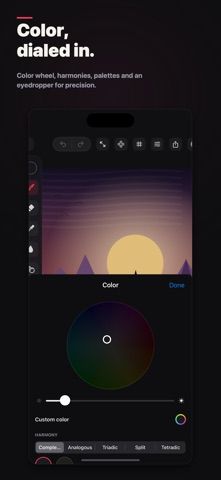
- Draws with pressure-sensitive brushes, layers, masks, selection, and color tools.
- Works across iPhone, iPad, and Mac with supported touch, Pencil, mouse, or trackpad input.
- Exports common image formats and time-lapse video; Premium unlocks additional tools.
A good fit for
- Illustrators who want a drawing workflow across Apple devices.
- People looking for an art app with a free tier and one-time lifetime option.
Worth knowing
- Some reference-generation features require supported Apple Intelligence devices; Premium price is shown in the app.
Frequently asked questions
Answers based on the app’s official listing and reviewed information.
What is FORMA: Draw, Paint & Sketch used for?
A drawing and illustration studio with brushes, layers, cross-device canvases, on-device reference generation, and export tools.
What can you do with FORMA: Draw, Paint & Sketch?
Draws with pressure-sensitive brushes, layers, masks, selection, and color tools. Works across iPhone, iPad, and Mac with supported touch, Pencil, mouse, or trackpad input. Exports common image formats and time-lapse video; Premium unlocks additional tools.
Who is FORMA: Draw, Paint & Sketch designed for?
Illustrators who want a drawing workflow across Apple devices. People looking for an art app with a free tier and one-time lifetime option.
What should you know before downloading FORMA: Draw, Paint & Sketch?
Some reference-generation features require supported Apple Intelligence devices; Premium price is shown in the app.
Does FORMA: Draw, Paint & Sketch include paid features?
FORMA Premium offers a one-time lifetime purchase; current price is shown in the app.
Which platforms support FORMA: Draw, Paint & Sketch?
Greatooly's reviewed app information lists iOS.
Researched from official sources; this is not a hands-on review. Last checked 2026-11-04.
Keep exploring
More apps that might be a good fit.

Roomture: AI Interior Design
Roomture redesigns interior, exterior and garden photos with AI, then lets users compare, refine and save design ideas.

Verde: AI Backyard Design Plan
Verde turns photos of gardens, balconies, and rooms into AI redesigns that account for existing structures and practical dimensions.

RoomMakeover: AI Room Design
RoomMakeover previews AI interior-design ideas from room photos, with style controls, credit packs, and Pro plans.