
Forma3D is a mobile mesh editor for designing and preparing 3D models without moving to a desktop for every change. It supports common formats including STL, 3MF, OBJ, PLY, DAE, USD, FBX, GLB, and Blender scenes, with tools for sculpting, sketch-to-mesh, painting, mesh repair, measurement, and splitting models into printable parts. Multi-color projects can be exported as 3MF for compatible slicers, and the listing says projects are edited locally and can work offline. The US App Store lists free download with in-app purchases: a $6.99 subscription offer with no term in its label, a $49.99 yearly option, and $99.99 lifetime access. Apple’s unverified privacy label says the developer reports that the app collects no data. The current listing requires iOS 17 or iPadOS 17 or later.
Forma3D - 3D Modeling & Print
Model, sculpt, repair, and paint 3D meshes on iPhone or iPad, with broad file import, multi-color 3MF export, and offline editing.
Overview
A closer look at Forma3D - 3D Modeling & Print.
A closer look
App screenshots
Choose with confidence
The useful details.
What it does
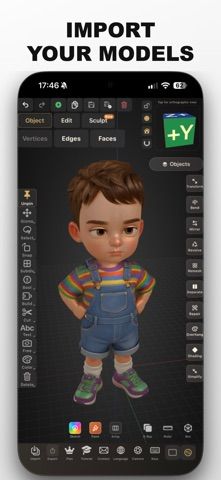
- Import and export a broad set of mesh and scene formats, including STL, 3MF, OBJ, FBX, GLB, and Blender .blend.
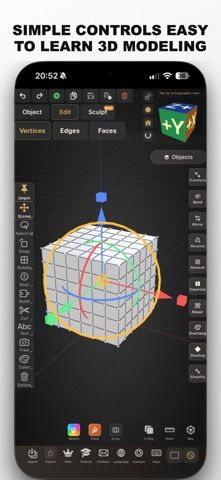
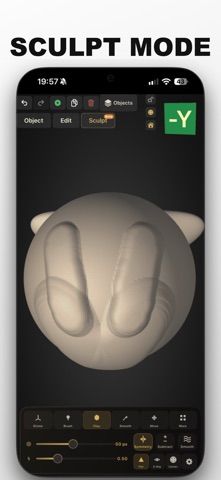
- Sculpt, paint, extrude, bevel, mirror, remesh, measure, and repair 3D geometry on a mobile device.
- Create geometry from sketches or SVGs and generate printable lithophanes from images.
- Split large models into parts with joints and export colored 3MF files for compatible multi-filament slicers.
- Use Apple Pencil support and local offline editing on iPhone or iPad.
A good fit for
- Makers who need to inspect or edit meshes away from a desktop computer.
- 3D-printing users who prepare models, split parts, or export multi-color 3MF files.
Worth knowing
- The iOS app is a mobile mesh editor; advanced desktop workflows and specialized slicer features may still require other software.
- Compatibility of colors, joints, or imported scene data depends on the receiving slicer and file format.
- The US App Store lists a $6.99 subscription offer without a stated period, plus $49.99 yearly and $99.99 lifetime offers; verify the checkout terms.
Frequently asked questions
Answers based on the app’s official listing and reviewed information.
Which 3D file formats can Forma3D open?
The listing includes STL, 3MF, OBJ, PLY, DAE, ABC, USD, FBX, GLB, and Blender .blend scenes.
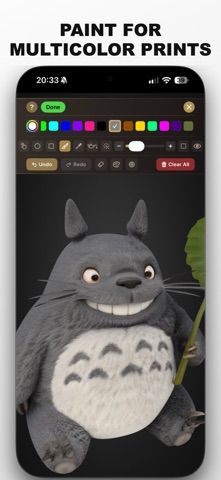
Can I paint a model for multi-color printing?
Yes. Forma3D describes per-face painting and 3MF export with color data for compatible multi-filament workflows.
Does the app include sculpting tools?
Yes. The listing describes gesture-based sculpting brushes, including push, pull, and smooth controls.
Can I use Forma3D without an internet connection?
The developer says editing runs locally on the device and supports offline use.
How much does Forma3D cost?
The US App Store lists a $6.99 subscription offer with no period in its label, a $49.99 yearly option, and $99.99 lifetime access.
Does Forma3D support Apple Pencil?
Yes. The listing describes Apple Pencil support for precise editing on iPad.
Researched from official sources; this is not a hands-on review. Last checked 2026-11-19.
Keep exploring
More apps that might be a good fit.

AI Song & Music Maker - Foxify
An AI music creation app for generating songs, lyrics, beats, voice-based covers, and remixes from ideas or audio.

Photo Collage EZ
Arrange photos in grid or creative layouts, customize backgrounds and borders, adjust crop and shadows, and export collages up to 4K.

GreyForge - Miniature painting
Preview paint schemes on a miniature photo, get step-by-step painting recipes, and organize projects for tabletop figures.