
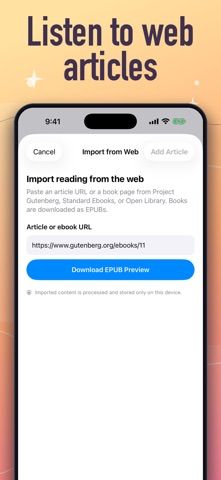
FreeReader converts documents and web links into spoken audio. Supported file types listed include EPUB, PDF, DOCX, TXT, RTF, HTML, Markdown, and OpenDocument Text, with more than 30 languages available. Users can also browse free books from Project Gutenberg and independent authors. The developer describes the core reader as free, without a sign-up or stated usage limit, and says it is intended to make text-to-speech available to more readers, including people with dyslexia or ADHD. FreeReader Gold is an optional subscription with a seven-day trial for eligible new subscribers; the listing does not state the price or exactly which features it adds. Listening preferences and voice availability may vary by language and document quality. This is a reading aid, not a diagnosis or treatment for a learning condition.
FreeReader | Text to Speech
A text-to-speech reader that turns ebooks, PDFs, documents, and web links into spoken audio.
Overview
A closer look at FreeReader | Text to Speech.
A closer look
App screenshots
Choose with confidence
The useful details.
What it does
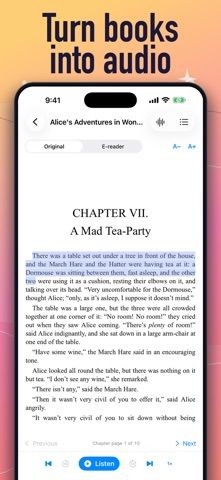
- Read aloud EPUB, PDF, DOCX, TXT, RTF, HTML, Markdown, and OpenDocument text files.
- Import a document or web link and listen in more than 30 listed languages.
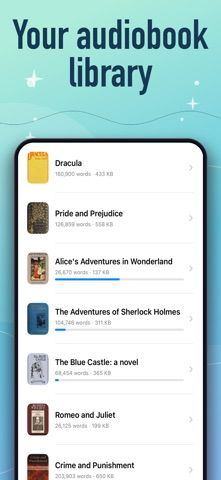
- Browse free books from Project Gutenberg and independent authors.
- Use text-to-speech as an optional support while following along with a document.
A good fit for
- Readers who prefer listening to personal documents or want text-to-speech while reading.
Worth knowing
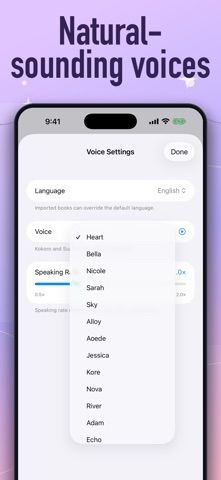
- Voice quality and text recognition may vary with language, formatting, and document quality.
- The listing does not explain FreeReader Gold features or price; check the trial and renewal terms before subscribing.
- The app is a reading aid and does not diagnose or treat learning conditions.
Frequently asked questions
Answers based on the app’s official listing and reviewed information.
What is FreeReader | Text to Speech used for?
A text-to-speech reader that turns ebooks, PDFs, documents, and web links into spoken audio.
What can you do with FreeReader | Text to Speech?
Read aloud EPUB, PDF, DOCX, TXT, RTF, HTML, Markdown, and OpenDocument text files. Import a document or web link and listen in more than 30 listed languages. Browse free books from Project Gutenberg and independent authors. Use text-to-speech as an optional support while following along with a document.
Who is FreeReader | Text to Speech designed for?
Readers who prefer listening to personal documents or want text-to-speech while reading.
What should you know before downloading FreeReader | Text to Speech?
Voice quality and text recognition may vary with language, formatting, and document quality. The listing does not explain FreeReader Gold features or price; check the trial and renewal terms before subscribing. The app is a reading aid and does not diagnose or treat learning conditions.
Does FreeReader | Text to Speech include paid features?
FreeReader Gold offers a 7-day trial for eligible new subscribers. The listing does not state its price or included features; check the App Store before starting.
Which platforms support FreeReader | Text to Speech?
Greatooly's reviewed app information lists iOS.
Researched from official sources; this is not a hands-on review. Last checked 2026-11-04.
Keep exploring
More apps that might be a good fit.

Siftivo: What to Read Next
Siftivo suggests books from a reader’s taste and combines daily picks with reading shelves, reviews, reader follows, and a journal.

ReadFlow - Book Tracker
ReadFlow tracks print, ebook, and audiobook progress with session logs, quotes, shelves, and import tools.

Margin: Reading Streak
Margin is a reading streak tracker, EPUB and PDF reader, book library, and audiobook recorder with optional Plus storage.