
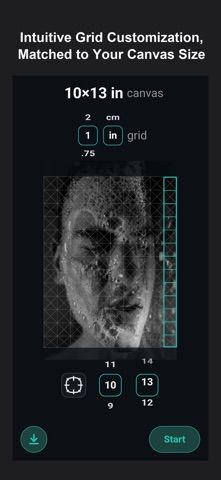
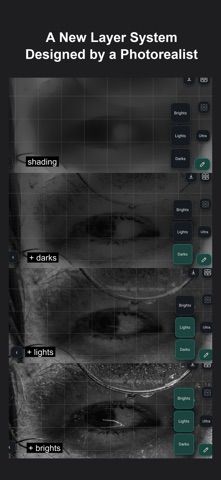
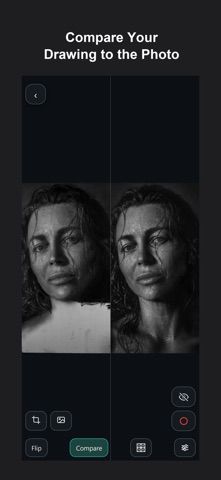
Grid Drawing: Photorealism is a drawing aid for artists who want to reproduce a photographic reference more accurately. Users upload an image, apply a custom grid, and work through the reference square by square. The app can separate a photo into essential layers, mark which grid squares have been completed, and help compare the current drawing with the original. This makes it possible to focus on a small section at a time and notice errors before they spread across a larger drawing. The developer describes it as an all-in-one tool for making drawings from photographs. The App Store description does not specify pricing, supported export formats, or whether paid features are available.
Grid Drawing: Photorealism
A grid-based drawing guide that helps artists map a photo reference, track completed squares, and compare their work.
By Dylan EakinReleased 2026/09/17App Store rating 4.9 (141)Official store informationPublished 2026/11/04Checked 2026-11-04
Overview
A closer look at Grid Drawing: Photorealism.
A closer look
App screenshots
Choose with confidence
The useful details.
What it does
- Upload a photo and apply a custom grid for drawing practice.
- Break a reference into layers or smaller sections to work through gradually.
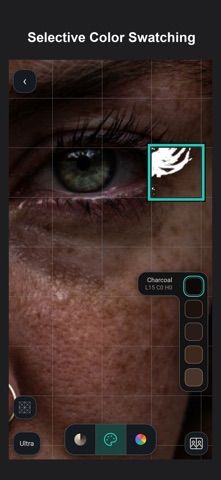
- Mark completed squares and compare the drawing against the source image.
- Use the grid method to guide proportion and placement in a photorealistic drawing.
A good fit for
- Artists who use a grid method to transfer a photo reference into a drawing.
Worth knowing
- The app guides drawing from a reference but does not itself replace a drawing or painting editor.
- The listing does not state whether paid features or export options are available.
Frequently asked questions
Answers based on the app’s official listing and reviewed information.
What is Grid Drawing: Photorealism used for?
A grid-based drawing guide that helps artists map a photo reference, track completed squares, and compare their work.
What can you do with Grid Drawing: Photorealism?
Upload a photo and apply a custom grid for drawing practice. Break a reference into layers or smaller sections to work through gradually. Mark completed squares and compare the drawing against the source image. Use the grid method to guide proportion and placement in a photorealistic drawing.
Who is Grid Drawing: Photorealism designed for?
Artists who use a grid method to transfer a photo reference into a drawing.
What should you know before downloading Grid Drawing: Photorealism?
The app guides drawing from a reference but does not itself replace a drawing or painting editor. The listing does not state whether paid features or export options are available.
Does Grid Drawing: Photorealism include paid features?
The reviewed listing does not confirm current in-app purchase options.
Which platforms support Grid Drawing: Photorealism?
Greatooly's reviewed app information lists iOS.
Researched from official sources; this is not a hands-on review. Last checked 2026-11-04.
Keep exploring
More apps that might be a good fit.

Roomture: AI Interior Design
Roomture redesigns interior, exterior and garden photos with AI, then lets users compare, refine and save design ideas.

Verde: AI Backyard Design Plan
Verde turns photos of gardens, balconies, and rooms into AI redesigns that account for existing structures and practical dimensions.

RoomMakeover: AI Room Design
RoomMakeover previews AI interior-design ideas from room photos, with style controls, credit packs, and Pro plans.