
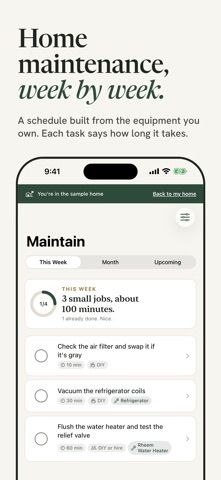
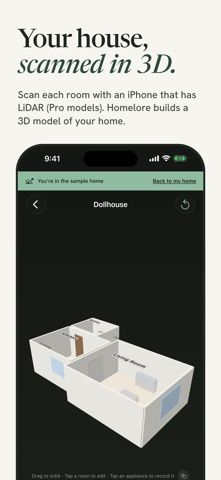
Homelore builds a home record from room scans, appliance labels, and maintenance details. On a LiDAR-capable iPhone, scan rooms into a 3D dollhouse and floor plans; label recognition can fill in appliance details and suggest a maintenance schedule tuned to the home’s equipment and climate. Save manuals, receipts, warranties, and inspection records, and mark utility shutoffs for offline emergency access. The free tier includes room scanning, floor plans, five appliance identifications, the current week’s tasks, emergency mode, the document vault, and data export. Homelore Premium is $99.99 per year after a one-month trial; Home Deed is a $299.99 one-time purchase. It requires iOS 26 or later. The listing says the record stays on-device and the developer collects no data.

Homelore: Home Maintenance
Homelore combines LiDAR room scans, appliance identification, maintenance schedules, emergency shutoff notes and a local home document vault.
Overview
A closer look at Homelore: Home Maintenance.
A closer look
App screenshots
Choose with confidence
The useful details.
What it does
- Scan rooms with LiDAR to create a 3D dollhouse and measured floor plans.
- Read appliance labels to build an equipment record and generate climate-aware maintenance tasks.
- Store manuals, receipts, warranties, and reports alongside home details.
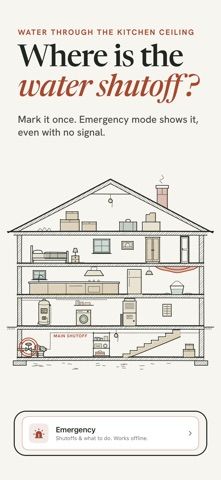
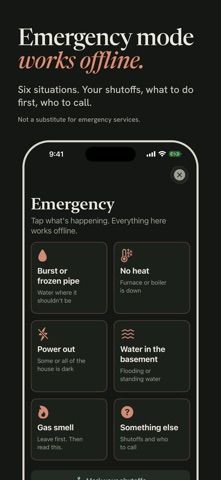
- Save emergency shutoff locations and access marked guidance offline; export records as JSON, CSV, or original files.
A good fit for
- Homeowners who want maintenance schedules and appliance records tied to their actual equipment.
- People who want a portable home inventory, maintenance history, and offline shutoff notes.
Worth knowing
- Requires iOS 26 or later. Room scanning requires an iPhone with LiDAR, such as iPhone 12 Pro or later Pro models; most other features work without LiDAR. Emergency guidance is not a replacement for emergency services.
- The US listing offers Premium at $99.99/year after a one-month trial and Home Deed at $299.99 once. Premium and Home Deed add unlimited AI identifications and extended planning/report features.
Frequently asked questions
Answers based on the app’s official listing and reviewed information.
What is Homelore: Home Maintenance used for?
Homelore combines LiDAR room scans, appliance identification, maintenance schedules, emergency shutoff notes and a local home document vault.
What can you do with Homelore: Home Maintenance?
Scan rooms with LiDAR to create a 3D dollhouse and measured floor plans. Read appliance labels to build an equipment record and generate climate-aware maintenance tasks. Store manuals, receipts, warranties, and reports alongside home details. Save emergency shutoff locations and access marked guidance offline; export records as JSON, CSV, or original files.
Who is Homelore: Home Maintenance designed for?
Homeowners who want maintenance schedules and appliance records tied to their actual equipment. People who want a portable home inventory, maintenance history, and offline shutoff notes.
What should you know before downloading Homelore: Home Maintenance?
Requires iOS 26 or later. Room scanning requires an iPhone with LiDAR, such as iPhone 12 Pro or later Pro models; most other features work without LiDAR. Emergency guidance is not a replacement for emergency services. The US listing offers Premium at $99.99/year after a one-month trial and Home Deed at $299.99 once. Premium and Home Deed add unlimited AI identifications and extended planning/report features.
What does Homelore: Home Maintenance cost?
Free to download. Free tier includes room scans and floor plans, 5 appliance identifications, this week’s maintenance, emergency mode, document storage, and full export. US App Store Homelore Premium is $99.99/year and starts with a one-month free trial; it adds unlimited AI identifications, the full calendar, and an insurance inventory report. US App Store Home Deed is a $299.99 one-time purchase, with Premium features and 200 AI identifications per year.
Which platforms support Homelore: Home Maintenance?
Greatooly's reviewed app information lists iOS.
Researched from official sources; this is not a hands-on review. Last checked 2026-11-10.
Keep exploring
More apps that might be a good fit.

Fetch Wardrobe: Digital Closet
Fetch Wardrobe turns clothing photos into a digital closet for outfit planning, trips, styling with friends, and a virtual wardrobe space.

Housora: Home Inventory
Housora organizes home items, warranties, maintenance reminders, and photo-based reports, with household sharing and plans for multiple properties.

Wearobe: Closet & Outfits
Wearobe catalogs clothes from photos, suggests outfits from a digital closet, tracks wears, and lets users share selected garments or wardrobes privately.