
Jars: Savings Goal Tracker helps users organize personal saving targets into separate virtual jars. Each jar can have a target, deadline, currency, color, and note about where the money is actually kept. Users record deposits and withdrawals, transfer entries between jars, or enter a corrected balance; the app maintains a dated transaction history. Savings plans can estimate weekly or monthly contributions needed for a goal, and notifications can record a planned deposit. The app also includes savings challenges, monthly summaries, widgets, Siri actions, Face ID or passcode locking, and optional exports. The developer says jar balances are stored on the phone and the app works offline; backups can be saved to the user’s iCloud Drive. Jars records the user’s entries and does not hold, transfer, or verify funds. The Apple listing describes no account or ads but does not state subscription or purchase terms.

Jars: Savings Goal Tracker
Jars tracks user-entered savings goals, deposits, and withdrawal plans without holding or moving money.
Overview
A closer look at Jars: Savings Goal Tracker.
A closer look
App screenshots


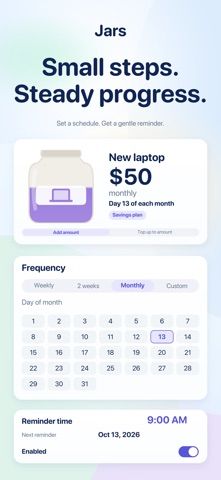

Choose with confidence
The useful details.
What it does
- Create savings jars with goals, deadlines, currencies, notes, and optional categories.
- Record deposits, withdrawals, and transfers with dates and editable notes.
- Plan weekly or monthly contributions and set payday reminders.
- Try savings challenges, review progress summaries, and use widgets or Siri actions.
- Lock jar balances with Face ID or passcode and export backups or CSV transactions.
A good fit for
- People who want to track progress toward multiple personal savings goals.
- Users who prefer offline, manually maintained savings records and exportable transactions.
Worth knowing
- Jars tracks user-entered amounts but does not hold, verify, or transfer money or connect to a bank account.
- Savings contribution calculations are planning aids and do not guarantee a financial outcome; the listing does not specify paid features or pricing.
Frequently asked questions
Answers based on the app’s official listing and reviewed information.
What is Jars: Savings Goal Tracker used for?
Jars tracks user-entered savings goals, deposits, and withdrawal plans without holding or moving money.
What can you do with Jars: Savings Goal Tracker?
Create savings jars with goals, deadlines, currencies, notes, and optional categories. Record deposits, withdrawals, and transfers with dates and editable notes. Plan weekly or monthly contributions and set payday reminders. Try savings challenges, review progress summaries, and use widgets or Siri actions.
Who is Jars: Savings Goal Tracker designed for?
People who want to track progress toward multiple personal savings goals. Users who prefer offline, manually maintained savings records and exportable transactions.
What should you know before downloading Jars: Savings Goal Tracker?
Jars tracks user-entered amounts but does not hold, verify, or transfer money or connect to a bank account. Savings contribution calculations are planning aids and do not guarantee a financial outcome; the listing does not specify paid features or pricing.
What does Jars: Savings Goal Tracker cost?
Apple lists a free download; the current store description does not state whether paid features or subscriptions are available.
Which platforms support Jars: Savings Goal Tracker?
Greatooly's reviewed app information lists iOS.
Researched from official sources; this is not a hands-on review. Last checked 2026-11-10.
Keep exploring
More apps that might be a good fit.

Coal - Gift List & Budget
Budget for gifts by recipient and track each purchase through delivery, wrapping, and returns.

Budget Planner App: Tally
A personal budget app with voice expense entry, automatic category suggestions, spending limits, and charts.

MaxIA – Personal Finance
A private personal-finance tracker with budgets, recurring bills, spending analysis, forecasts, and an on-device AI assistant.