
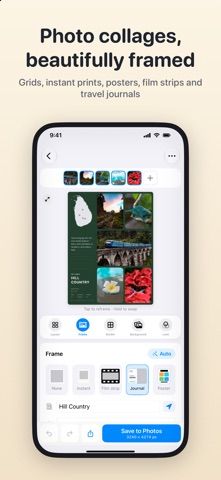
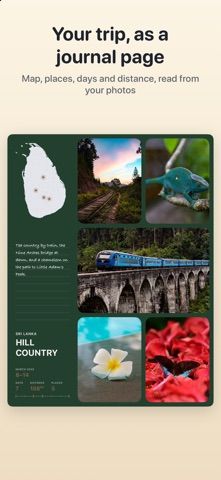
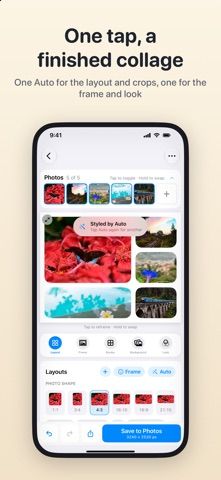
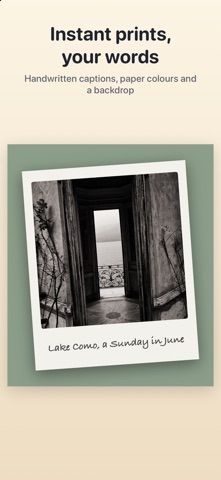
Layoutz turns a group of photos into a grid, film strip, feature layout, or travel-journal page. The journal can place a map marker beside photos and show location, dates, distance, or other details read from the images. An automatic layout tool suggests a photo order, crop, and look, while users can adjust frames by dragging, swap photos, and add captions or film-style date stamps. Finished collages can be saved to Photos at full resolution. The developer says the app has no watermark, ads, subscription, or sign-up, and that processing happens on-device so photos do not leave the phone. Because a journal page can include location and date information from image metadata, review map markers and captions before sharing a collage publicly. Layoutz is a compact creative tool rather than a full photo editor.

Layoutz: Photo Grid Collage
An on-device collage and travel-journal maker that builds photo grids, film strips, and trip pages.
Overview
A closer look at Layoutz: Photo Grid Collage.
A closer look
App screenshots
Choose with confidence
The useful details.
What it does
- Create photo grids, film strips, feature layouts, and travel-journal pages
- Adjust crops, frame sizes, captions, and date stamps
- Generate a layout suggestion from selected photos
- Save full-resolution collages with on-device photo processing
A good fit for
- Travelers who want to turn trip photos into a journal page
- People creating clean collages without a watermark or subscription
Worth knowing
- Travel pages may display location and date data from photos; review metadata-derived details before sharing.
Frequently asked questions
Answers based on the app’s official listing and reviewed information.
What is Layoutz: Photo Grid Collage used for?
An on-device collage and travel-journal maker that builds photo grids, film strips, and trip pages.
What can you do with Layoutz: Photo Grid Collage?
Create photo grids, film strips, feature layouts, and travel-journal pages Adjust crops, frame sizes, captions, and date stamps Generate a layout suggestion from selected photos Save full-resolution collages with on-device photo processing
Who is Layoutz: Photo Grid Collage designed for?
Travelers who want to turn trip photos into a journal page People creating clean collages without a watermark or subscription
What should you know before downloading Layoutz: Photo Grid Collage?
Travel pages may display location and date data from photos; review metadata-derived details before sharing.
Does Layoutz: Photo Grid Collage include paid features?
The reviewed listing reports no in-app purchases.
Which platforms support Layoutz: Photo Grid Collage?
Greatooly's reviewed app information lists iOS.
Researched from official sources; this is not a hands-on review. Last checked 2026-11-04.
Keep exploring
More apps that might be a good fit.

Dreamy Room: AI Room Design
Dreamy Room uses a photo of a real room to generate AI interior concepts in styles, colors, and furnishing directions you can compare.

Roomture: AI Interior Design
Roomture redesigns interior, exterior and garden photos with AI, then lets users compare, refine and save design ideas.

Verde: AI Backyard Design Plan
Verde turns photos of gardens, balconies, and rooms into AI redesigns that account for existing structures and practical dimensions.