
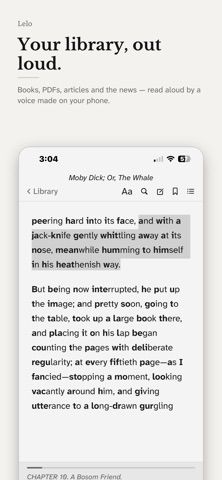
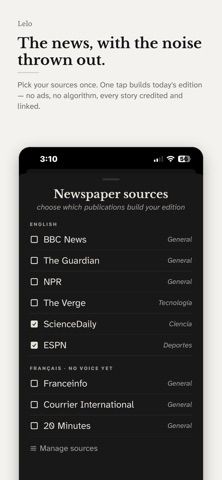
Lelo Reader reads books and documents aloud using neural voices generated on the device. It opens EPUB, PDF, plain-text files, web articles, and notes, and can keep chapter order, highlights, bookmarks, and an offline dictionary. Spoken sentences are highlighted as the page follows along, with adjustable playback speed and a sleep timer. Users can save chapters or books as audio for locked-screen listening and build a daily paper from selected news sources. The developer says personal files, notes, and audio stay on the phone and that no account is needed. Reading and the curated paper remain free; Lelo Pro unlocks all voices, audio downloads, ambient sounds, an Apple Watch app, and personal RSS feeds through a one-time purchase after a seven-day free access period.
Lelo Reader: Text to Speech
An offline reader and text-to-speech app for PDFs, EPUBs, articles, and notes, with on-device neural voices, highlights, and audio downloads.
Overview
A closer look at Lelo Reader: Text to Speech.
A closer look
App screenshots
Choose with confidence
The useful details.
What it does
- Read EPUB, PDF, plain-text files, web articles, and notes aloud.
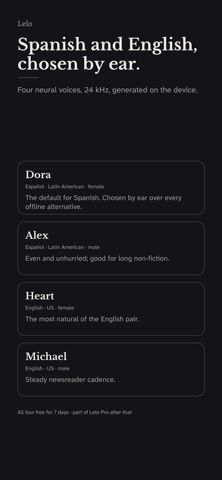
- Use on-device English or Latin American Spanish neural voices.
- Save highlights, notes, bookmarks, and offline dictionary lookups.
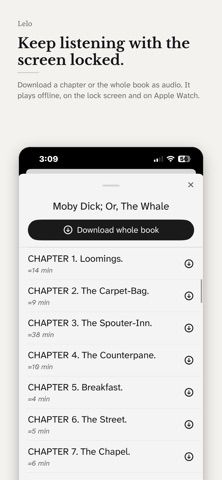
- Download spoken chapters, set a sleep timer, and use the daily paper.
A good fit for
- People who want to listen to their own documents or articles without sending files to a cloud service.
Worth knowing
- Requires iOS 18.4 or later; Lelo Pro is a one-time purchase after a seven-day access period, while core reading remains free.
Frequently asked questions
Answers based on the app’s official listing and reviewed information.
What is Lelo Reader: Text to Speech used for?
An offline reader and text-to-speech app for PDFs, EPUBs, articles, and notes, with on-device neural voices, highlights, and audio downloads.
What can you do with Lelo Reader: Text to Speech?
Read EPUB, PDF, plain-text files, web articles, and notes aloud. Use on-device English or Latin American Spanish neural voices. Save highlights, notes, bookmarks, and offline dictionary lookups. Download spoken chapters, set a sleep timer, and use the daily paper.
Who is Lelo Reader: Text to Speech designed for?
People who want to listen to their own documents or articles without sending files to a cloud service.
What should you know before downloading Lelo Reader: Text to Speech?
Requires iOS 18.4 or later; Lelo Pro is a one-time purchase after a seven-day access period, while core reading remains free.
Does Lelo Reader: Text to Speech include paid features?
Lelo Pro is listed as a $9.99 one-time purchase after a seven-day free access period; verify the current regional price.
Which platforms support Lelo Reader: Text to Speech?
Greatooly's reviewed app information lists iOS.
Researched from official sources; this is not a hands-on review. Last checked 2026-11-04.
Keep exploring
More apps that might be a good fit.

Siftivo: What to Read Next
Siftivo suggests books from a reader’s taste and combines daily picks with reading shelves, reviews, reader follows, and a journal.

ReadFlow - Book Tracker
ReadFlow tracks print, ebook, and audiobook progress with session logs, quotes, shelves, and import tools.

Margin: Reading Streak
Margin is a reading streak tracker, EPUB and PDF reader, book library, and audiobook recorder with optional Plus storage.