
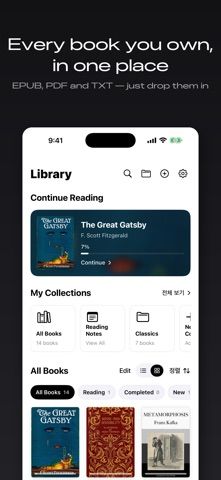
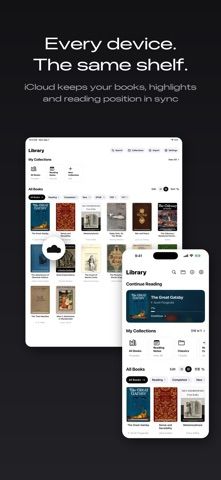
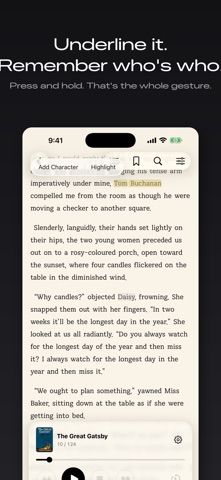
LiBook is a personal reader for EPUB, TXT, and PDF files. Readers can import their own books, adjust fonts and page layout, create color themes, and use volume buttons or Bluetooth remotes to turn pages. The listing describes full-text search, bookmarks, highlights, collection management, and iCloud sync for books and reading progress. Entire collections can be downloaded for offline use, while a space-saving option removes local copies without deleting the library entry. The developer says the app has no sign-up, no ads, and does not collect or transmit personal data; those are the developer’s privacy statements. LiBook is a reading tool rather than a book store, so users need to supply compatible files and should review their own cloud settings.
LiBook: EPUB, TXT, PDF Reader
An ebook reader for EPUB, TXT, and PDF files, with custom fonts, reading controls, search, and offline access.
Overview
A closer look at LiBook: EPUB, TXT, PDF Reader.
A closer look
App screenshots
Choose with confidence
The useful details.
What it does
- Reads EPUB, TXT, and PDF files with adjustable typography and page controls.
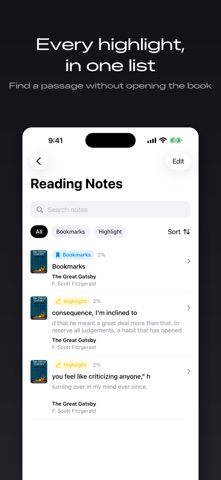
- Supports search, highlights, bookmarks, collections, and iCloud progress sync.
- Downloads collections for offline reading and can remove local copies to save space.
A good fit for
- Readers who already have EPUB, PDF, or TXT files to organize.
- People who want customizable reading layouts and offline access across Apple devices.
Worth knowing
- Users need to provide their own books; iCloud sync depends on Apple account settings, and the privacy description is provided by the developer.
Frequently asked questions
Answers based on the app’s official listing and reviewed information.
What is LiBook: EPUB, TXT, PDF Reader used for?
An ebook reader for EPUB, TXT, and PDF files, with custom fonts, reading controls, search, and offline access.
What can you do with LiBook: EPUB, TXT, PDF Reader?
Reads EPUB, TXT, and PDF files with adjustable typography and page controls. Supports search, highlights, bookmarks, collections, and iCloud progress sync. Downloads collections for offline reading and can remove local copies to save space.
Who is LiBook: EPUB, TXT, PDF Reader designed for?
Readers who already have EPUB, PDF, or TXT files to organize. People who want customizable reading layouts and offline access across Apple devices.
What should you know before downloading LiBook: EPUB, TXT, PDF Reader?
Users need to provide their own books; iCloud sync depends on Apple account settings, and the privacy description is provided by the developer.
Does LiBook: EPUB, TXT, PDF Reader include paid features?
The reviewed listing does not confirm current in-app purchase options.
Which platforms support LiBook: EPUB, TXT, PDF Reader?
Greatooly's reviewed app information lists iOS.
Researched from official sources; this is not a hands-on review. Last checked 2026-11-04.
Keep exploring
More apps that might be a good fit.

Siftivo: What to Read Next
Siftivo suggests books from a reader’s taste and combines daily picks with reading shelves, reviews, reader follows, and a journal.

ReadFlow - Book Tracker
ReadFlow tracks print, ebook, and audiobook progress with session logs, quotes, shelves, and import tools.

Margin: Reading Streak
Margin is a reading streak tracker, EPUB and PDF reader, book library, and audiobook recorder with optional Plus storage.