
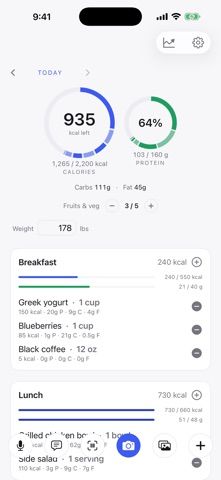
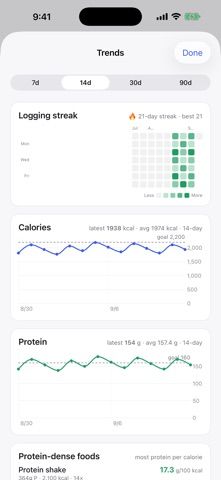
LifeApps Food Logger lets users record meals by typing, speaking, chatting, or taking a photo. It summarizes calories and protein, breaks entries down by meal, and includes a searchable food database, barcode lookups, and portion scaling. Users can also track other nutrition measures, cost, and weigh-ins, add a home-screen widget, and optionally connect body-weight data with Apple Health. The app is free, with no ads or third-party ad trackers according to its listing. AI-based chat, voice, and photo logging are optional, while account-backed logs sync with the developer’s other LifeApps products and web dashboard. Calories and photo-based portion estimates can be edited and are not medical advice; users should verify estimates and consult a clinician for health decisions.

LifeApps Food Logger
A calorie and macro logger with manual, voice, chat, and photo entry, food database searches, barcode lookup, and Apple Health support.
Overview
A closer look at LifeApps Food Logger.
A closer look
App screenshots
Choose with confidence
The useful details.
What it does
- Log food manually, by voice, chat, or an optional meal photo.
- Review calories, protein, macros, and per-meal summaries.
- Search food databases, scan barcodes, and adjust portion sizes.
- Use an optional home-screen widget and Apple Health weight connection.
A good fit for
- People who want several quick ways to log meals and review nutrition estimates.
Worth knowing
- Nutrition and photo portion values are estimates, and the developer says account logs are stored on its servers for syncing; the app is not medical advice.
Frequently asked questions
Answers based on the app’s official listing and reviewed information.
What is LifeApps Food Logger used for?
A calorie and macro logger with manual, voice, chat, and photo entry, food database searches, barcode lookup, and Apple Health support.
What can you do with LifeApps Food Logger?
Log food manually, by voice, chat, or an optional meal photo. Review calories, protein, macros, and per-meal summaries. Search food databases, scan barcodes, and adjust portion sizes. Use an optional home-screen widget and Apple Health weight connection.
Who is LifeApps Food Logger designed for?
People who want several quick ways to log meals and review nutrition estimates.
What should you know before downloading LifeApps Food Logger?
Nutrition and photo portion values are estimates, and the developer says account logs are stored on its servers for syncing; the app is not medical advice.
Does LifeApps Food Logger include paid features?
The reviewed listing reports no in-app purchases.
Which platforms support LifeApps Food Logger?
Greatooly's reviewed app information lists iOS.
Researched from official sources; this is not a hands-on review. Last checked 2026-11-04.
Keep exploring
More apps that might be a good fit.

Cami: Baby Tracker
Cami shares family logs for feeds, sleep, diapers, pumping, growth, and medicines, with timers, trends, and offline entry.

Baby Tracker - Our Tiny Days
Our Tiny Days records a baby's feeding, sleep, diapers, growth, health details, and daily milestones on iPhone and iPad.
CradleNote: Baby Tracker
CradleNote shares baby-care logs, timers, growth activities, developmental guidance, and private family memories across caregivers.