
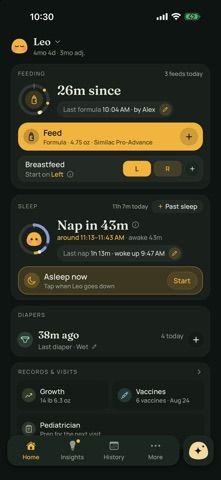
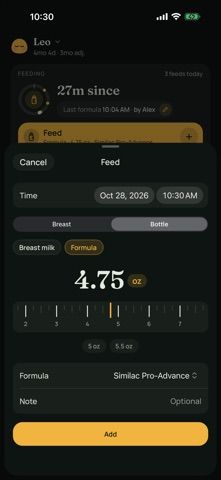
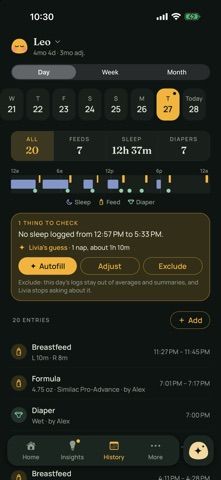
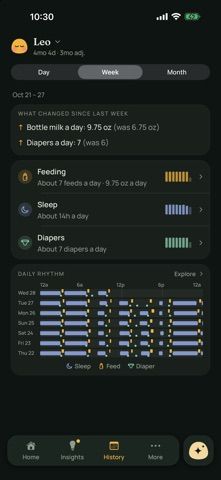
Livia Baby Tracker brings daily baby-care entries into one place, including breastfeeding, bottles, pumping, sleep, diapers, meals, growth measurements, milestones, vaccines, and medicine. Quick controls support one-handed logging, Siri requests, and timers on the Lock Screen or Dynamic Island. The home screen summarizes the day and can estimate upcoming sleep from a baby's recorded rhythm or typical awake times. Caregivers can import an export file from another tracker, invite a partner, grandparent, or nanny, and review shared activity. Appointment tools collect questions and recent routine summaries that can be shown or shared as a PDF. Entries save on the phone first and sync when connectivity returns. The developer says there are no ads and describes the app as a tracking aid rather than medical advice; growth trends should be discussed with a pediatrician. Apple lists the download as free, with no in-app purchase options in the listing.

Livia Baby Tracker
Livia tracks baby routines, growth, and appointments, supports partner syncing, and can import history from another tracker.
Overview
A closer look at Livia Baby Tracker.
A closer look
App screenshots
Choose with confidence
The useful details.
What it does
- Log feeds, pumping, sleep, diapers, meals, growth measurements, milestones, vaccines, and medicine.
- Use Siri, Lock Screen, and Dynamic Island controls for hands-free or quick routine tracking.
- Import history, invite caregivers, and sync shared entries between phones.
- Review daily summaries, history, reminders, and appointment notes, then share a PDF summary.
- Save entries offline first and sync them when the phone reconnects.
A good fit for
- Caregivers who want to track baby routines and growth measurements across the first years.
- Families moving from another tracker or coordinating logs among multiple caregivers.
Worth knowing
- Livia states that it is not medical advice; concerns about a baby's health should be discussed with a pediatrician.
- Some estimates and summaries depend on the baby's recorded history and the caregiver's entries.
Frequently asked questions
Answers based on the app’s official listing and reviewed information.
What is Livia Baby Tracker used for?
Livia tracks baby routines, growth, and appointments, supports partner syncing, and can import history from another tracker.
What can you do with Livia Baby Tracker?
Log feeds, pumping, sleep, diapers, meals, growth measurements, milestones, vaccines, and medicine. Use Siri, Lock Screen, and Dynamic Island controls for hands-free or quick routine tracking. Import history, invite caregivers, and sync shared entries between phones. Review daily summaries, history, reminders, and appointment notes, then share a PDF summary.
Who is Livia Baby Tracker designed for?
Caregivers who want to track baby routines and growth measurements across the first years. Families moving from another tracker or coordinating logs among multiple caregivers.
What should you know before downloading Livia Baby Tracker?
Livia states that it is not medical advice; concerns about a baby's health should be discussed with a pediatrician. Some estimates and summaries depend on the baby's recorded history and the caregiver's entries.
What does Livia Baby Tracker cost?
Apple lists Livia as a free download and the current listing does not show in-app purchases.
Which platforms support Livia Baby Tracker?
Greatooly's reviewed app information lists iOS.
Researched from official sources; this is not a hands-on review. Last checked 2026-11-10.
Keep exploring
More apps that might be a good fit.

Handsful: Multiples Tracker
Handsful tracks feeding, sleep, diapers and growth for twins, triplets and other multiples, with shared caregiver logs and optional AI summaries.

Baby Tracker: Plumi
Plumi logs baby feeding, sleep, diapers, growth, health and milestones, with offline tracking, widgets and optional caregiver sync.

Cami: Baby Tracker
Cami shares family logs for feeds, sleep, diapers, pumping, growth, and medicines, with timers, trends, and offline entry.