
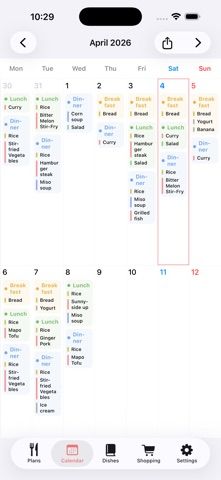
Meal Planner - Calendar & List is a personal organizer for meal schedules, a dish library, and grocery shopping. Record breakfast, lunch, and dinner by date, then review the plan in a list or monthly calendar. Saved dishes can include categories, ingredients, notes, recipe links, and images; you can copy, move, or swap meals and review cooking history to find dishes you make often. Ingredients from selected dishes can be added to a shopping list, where pending and completed items are kept separate. The app also supports backup and restore and says no account or sign-in is required. It is free to download with ads; the US App Store lists a one-time $7.99 Remove Ads purchase. The app requires iOS 17.6 or later. Apple's developer-provided privacy label is unverified and says location, identifiers, usage, and diagnostics may be used for cross-app tracking, while listing advertising and analytics data as not linked to identity. Review the policy if you plan to store personal food or routine information.
Meal Planner - Calendar & List
Organize dated breakfasts, lunches, and dinners in a calendar, save dish notes, and collect ingredients in a grocery list.
Overview
A closer look at Meal Planner - Calendar & List.
A closer look
App screenshots
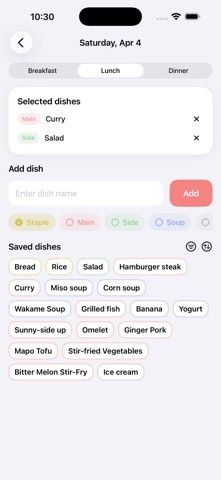
Choose with confidence
The useful details.
What it does
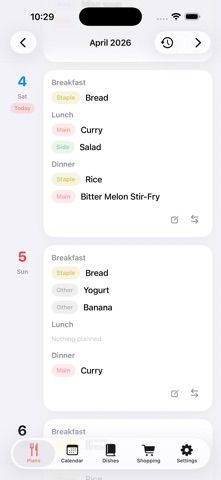
- Schedule breakfast, lunch, and dinner by date and review plans in monthly calendar or list form.
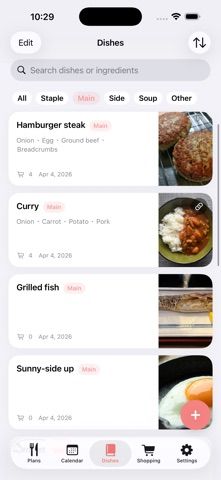
- Save dishes with categories, ingredient lists, notes, recipe URLs, and images in a personal library.
- Import ingredients from planned dishes into a shopping list and separate pending from completed items.
- Copy, move, or swap plans, review cooking history, and back up or restore app data without an account.
- Remove ads with a one-time in-app purchase.
A good fit for
- People who want a clear calendar and list view for everyday meal planning.
- Cooks who keep their own dish notes and want to build shopping lists from saved ingredients.
Worth knowing
- Requires iOS 17.6 or later. The free version contains advertising; the US App Store lists a one-time $7.99 purchase to remove ads.
- Apple's developer-provided, unverified privacy label says location, identifiers, usage, and diagnostics may be used for tracking, and lists advertising and analytics data. The app says no account is required and supports backup and restore; confirm where backups are stored.
- The listing describes manual meal scheduling and dish records rather than automatic meal recommendations or allergy checks.
Frequently asked questions
Answers based on the app’s official listing and reviewed information.
Can I plan all three meals each day?
Yes. The app supports breakfast, lunch, and dinner by date, and you can hide meal types you do not use.
Can I save my own recipes or dishes?
You can create a dish library with categories, ingredients, notes, recipe URLs, and images.
How do I make a grocery list from a meal plan?
Ingredients from saved dishes can be added to the shopping list, where pending and completed items are tracked separately.
Can I review meals I have cooked before?
Yes. The history feature records dishes and lets you review how often and when you made them.
How much does it cost to remove ads?
The US App Store lists a one-time $7.99 Remove Ads purchase.
Does the app require an account?
No. The App Store listing says there is no sign-up or login and describes backup and restore for app data.
Researched from official sources; this is not a hands-on review. Last checked 2026-11-13.
Keep exploring
More apps that might be a good fit.
Taplist – Grocery List
Build grocery lists quickly, reuse regular purchases, group items by recipe, and keep shopping history on your iPhone.

Mise: Family Recipe Cookbook
Create and import recipes, scan handwritten cards, and share a digital family cookbook with collaborative Kitchens.

Cestio: Meal Planner & Recipes
Plan a week of meals around budget, preferences, and local stores, then share an aisle-sorted grocery list with your household.