GreatoolyGreatooly
My Recipe Box: Cookbook & Plan app icon

My Recipe Box: Cookbook & Plan

Save recipes from cooking sites, edit and organize a digital cookbook, plan meals, create grocery lists, and sync recipes across services.

By CmonAppApp Store rating 4.8 (1,189)Official store informationPublished 2026/11/03Checked 2026-11-03

Overview

A closer look at My Recipe Box: Cookbook & Plan.

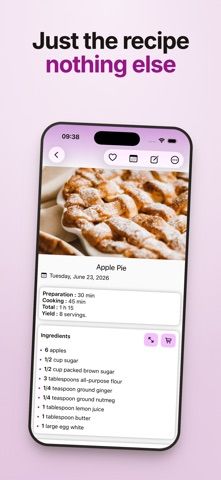
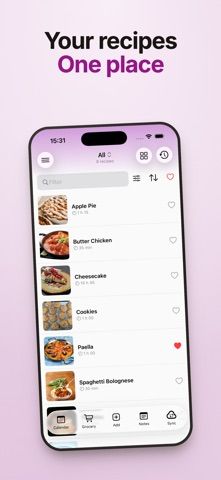
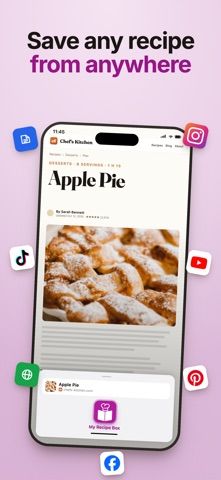
My Recipe Box is a digital cookbook for saving family recipes and importing dishes from cooking websites. Users can edit ingredients and instructions, add personal notes or tags, adjust quantities, and group recipes into collections. A meal planner helps place saved dishes across the week, while a grocery list gathers ingredients for shopping.

The listing describes Dropbox sync and premium options for removing ads and watermarks, exporting recipes as PDFs, linking recipes, and syncing through Google Drive, pCloud, or WebDAV. This can make the app useful as a personal recipe archive, especially for people who want to keep family recipes alongside recipes they find online.

The US App Store lists a free download, but the current purchase terms for Premium were not clear in the material reviewed. Recipe import depends on the source site, and cloud sync may involve accounts with third-party services. We have not tested import accuracy or backup recovery.
A closer look

App screenshots

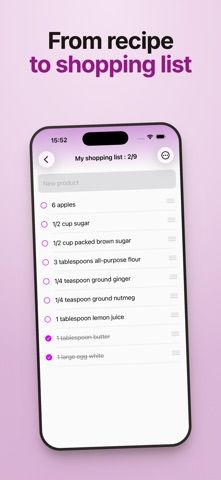
My Recipe Box: Cookbook & Plan official iOS screenshot 1My Recipe Box: Cookbook & Plan official iOS screenshot 2Official iOS store screenshotOfficial iOS store screenshot

Choose with confidence

The useful details.

What it does

  • Import recipes from many cooking websites or add them manually
  • Edit recipes, add notes and tags, and organize collections
  • Plan meals and build grocery lists from saved recipes
  • Sync through supported cloud services and export recipes with Premium

A good fit for

  • Home cooks who want to build a digital cookbook from family recipes and websites

Worth knowing

  • The listing does not clearly state the current price or billing terms for Premium features.
  • Imported recipes may need editing if a website's format changes.
  • Cloud sync depends on third-party accounts and backup settings.

Frequently asked questions

Answers based on the app’s official listing and reviewed information.

What is My Recipe Box: Cookbook & Plan used for?

Save recipes from cooking sites, edit and organize a digital cookbook, plan meals, create grocery lists, and sync recipes across services.

What can you do with My Recipe Box: Cookbook & Plan?

Import recipes from many cooking websites or add them manually Edit recipes, add notes and tags, and organize collections Plan meals and build grocery lists from saved recipes Sync through supported cloud services and export recipes with Premium

Who is My Recipe Box: Cookbook & Plan designed for?

Home cooks who want to build a digital cookbook from family recipes and websites

What should you know before downloading My Recipe Box: Cookbook & Plan?

The listing does not clearly state the current price or billing terms for Premium features. Imported recipes may need editing if a website's format changes. Cloud sync depends on third-party accounts and backup settings.

Does My Recipe Box: Cookbook & Plan include paid features?

The reviewed listing does not confirm current in-app purchase options.

Which platforms support My Recipe Box: Cookbook & Plan?

Greatooly's reviewed app information lists iOS.

Researched from official sources; this is not a hands-on review. Last checked 2026-11-03.

Keep exploring

More apps that might be a good fit.

GroceryGret: Grocery List

Share a grocery list, scan recipe ingredients, and compare nearby stores using community receipt prices.

Clean Plate Meal Prep

A local meal-prep ordering app for checking menus, finding nearby locations, ordering ahead, and collecting loyalty rewards.

The Bento Co.

A meal-ordering app for browsing menu items, checking nutrition and allergen details, and managing meal subscriptions.