
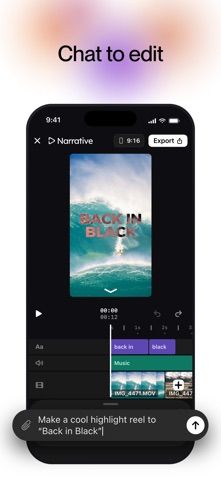
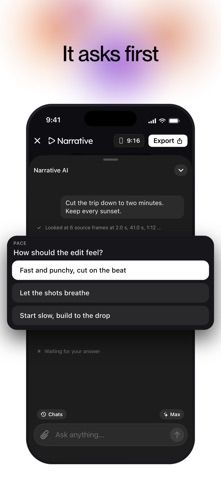
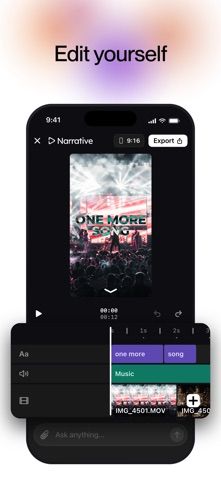
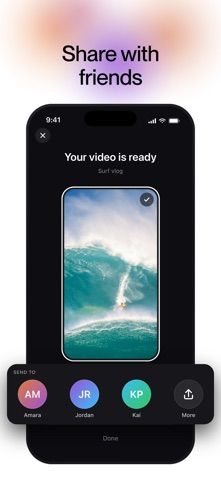
Narrative is a mobile video editor built around editing requests written in plain language. A creator can import clips from the camera roll, ask for a short highlight reel, captions, a title, or tighter pacing, and review the resulting edit on a multitrack timeline. The timeline includes video, text, graphics, transitions, and music, so users can make manual changes after the first AI pass or ask for another revision. The developer positions it for people who regularly post sports highlights, montages, short-form edits, and talking-head videos. The app is free to download, but the listing says timeline editing, AI editing, and exports all require a Narrative subscription. The captured description does not state subscription prices. That paywall covers the core editing workflow, so check the current terms before bringing a project into the app.

Narrative: AI Video Editor
An AI video editor that turns written instructions into a multitrack draft, then lets creators refine the timeline by hand or with more prompts.
Overview
A closer look at Narrative: AI Video Editor.
A closer look
App screenshots
Choose with confidence
The useful details.
What it does
- Import video clips from the camera roll and describe the desired edit in plain language.
- Generate a draft with pacing changes, captions, titles, and other requested edits.
- Refine results manually on a multitrack timeline with video, text, graphics, transitions, and music.
- Use additional prompts to revise short-form videos, montages, highlights, and talking-head edits.
A good fit for
- Mobile creators who publish short videos often and want to start edits from a written brief.
Worth knowing
- AI editing, timeline editing, and exports require a subscription; the captured description does not state its price.
- The App Store description does not specify supported export resolutions, formats, or subscription limits.
- The free download alone may not be enough to complete and export a finished project.
Frequently asked questions
Answers based on the app’s official listing and reviewed information.
What is Narrative: AI Video Editor used for?
An AI video editor that turns written instructions into a multitrack draft, then lets creators refine the timeline by hand or with more prompts.
What can you do with Narrative: AI Video Editor?
Import video clips from the camera roll and describe the desired edit in plain language. Generate a draft with pacing changes, captions, titles, and other requested edits. Refine results manually on a multitrack timeline with video, text, graphics, transitions, and music. Use additional prompts to revise short-form videos, montages, highlights, and talking-head edits.
Who is Narrative: AI Video Editor designed for?
Mobile creators who publish short videos often and want to start edits from a written brief.
What should you know before downloading Narrative: AI Video Editor?
AI editing, timeline editing, and exports require a subscription; the captured description does not state its price. The App Store description does not specify supported export resolutions, formats, or subscription limits. The free download alone may not be enough to complete and export a finished project.
Does Narrative: AI Video Editor include paid features?
A Narrative subscription is required for AI editing, timeline editing, and exports. The captured listing did not state the subscription price; check current regional pricing in the App Store.
Which platforms support Narrative: AI Video Editor?
Greatooly's reviewed app information lists iOS.
Researched from official sources; this is not a hands-on review. Last checked 2026-11-04.
Keep exploring
More apps that might be a good fit.

Verde: AI Backyard Design Plan
Verde turns photos of gardens, balconies, and rooms into AI redesigns that account for existing structures and practical dimensions.

RoomMakeover: AI Room Design
RoomMakeover previews AI interior-design ideas from room photos, with style controls, credit packs, and Pro plans.

Zu3D
Zu3D combines stop-motion capture, drawing, video editing, green-screen effects, sound, and export tools for animated films.