
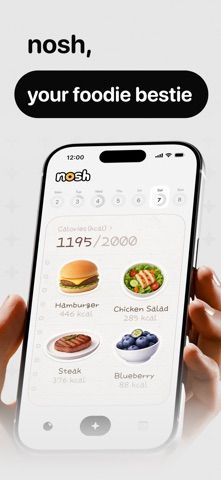
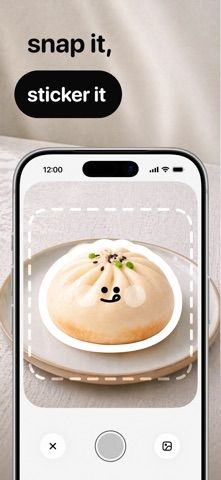
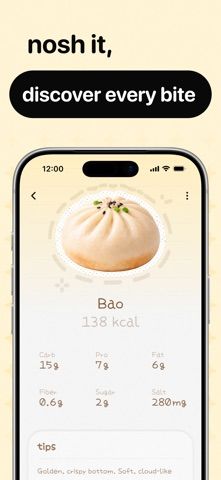
nosh makes meal logging more visual by turning food photos into stickers in a personal food journal. The app estimates calories, protein, carbohydrates, and fat, then adds short notes intended to make nutrition tracking feel approachable. Users can review past meals, copy a prior food entry to another date, and receive an AI-generated weekly recap. Recognition results can be edited, including portion size, calories, and meal time, and a calorie goal can be set. The US App Store lists nosh as a free iPhone app. It requires iOS 17.0 or later. Food recognition and nutrition values can be incomplete or inaccurate and should not be treated as medical advice. Apple reports that the app may request a phone number and handle identifiers, photos, usage, and diagnostics; those disclosures are not verified by Apple.

nosh - AI Food Scanner
A food journal that turns meal photos into visual stickers and provides calorie and macronutrient estimates with weekly recaps.
Overview
A closer look at nosh - AI Food Scanner.
A closer look
App screenshots
Choose with confidence
The useful details.
What it does
- Log meals from photos and turn food entries into visual stickers.
- View estimated calories, protein, carbohydrates, and fat with short contextual notes.
- Review a food journal, copy earlier meals to another date, and receive an AI weekly recap.
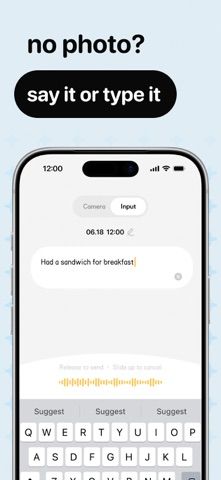
- Edit recognized food entries, portions, calorie values, and time, and set a calorie goal.
A good fit for
- People who prefer a visual food diary to a spreadsheet-style tracker.
- Users who want to revisit meals and see a lightweight weekly summary.
- People willing to review photo-based food recognition and adjust entries manually.
Worth knowing
- Requires iOS 17.0 or later and is listed for iPhone.
- Calorie and macronutrient values are estimates and may be wrong if a photo or portion is misidentified; correct entries yourself.
- The app's nutrition tips and weekly recaps are not medical or dietetic advice.
- Apple's privacy label reports identifiers used for tracking, a phone number linked to functionality, and unlinked photos, identifiers, usage, and diagnostics; Apple says developer disclosures are not verified.
Frequently asked questions
Answers based on the app’s official listing and reviewed information.
How does nosh record meals?
You photograph food, and the app turns the entry into a visual sticker for your food journal.
What nutrition details does nosh show?
The listing describes calorie, protein, carbohydrate, and fat estimates with short notes. Check estimates against food labels or a trusted nutrition source.
Can I correct a recognized meal?
Yes. The app lets you edit recognition results, including calories, portion size, and time.
Does nosh include a weekly report?
Yes. Recent App Store release notes describe an AI weekly recap of food records.
Is nosh free?
The US App Store lists nosh as free and does not show in-app purchase products.
Which iPhone software does nosh require?
Apple lists iOS 17.0 or later.
Researched from official sources; this is not a hands-on review. Last checked 2026-11-19.
Keep exploring
More apps that might be a good fit.
Beginner Workout at Home
Follow short, equipment-free home workouts, track routines and streaks, and scan meals for calorie estimates.

ReceipeMe
A recipe organizer that imports links and videos, plans meals, builds grocery lists, and exports recipes as PDFs.

Eatsy: Family Meal Planner
A family meal planner with a weekly menu, more than 350 built-in meal ideas, and dietary preference settings.