
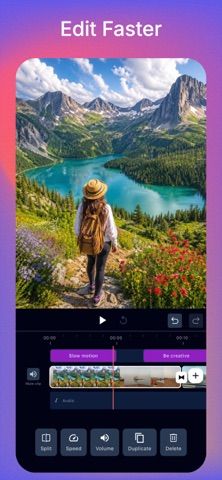
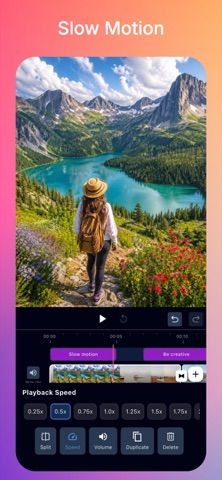
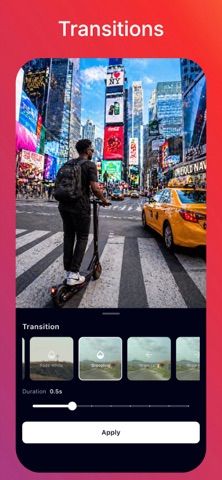
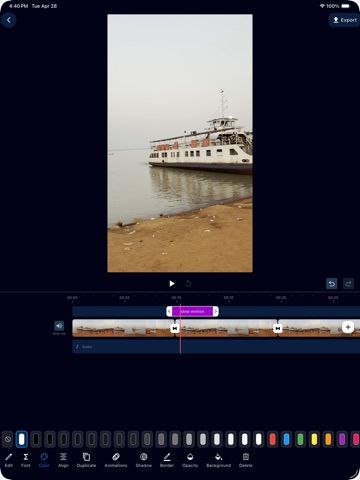
Nully is a mobile video editor for making short clips, social posts, vlogs, and multi-clip projects. Quick Actions let users trim a clip, change its speed, or convert formats without opening a full timeline project. The timeline editor supports splitting, rearranging, and duplicating clips, adjusting speed and audio, adding formatted text overlays, and connecting clips with transitions. The App Store description also lists music, captions, keyframes, masks, and other editing tools in recent updates. The developer says Nully is free, has no subscriptions or paywalls, and exports without a watermark. It supports iPhone and iPad on iOS 15 or later. Apple’s unverified privacy label lists device identifiers and diagnostics that are not linked to the user for analytics; check the privacy page for details about media permissions and local storage.

Nully - Video Editor
Edit short videos with trim, speed controls, a multi-clip timeline, text overlays, animations, transitions, and audio tools.
Overview
A closer look at Nully - Video Editor.
A closer look
App screenshots
Choose with confidence
The useful details.
What it does
- Trim clips, change playback speed, and convert video formats from Quick Actions.
- Arrange, split, duplicate, and delete clips in a multi-clip timeline.
- Adjust audio, add background music, and create formatted text overlays and animations.
- Add transitions and export edited videos without a watermark, according to the developer.
A good fit for
- People who want a free editor for short videos and social clips.
- Creators who need both quick trims and a timeline for multi-clip edits.
Worth knowing
- The listing describes a mobile editor and does not document cloud project syncing or team collaboration.
- Apple’s unverified privacy label lists non-linked device identifiers and diagnostics for analytics.
- Some editing tools, such as captions and keyframes, appear in version history and may depend on the installed version.
Frequently asked questions
Answers based on the app’s official listing and reviewed information.
Can I trim a video quickly in Nully?
Yes. Quick Actions include trimming, speed changes, and video format conversion.
Does Nully support multi-clip editing?
Yes. Its timeline lets you split, rearrange, duplicate, and remove clips.
Can I add titles or captions?
The listing describes formatted text overlays and animations; a recent version update also mentions automatic captions.
Can I add music to a video?
Yes. The description and version history mention adding background music and editing audio clips.
Does Nully add a watermark or require a subscription?
The developer says Nully is free, has no subscription paywall, and exports without a watermark.
Which devices can run Nully?
The US App Store lists iPhone and iPad compatibility and requires iOS 15 or later.
Researched from official sources; this is not a hands-on review. Last checked 2026-11-19.
Keep exploring
More apps that might be a good fit.

AI Song & Music Maker - Foxify
An AI music creation app for generating songs, lyrics, beats, voice-based covers, and remixes from ideas or audio.

Photo Collage EZ
Arrange photos in grid or creative layouts, customize backgrounds and borders, adjust crop and shadows, and export collages up to 4K.

GreyForge - Miniature painting
Preview paint schemes on a miniature photo, get step-by-step painting recipes, and organize projects for tabletop figures.