GreatoolyGreatooly
Phlow: Pro Camera Photo Editor app icon

Phlow: Pro Camera Photo Editor

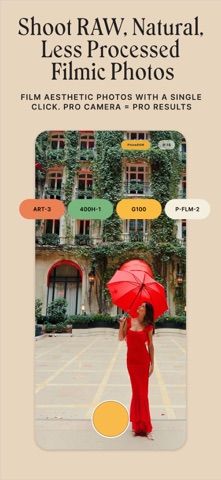
A camera and editor for iPhone photographers who want RAW capture, film-style presets, and color tools that work across photos and video.

By Phlow, Inc.App Store rating 4.9 (2,611)Official store informationPublished 2026/11/03Checked 2026-11-03

Overview

A closer look at Phlow: Pro Camera Photo Editor.

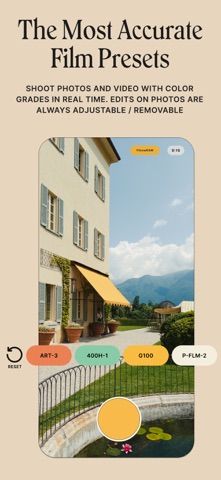
Phlow combines an iPhone camera with a photo and video color-grading workflow. Its listing highlights RAW capture, live presets, an interval camera for timed shots, and tools for adjusting footage after recording. The idea is to capture and finish an image in one place rather than moving between a camera app and a separate filter editor.

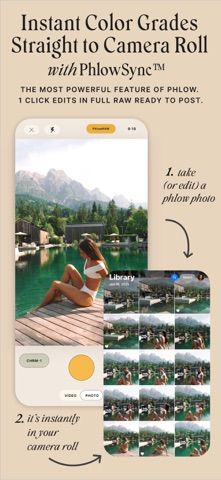
PhlowSync is described as sending non-destructive edits back to the Apple Photos library. The editing tools include color targeting, grain, blur, bloom, and 4K video grading. Camera Roll integration lets a user work with existing media as well as photos taken in Phlow. Export controls are aimed at creators who want to retain image quality for later use.

The developer presents Phlow as a subscription product; exact billing periods and current prices should be checked in the App Store. RAW files and 4K clips can use substantial storage, and some workflows depend on device capabilities. This profile is based on the official US App Store description and screenshots. We have not tested non-destructive editing, syncing, or export quality.

A closer look

App screenshots

Phlow: Pro Camera Photo Editor official iOS screenshot 1Phlow: Pro Camera Photo Editor official iOS screenshot 2Official iOS store screenshotOfficial iOS store screenshot

Choose with confidence

The useful details.

What it does

  • RAW camera with live presets and interval shooting
  • Non-destructive sync with Apple Photos through PhlowSync
  • Photo and 4K video color grading, including HSL, grain, and blur tools
  • Camera Roll editing and high-quality export controls

A good fit for

  • Photographers and creators who prefer to capture and grade images in one iPhone workflow

Worth knowing

  • The official description presents Phlow as a subscription product; confirm the current price and trial terms in the App Store.
  • RAW and sync workflows can produce large files and depend on the device and available storage.

Frequently asked questions

Answers based on the app’s official listing and reviewed information.

What is Phlow: Pro Camera Photo Editor used for?

A camera and editor for iPhone photographers who want RAW capture, film-style presets, and color tools that work across photos and video.

What can you do with Phlow: Pro Camera Photo Editor?

RAW camera with live presets and interval shooting Non-destructive sync with Apple Photos through PhlowSync Photo and 4K video color grading, including HSL, grain, and blur tools Camera Roll editing and high-quality export controls

Who is Phlow: Pro Camera Photo Editor designed for?

Photographers and creators who prefer to capture and grade images in one iPhone workflow

What should you know before downloading Phlow: Pro Camera Photo Editor?

The official description presents Phlow as a subscription product; confirm the current price and trial terms in the App Store. RAW and sync workflows can produce large files and depend on the device and available storage.

Does Phlow: Pro Camera Photo Editor include paid features?

Phlow's store description presents its tools through a subscription; current billing periods and pricing were not verified.

Which platforms support Phlow: Pro Camera Photo Editor?

Greatooly's reviewed app information lists iOS.

Researched from official sources; this is not a hands-on review. Last checked 2026-11-03.

Keep exploring

More apps that might be a good fit.

Verde: AI Backyard Design Plan

Verde turns photos of gardens, balconies, and rooms into AI redesigns that account for existing structures and practical dimensions.

RoomMakeover: AI Room Design

RoomMakeover previews AI interior-design ideas from room photos, with style controls, credit packs, and Pro plans.

Zu3D

Zu3D combines stop-motion capture, drawing, video editing, green-screen effects, sound, and export tools for animated films.