
Pintaro is an iPhone collage editor built for mixing motion and still images in a single composition. It can place Live Photos or videos into grids, split screens, picture-in-picture layouts, or a three-panel collage, and it also supports regular photo collages. Users can reframe, reorder, trim, and color-adjust each panel, choose cover frames, and tune spacing, corners, shadows, and backgrounds. Pintaro can detect iPhone camera metadata for a device watermark or add a logo, image, or text mark. The listing supports square, portrait, and landscape layouts and says video export can reach 4K when supported. Media is processed on-device and no account is required, according to the developer. The app requires iOS 16 or later and includes advertising. US App Store Pro options include $0.99 monthly, $1.99 quarterly, $5.99 yearly, or $12.99 lifetime; Apple’s unverified privacy label also reports advertising identifiers and usage data.

Pintaro: Photo Collage Maker
Combine Live Photos, videos, and still images into motion collages with custom layouts, edits, and watermarks.
Overview
A closer look at Pintaro: Photo Collage Maker.
A closer look
App screenshots
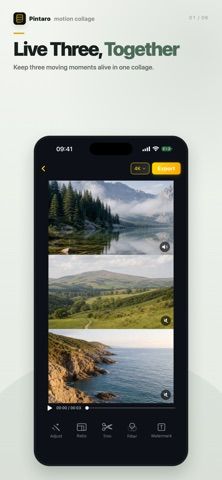
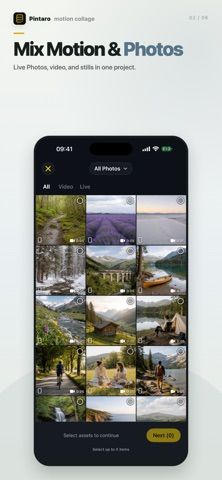
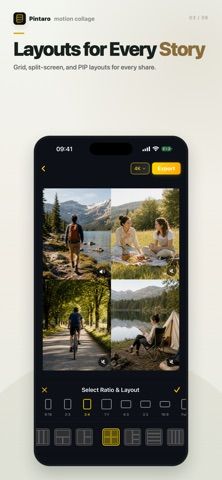
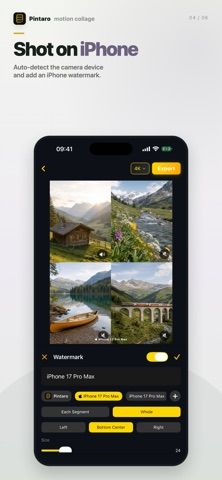
Choose with confidence
The useful details.
What it does
- Combine Live Photos, videos, and still images in grids, split screens, and picture-in-picture layouts.
- Reframe, reorder, trim, choose cover frames, and adjust color or visual effects for each panel.
- Add detected iPhone, custom image, logo, or text watermarks to a collage.
- Export square, portrait, or landscape designs and video up to 4K when supported.
- Create without an account; the listing says media is processed on-device.
A good fit for
- iPhone photographers who want to combine Live Photos and video in a social-ready collage.
- Creators who want precise panel controls and a custom camera or brand watermark.
Worth knowing
- Requires iOS 16 or later and is listed for iPhone.
- The app includes advertising; Apple's unverified privacy label lists device identifiers and usage data for advertising, plus crash data.
- A version note describes support for up to nine motion items while the listing summary says up to four; confirm current layout limits in the app.
Frequently asked questions
Answers based on the app’s official listing and reviewed information.
What does Pintaro: Photo Collage Maker do?
It combines Live Photos, videos, and still pictures in custom collage layouts with editing and watermark controls.
Can Pintaro mix videos with photos?
Yes. The listing describes layouts that can combine Live Photos, videos, and still images, including grids, split screens, and picture-in-picture.
Can I add a custom watermark in Pintaro?
Yes. You can use a detected iPhone model or add your own logo, image, or text watermark.
What export formats does Pintaro support?
The listing describes square, portrait, and landscape ratios, with video export up to 4K when supported by the device.
What does Pintaro Pro cost?
The US App Store lists $0.99 monthly, $1.99 quarterly, $5.99 yearly, or $12.99 for Lifetime Pro.
Which devices support Pintaro?
The App Store lists Pintaro for iPhone and requires iOS 16 or later. Greatooly's reviewed platform information lists iOS.
Researched from official sources; this is not a hands-on review. Last checked 2026-11-19.
Keep exploring
More apps that might be a good fit.

AI Song & Music Maker - Foxify
An AI music creation app for generating songs, lyrics, beats, voice-based covers, and remixes from ideas or audio.

Photo Collage EZ
Arrange photos in grid or creative layouts, customize backgrounds and borders, adjust crop and shadows, and export collages up to 4K.

GreyForge - Miniature painting
Preview paint schemes on a miniature photo, get step-by-step painting recipes, and organize projects for tabletop figures.