
PixelColor is a pixel-art coloring app where users fill numbered squares to reveal a picture. The listing includes 97 hand-tuned designs across several difficulty levels and categories, plus a daily picture. Users can also turn their own photos into pixel art and color the result; the developer says photos stay on the device. Zoom and pan controls, a Magic Wand, and a larger Bucket tool support more detailed pictures. Finished artwork can be replayed as a time-lapse and shared as video. The app works offline without an account, and optional purchases can remove ads between pictures or add booster packs. Rewarded ads are described as optional. The listing identifies some artwork as adapted from Google Noto Emoji under Apache 2.0. Check the purchase screen for booster contents and prices.

PixelColor: Pixel Art Coloring
An offline pixel-coloring game with numbered pictures, photo conversion, daily art, and time-lapse sharing.
Overview
A closer look at PixelColor: Pixel Art Coloring.
A closer look
App screenshots
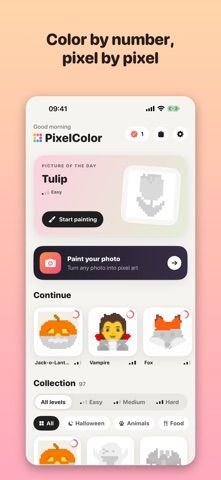
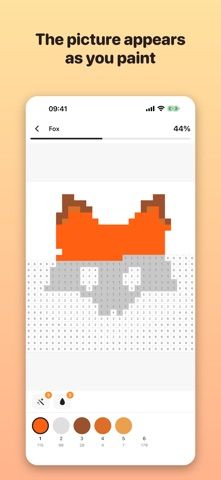
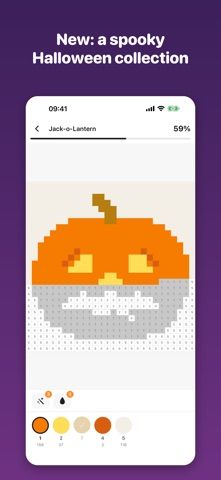
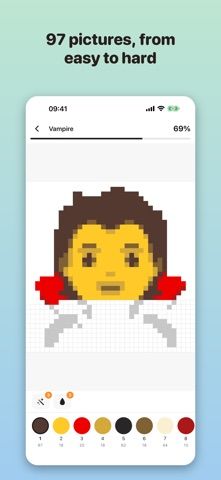
Choose with confidence
The useful details.
What it does
- Color numbered pixel pictures across easy, medium, and hard levels.
- Convert a personal photo into pixel art and color it on-device.
- Use zoom, pan, a Magic Wand, and a larger fill bucket to complete images.
- Replay a finished picture as a time-lapse and share the video.
A good fit for
- Casual players who enjoy guided coloring and making pixel art from personal photos.
Worth knowing
- The app includes ads between pictures; removing ads or buying booster packs requires optional purchases.
- The listing does not specify current prices or booster contents.
- The app is a coloring activity rather than a full pixel-art drawing editor.
Frequently asked questions
Answers based on the app’s official listing and reviewed information.
What is PixelColor: Pixel Art Coloring used for?
An offline pixel-coloring game with numbered pictures, photo conversion, daily art, and time-lapse sharing.
What can you do with PixelColor: Pixel Art Coloring?
Color numbered pixel pictures across easy, medium, and hard levels. Convert a personal photo into pixel art and color it on-device. Use zoom, pan, a Magic Wand, and a larger fill bucket to complete images. Replay a finished picture as a time-lapse and share the video.
Who is PixelColor: Pixel Art Coloring designed for?
Casual players who enjoy guided coloring and making pixel art from personal photos.
What should you know before downloading PixelColor: Pixel Art Coloring?
The app includes ads between pictures; removing ads or buying booster packs requires optional purchases. The listing does not specify current prices or booster contents. The app is a coloring activity rather than a full pixel-art drawing editor.
Does PixelColor: Pixel Art Coloring include paid features?
The reviewed listing does not confirm current in-app purchase options.
Which platforms support PixelColor: Pixel Art Coloring?
Greatooly's reviewed app information lists iOS.
Researched from official sources; this is not a hands-on review. Last checked 2026-11-04.
Keep exploring
More apps that might be a good fit.

Adopt Cute Pets: Pet Care
Adopt Cute Pets: Pet Care is a virtual pet game about adopting animals, tending to their needs, playing activities, and building a pet home.

Urban Jungle: Cozy Home Garden
Urban Jungle is a cozy home garden simulation where players decorate rooms with plants, solve placement puzzles, and unlock a story.

Gardenship: Flora's Secret
Gardenship is a story-driven garden makeover game with flower growing, estate decoration, bouquet crafting, and social play.