
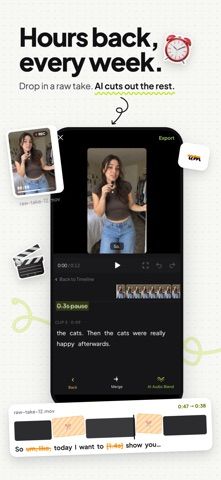
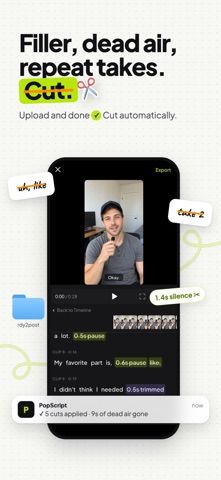
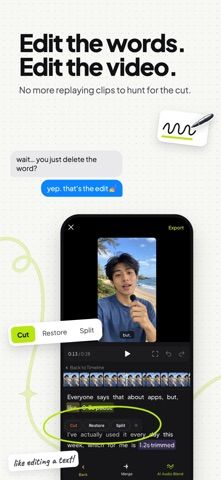
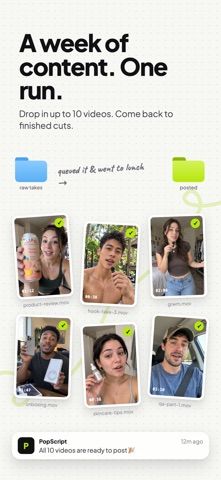
PopScript is a video editing app for people who speak to camera or record voiceovers and want to shorten the editing process. It can remove filler words and long pauses, trim false starts, and keep a selected take when a line is repeated. The result appears as a transcript, where deleting a sentence removes the matching video segment; edits can be restored with a tap. PopScript can generate captions, add text, photos, and GIFs, adjust speed, resize for TikTok, Reels, Shorts, or YouTube, and export at up to 4K. The listing describes Starter, Pro, and Pro Plus subscription tiers after a free trial, with no watermark on paid plans. It is aimed at creators, educators, sellers, and brands that publish short videos often.

PopScript: AI Video Editor
An AI video editor that removes pauses and repeated takes, edits through a transcript, and creates captions for social videos.
By florence kwokReleased 2026/09/27App Store rating 5.0 (3)Official store informationPublished 2026/11/04Checked 2026-11-04
Overview
A closer look at PopScript: AI Video Editor.
A closer look
App screenshots
Choose with confidence
The useful details.
What it does
- Remove filler words, pauses, and false starts from recorded videos.
- Edit a video by deleting or restoring sentences in its transcript.
- Generate captions and add text, photos, GIFs, or speed changes.
- Resize videos for common social formats and export up to 4K.
A good fit for
- Creators and small teams who regularly edit talking-head or voiceover videos for social platforms.
Worth knowing
- A free trial is offered, then continued use requires a Starter, Pro, or Pro Plus subscription.
- Current plan prices and trial duration were not stated in the captured listing.
Frequently asked questions
Answers based on the app’s official listing and reviewed information.
What is PopScript: AI Video Editor used for?
An AI video editor that removes pauses and repeated takes, edits through a transcript, and creates captions for social videos.
What can you do with PopScript: AI Video Editor?
Remove filler words, pauses, and false starts from recorded videos. Edit a video by deleting or restoring sentences in its transcript. Generate captions and add text, photos, GIFs, or speed changes. Resize videos for common social formats and export up to 4K.
Who is PopScript: AI Video Editor designed for?
Creators and small teams who regularly edit talking-head or voiceover videos for social platforms.
What should you know before downloading PopScript: AI Video Editor?
A free trial is offered, then continued use requires a Starter, Pro, or Pro Plus subscription. Current plan prices and trial duration were not stated in the captured listing.
Does PopScript: AI Video Editor include paid features?
PopScript offers Starter, Pro, and Pro Plus subscriptions after a free trial; current pricing and trial duration were not stated in the captured listing.
Which platforms support PopScript: AI Video Editor?
Greatooly's reviewed app information lists iOS.
Researched from official sources; this is not a hands-on review. Last checked 2026-11-04.
Keep exploring
More apps that might be a good fit.

Roomture: AI Interior Design
Roomture redesigns interior, exterior and garden photos with AI, then lets users compare, refine and save design ideas.

Verde: AI Backyard Design Plan
Verde turns photos of gardens, balconies, and rooms into AI redesigns that account for existing structures and practical dimensions.

RoomMakeover: AI Room Design
RoomMakeover previews AI interior-design ideas from room photos, with style controls, credit packs, and Pro plans.