
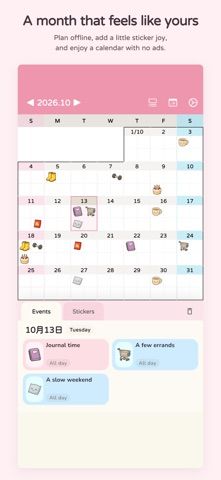
Q Calendar turns a monthly schedule into a decorated personal planner. Add events and recurring reminders, mark dates with stickers, import your own images, and sort sticker favorites into categories. Its core calendar is stored locally and works offline; the current listing also describes optional cloud backup and recovery tools for deleted events. You can change the theme and choose whether usage analytics and crash reports are sent. Those diagnostics are enabled by default and can be switched off in Privacy settings, according to the developer. Q Calendar suits people who want visual customization around a simple calendar. Local reminders have a rolling delivery window, so the app should be opened regularly to refresh upcoming notifications.

Q Calendar: Sticker Planner
A customizable sticker calendar for monthly plans, recurring events, reminders, and personal themes.
Overview
A closer look at Q Calendar: Sticker Planner.
A closer look
App screenshots
Choose with confidence
The useful details.
What it does
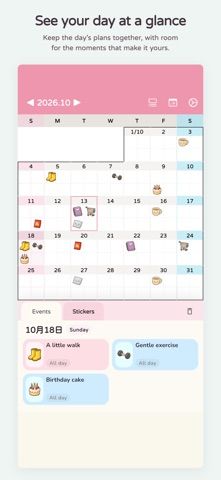
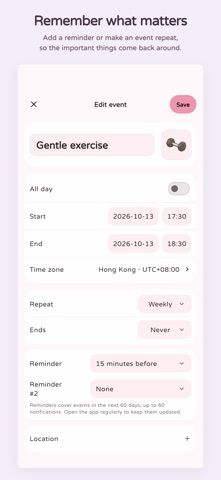
- Create calendar events, recurring plans, and local reminders.
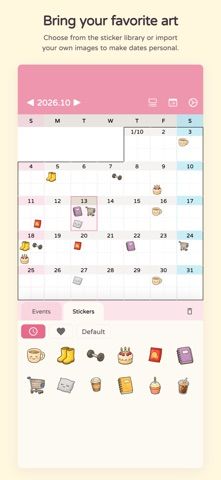
- Decorate dates with built-in stickers or imported images.
- Organize sticker favorites and choose calendar themes.
- Use core planning offline, with backup and deleted-event recovery tools.
A good fit for
- People who prefer a visual, customizable calendar for routines and everyday plans.
Worth knowing
- Usage analytics and crash reporting are enabled by default but can be disabled; local reminders cover a limited upcoming window and need refreshes.
Frequently asked questions
Answers based on the app’s official listing and reviewed information.
What is Q Calendar: Sticker Planner used for?
A customizable sticker calendar for monthly plans, recurring events, reminders, and personal themes.
What can you do with Q Calendar: Sticker Planner?
Create calendar events, recurring plans, and local reminders. Decorate dates with built-in stickers or imported images. Organize sticker favorites and choose calendar themes. Use core planning offline, with backup and deleted-event recovery tools.
Who is Q Calendar: Sticker Planner designed for?
People who prefer a visual, customizable calendar for routines and everyday plans.
What should you know before downloading Q Calendar: Sticker Planner?
Usage analytics and crash reporting are enabled by default but can be disabled; local reminders cover a limited upcoming window and need refreshes.
Does Q Calendar: Sticker Planner include paid features?
The reviewed listing reports no in-app purchases.
Which platforms support Q Calendar: Sticker Planner?
Greatooly's reviewed app information lists iOS.
Researched from official sources; this is not a hands-on review. Last checked 2026-11-04.
Keep exploring
More apps that might be a good fit.

VowFolio: Wedding Planner
VowFolio Planner organizes a couple’s guest list, seating chart, budget, checklist, vendors, wedding website, and guest photos.

LevelUp! Kids
LevelUp! Kids turns family chores into quests, letting children earn points for screen time or rewards that parents approve.

Wantd - Curated Wishlist
Wantd saves products from online shops into shareable wishlists, keeps gift reservations secret, and supports group gifts and a social feed.