
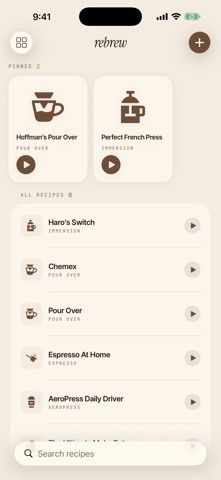
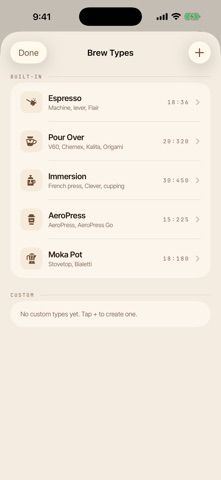
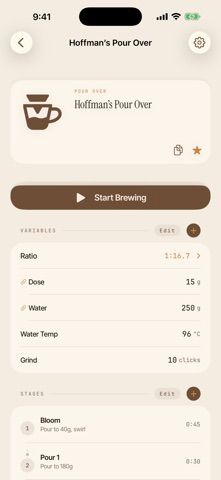
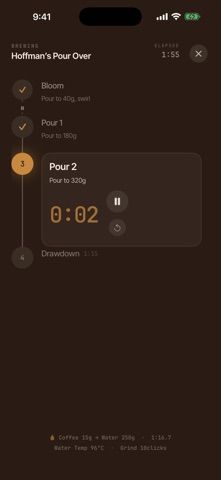
Rebrew Coffee is an iPhone app in the coffee brewing category. The developer describes it as a recipe and guided-timer tool for repeatable coffee brewing. The current U.S. App Store listing highlights set a coffee-to-water ratio and adjust dose calculations.; build recipes with timed brewing steps.; follow a guided timer during a pour.. These tools can help users keep the related workflow in one place and return to saved information when needed. It may suit home brewers who want to repeat recipes or keep notes about coffee experiments. Brew guidance depends on the selected method, beans, grinder, water, and equipment; check the app’s supported brewers and any paid features before use. Apple currently lists the download as Free; this lookup does not confirm whether every optional feature is included or what upgrades may cost, so review current purchase and renewal terms. The listing reports iOS 18.0 compatibility. This summary reflects Apple’s U.S. listing checked on 2026-11-19; availability, pricing, privacy terms, and integrations can change.

Rebrew Coffee
Rebrew Coffee is a coffee brewing app for iPhone, focused on a recipe and guided-timer tool for repeatable coffee brewing. Its current U.S. App Store listing describes tools for this workflow.
Overview
A closer look at Rebrew Coffee.
A closer look
App screenshots
Choose with confidence
The useful details.
What it does
- Set a coffee-to-water ratio and adjust dose calculations.
- Build recipes with timed brewing steps.
- Follow a guided timer during a pour.
- Use a Lock Screen activity and step alerts while brewing.
A good fit for
- Home coffee brewers who want recipes, timers, or brew logs.
- Coffee drinkers comparing beans and preparation methods.
Worth knowing
- Brew guidance depends on the selected method, beans, grinder, water, and equipment; check the app’s supported brewers and any paid features before use.
- Optional features, pricing, and data handling should be checked in the current listing and developer policy.
Frequently asked questions
Answers based on the app’s official listing and reviewed information.
What is Rebrew Coffee used for?
Rebrew Coffee is a coffee brewing app for iPhone, focused on a recipe and guided-timer tool for repeatable coffee brewing. Its current U.S. App Store listing describes tools for this workflow.
What can you do with Rebrew Coffee?
Set a coffee-to-water ratio and adjust dose calculations. Build recipes with timed brewing steps. Follow a guided timer during a pour. Use a Lock Screen activity and step alerts while brewing.
Who is Rebrew Coffee designed for?
Home coffee brewers who want recipes, timers, or brew logs. Coffee drinkers comparing beans and preparation methods.
What should you know before downloading Rebrew Coffee?
Brew guidance depends on the selected method, beans, grinder, water, and equipment; check the app’s supported brewers and any paid features before use. Optional features, pricing, and data handling should be checked in the current listing and developer policy.
What does Rebrew Coffee cost?
Free to download. Free to download according to the U.S. App Store listing (Free). Optional purchases and subscription terms are not fully confirmed by the lookup; review the store page before purchase.
Which platforms support Rebrew Coffee?
Greatooly's reviewed app information lists iOS.
Researched from official sources; this is not a hands-on review. Last checked 2026-11-19.
Keep exploring
More apps that might be a good fit.

Brewin - Scan & Brew Coffee
Brewin - Scan & Brew Coffee is a coffee brewing app for iPhone, focused on a coffee log and collection with bag scanning. Its current U.S. App Store listing describes tools for this workflow.

Coffee Brewing Ratio Calc
Coffee Brewing Ratio Calc is a coffee brewing app for iPhone, focused on a ratio calculator and timer for measured coffee brewing. Its current U.S. App Store listing describes tools for this workflow.

BrewLens: Coffee Brewing Lab
BrewLens: Coffee Brewing Lab is a coffee brewing app for iPhone, focused on a local-first coffee tool for brewing experiments and cupping. Its current U.S. App Store listing describes tools for this workflow.