
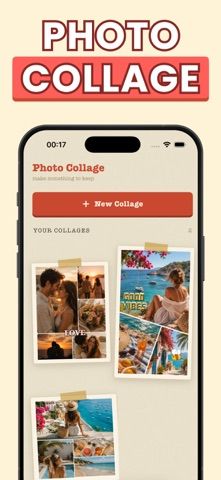
Retro Scrapbook Collage Maker helps turn phone photos into vintage-inspired layouts. Choose from hundreds of collage templates, including grids, shapes, and frames, then add stickers, film-style filters, text, borders, and background colors. Basic photo adjustments include brightness, contrast, warmth, and cropping. Finished collages can be saved in high quality or shared to Instagram, messages, and other destinations. The app is free to download, while Pro unlocks unlimited collages and premium features through weekly or yearly subscriptions or a one-time lifetime purchase. The current App Store description does not give the active price for each option, so check the purchase screen before starting a subscription. The listing describes a straightforward editing workflow but provides limited evidence about privacy and backup behavior; review photo-library permissions and export quality with a test image before editing a large project.

Retro Scrapbook Collage Maker
A photo collage maker with retro layouts, stickers, film filters, text styling, and social-ready export sizes.
Overview
A closer look at Retro Scrapbook Collage Maker.
A closer look
App screenshots
Choose with confidence
The useful details.
What it does
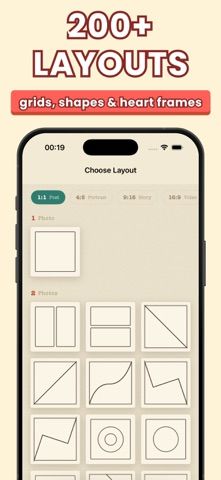
- Build collages from 200-plus layouts, grids, shapes, and heart frames.
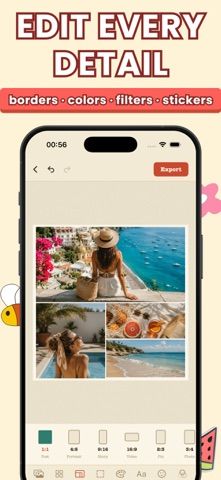
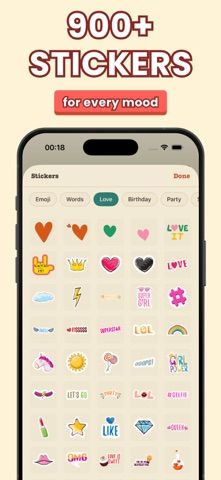
- Decorate photos with 900-plus stickers, retro filters, text, borders, and backgrounds.
- Adjust brightness, contrast, warmth, and cropping for individual photos.
- Export in sizes for posts, stories, portraits, pins, and other sharing destinations.
A good fit for
- People who want quick scrapbook-style photo collages for social posts and personal albums.
Worth knowing
- Pro is required for unlimited collages and premium features. Weekly, yearly, and lifetime purchase choices are listed, but verify current prices and renewal terms in the App Store. Review photo-library permissions and backup behavior before importing personal images.
Frequently asked questions
Answers based on the app’s official listing and reviewed information.
What is Retro Scrapbook Collage Maker used for?
A photo collage maker with retro layouts, stickers, film filters, text styling, and social-ready export sizes.
What can you do with Retro Scrapbook Collage Maker?
Build collages from 200-plus layouts, grids, shapes, and heart frames. Decorate photos with 900-plus stickers, retro filters, text, borders, and backgrounds. Adjust brightness, contrast, warmth, and cropping for individual photos. Export in sizes for posts, stories, portraits, pins, and other sharing destinations.
Who is Retro Scrapbook Collage Maker designed for?
People who want quick scrapbook-style photo collages for social posts and personal albums.
What should you know before downloading Retro Scrapbook Collage Maker?
Pro is required for unlimited collages and premium features. Weekly, yearly, and lifetime purchase choices are listed, but verify current prices and renewal terms in the App Store. Review photo-library permissions and backup behavior before importing personal images.
Does Retro Scrapbook Collage Maker include paid features?
Pro offers weekly and yearly subscriptions; current US prices and included trial terms should be confirmed in the purchase screen. A one-time lifetime purchase is offered for Pro; verify the current price in the App Store.
Which platforms support Retro Scrapbook Collage Maker?
Greatooly's reviewed app information lists iOS.
Researched from official sources; this is not a hands-on review. Last checked 2026-11-04.
Keep exploring
More apps that might be a good fit.

Roomture: AI Interior Design
Roomture redesigns interior, exterior and garden photos with AI, then lets users compare, refine and save design ideas.

Verde: AI Backyard Design Plan
Verde turns photos of gardens, balconies, and rooms into AI redesigns that account for existing structures and practical dimensions.

RoomMakeover: AI Room Design
RoomMakeover previews AI interior-design ideas from room photos, with style controls, credit packs, and Pro plans.