
Room Planner: Home Design AI generates visual redesign concepts from a photo of a room. Users can select a style and color direction, compare several generated looks, and save or share ideas for spaces such as bedrooms, kitchens, offices, and living rooms. The app is positioned for early inspiration and remodel planning rather than producing construction-ready plans. The listing offers one free transformation; Premium unlocks all styles and unlimited redesigns through weekly or annual subscriptions. Current prices are shown in the app. Generated images can help compare decor directions, but furniture placement, dimensions, materials, and costs may not match the real room. Verify measurements and contractor requirements before spending money or beginning work.

Room Planner: Home Design AI
An AI room redesign app that generates interior style concepts from photos of existing rooms.
Overview
A closer look at Room Planner: Home Design AI.
A closer look
App screenshots
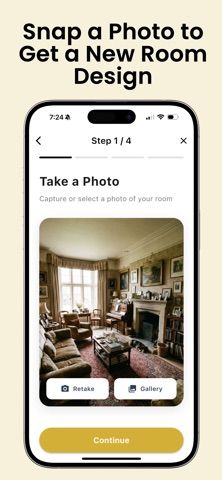
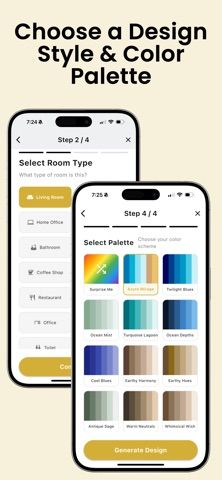


Choose with confidence
The useful details.
What it does
- Creates room redesign concepts from a user-selected photo and style direction.
- Supports multiple room types and lets users compare and save design variations.
- Starts with one free transformation; Premium unlocks more styles and redesigns.
A good fit for
- Homeowners or renters gathering visual ideas before updating a room.
- Designers or stagers who want a fast concept to discuss with a client.
Worth knowing
- Generated designs are inspiration rather than measured floor plans or construction guidance; additional use requires a subscription.
Frequently asked questions
Answers based on the app’s official listing and reviewed information.
What is Room Planner: Home Design AI used for?
An AI room redesign app that generates interior style concepts from photos of existing rooms.
What can you do with Room Planner: Home Design AI?
Creates room redesign concepts from a user-selected photo and style direction. Supports multiple room types and lets users compare and save design variations. Starts with one free transformation; Premium unlocks more styles and redesigns.
Who is Room Planner: Home Design AI designed for?
Homeowners or renters gathering visual ideas before updating a room. Designers or stagers who want a fast concept to discuss with a client.
What should you know before downloading Room Planner: Home Design AI?
Generated designs are inspiration rather than measured floor plans or construction guidance; additional use requires a subscription.
Does Room Planner: Home Design AI include paid features?
Premium offers weekly and annual plans; current prices are shown in the app.
Which platforms support Room Planner: Home Design AI?
Greatooly's reviewed app information lists iOS.
Researched from official sources; this is not a hands-on review. Last checked 2026-11-04.
Keep exploring
More apps that might be a good fit.

VowFolio: Wedding Planner
VowFolio Planner organizes a couple’s guest list, seating chart, budget, checklist, vendors, wedding website, and guest photos.

LevelUp! Kids
LevelUp! Kids turns family chores into quests, letting children earn points for screen time or rewards that parents approve.

Wantd - Curated Wishlist
Wantd saves products from online shops into shareable wishlists, keeps gift reservations secret, and supports group gifts and a social feed.