
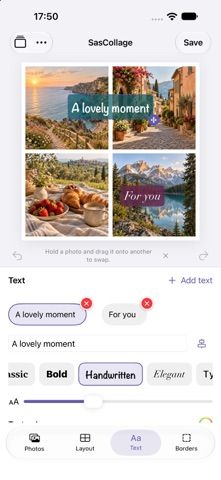
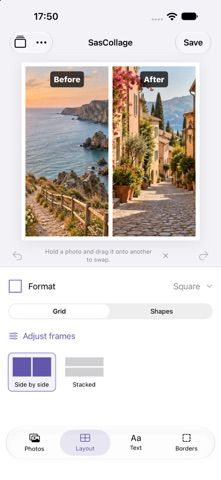
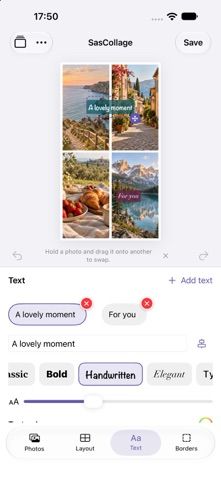
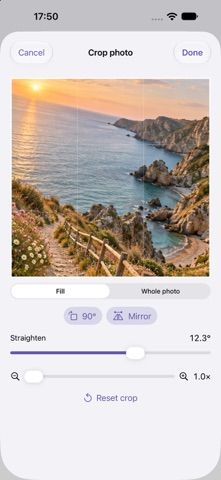
SasCollage combines three to ten photos into a customizable image. Users can choose a starting grid, drag dividers to resize frames, crop and swap pictures, then adjust spacing, background color, borders, and layout shape. Drafts save on the device for later editing, and finished collages can be exported to Photos or shared without a watermark. The app is free, with no account, ads, subscription, or in-app purchase listed. Its developer says photos and usage data are not sent to its servers and that the app does not track users. The current listing supports iOS 17 or later and iPad as well as iPhone. It focuses on simple photo grids rather than full graphic-design templates or extensive text and sticker editing.

CreativityCollage making appsColor palette creation appsGraphic design appsLogo design appsPhoto editing apps
SasCollage: Photo Collage
A free, private collage editor for combining 3 to 10 photos with adjustable grids, crops, shapes, borders, and colors.
By Dennis NederhofReleased 2026/09/14App Store rating 4.5 (2)Official store informationPublished 2026/11/04Checked 2026-11-04
Overview
A closer look at SasCollage: Photo Collage.
A closer look
App screenshots
Choose with confidence
The useful details.
What it does
- Combine 3 to 10 photos in adjustable grid layouts.
- Resize frames, crop and swap photos, and change spacing and borders.
- Choose shapes, colors, and square, portrait, or landscape formats.
- Save drafts locally and export without a watermark.
A good fit for
- People who want a simple, watermark-free collage without an account or subscription.
Worth knowing
- The editor is limited to 3–10 photos and requires iOS 17 or later; it does not aim to replace a full graphic-design suite.
Frequently asked questions
Answers based on the app’s official listing and reviewed information.
What is SasCollage: Photo Collage used for?
A free, private collage editor for combining 3 to 10 photos with adjustable grids, crops, shapes, borders, and colors.
What can you do with SasCollage: Photo Collage?
Combine 3 to 10 photos in adjustable grid layouts. Resize frames, crop and swap photos, and change spacing and borders. Choose shapes, colors, and square, portrait, or landscape formats. Save drafts locally and export without a watermark.
Who is SasCollage: Photo Collage designed for?
People who want a simple, watermark-free collage without an account or subscription.
What should you know before downloading SasCollage: Photo Collage?
The editor is limited to 3–10 photos and requires iOS 17 or later; it does not aim to replace a full graphic-design suite.
Does SasCollage: Photo Collage include paid features?
The reviewed listing reports no in-app purchases.
Which platforms support SasCollage: Photo Collage?
Greatooly's reviewed app information lists iOS.
Researched from official sources; this is not a hands-on review. Last checked 2026-11-04.
Keep exploring
More apps that might be a good fit.

Verde: AI Backyard Design Plan
Verde turns photos of gardens, balconies, and rooms into AI redesigns that account for existing structures and practical dimensions.

RoomMakeover: AI Room Design
RoomMakeover previews AI interior-design ideas from room photos, with style controls, credit packs, and Pro plans.

Zu3D
Zu3D combines stop-motion capture, drawing, video editing, green-screen effects, sound, and export tools for animated films.