
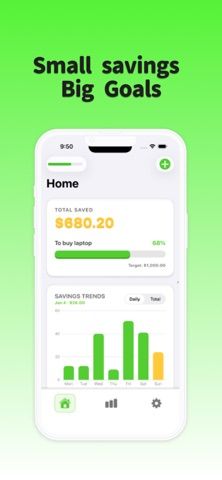
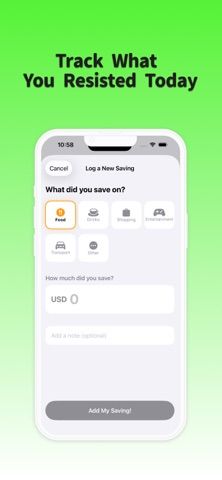
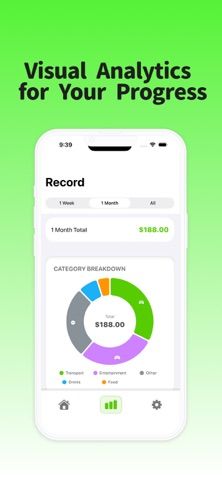
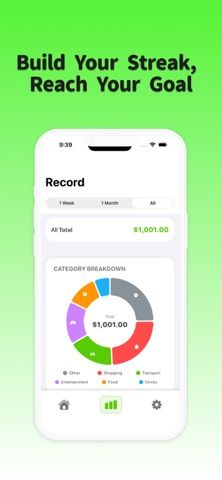
Savings Tracker - GamanChart turns a skipped purchase into a visible savings entry. Record an amount, choose a category, and add a note about what you chose not to buy. Set a goal such as a trip or a new device, add a target date, and follow a progress bar as the virtual savings total grows. Charts show where the saved amounts came from and how progress changes over time, while a streak feature helps make the habit repeatable. The developer says savings entries are stored locally on the device. Apple’s privacy label also says usage data may be used for third-party advertising. The iPhone app is free to download, with monthly and annual Premium options for full history and detailed analysis. It requires iOS 26.0 or later.

Savings Tracker - GamanChart
A habit-building savings tracker for logging money not spent, setting goals, visualizing progress, and building daily streaks.
By SOCCERLAWSDOJOReleased 2026/01/07No ratings yetOfficial store informationPublished 2026/11/19Checked 2026-11-19
Overview
A closer look at Savings Tracker - GamanChart.
A closer look
App screenshots
Choose with confidence
The useful details.
What it does
- Log an amount saved by resisting an impulse purchase and add a category or note.
- Create savings goals with a target and deadline and follow progress over time.
- Review savings by category and date using graphs and history views.
- Build a streak of days when you record a saving decision.
- Unlock full history and detailed analysis with Premium.
A good fit for
- People who want to make small spending decisions visible and motivating.
- Users who want a lightweight goal tracker rather than a full budget or bank aggregator.
- Anyone trying to build a consistent savings habit through streaks and progress charts.
Worth knowing
- Requires iOS 26.0 or later and is listed for iPhone.
- Savings amounts are self-reported; the app does not move money into a bank account or savings product.
- Full history and detailed analysis require Premium.
- Apple’s privacy label says usage data may be collected for third-party advertising, even though the developer says financial entries stay on the device.
Frequently asked questions
Answers based on the app’s official listing and reviewed information.
What does GamanChart track?
It records money you chose not to spend and visualizes those self-reported amounts as progress toward savings goals.
Can I set a savings goal and deadline?
Yes. The listing describes creating a named goal with a target and deadline, then following its progress bar.
How can I review my savings progress?
The app describes graphs that show savings by category and over time; Premium unlocks full history and detailed analysis.
Does GamanChart transfer money into savings?
No. It records amounts you say you saved; it does not transfer money to a bank or savings account.
How much does GamanChart Premium cost?
The US App Store lists $3.99 monthly or $29.99 yearly.
What device does GamanChart require?
Apple lists iOS 26.0 or later and marks it as designed for iPhone.
Researched from official sources; this is not a hands-on review. Last checked 2026-11-19.
Keep exploring
More apps that might be a good fit.

SpendZero: No Spend Challenge
SpendZero: No Spend Challenge is an iPhone app for no-spend challenge. It is presented as a tool for tracking spending pauses or no-buy challenges.

Otti: No Spend Challenge
Otti: No Spend Challenge is an iPhone app for no-spend challenge. It is presented as a tool for tracking spending pauses or no-buy challenges.

NoSpend: No Spend Challenge
NoSpend: No Spend Challenge is an iPhone app for no-spend challenge. It is presented as a tool for tracking spending pauses or no-buy challenges.