
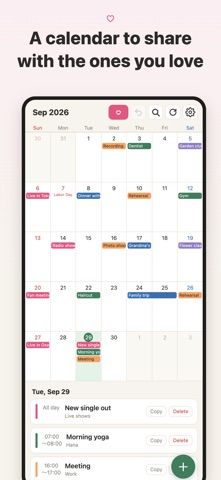
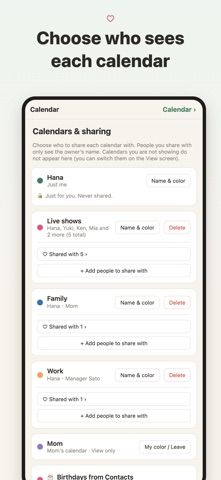
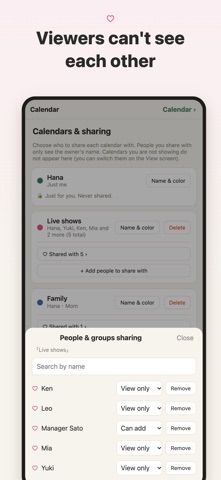
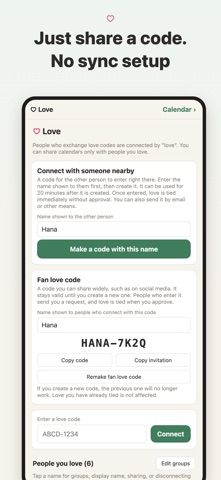
Loved Ones Calendar is a sharing-focused calendar for people who want different groups to see different plans. Create separate calendars for family, work, a partner, or fans, then choose whether each person can view, add, or edit events. The developer says viewers do not see who else has access, and a calendar can show a different owner name to different people. Additional tools include recurring events, alerts, contact birthdays, 13 Home Screen widgets, holiday calendars for 43 countries, Google Calendar import, and .ics export. Keeping a personal schedule and viewing calendars shared with you are free; creating a new shared calendar requires a paid annual plan, with a two-week trial. The listing does not state the current price. Review each calendar's permissions before sharing private events publicly or with a broad group.

Shared Calendar: Loved Ones
Loved Ones Calendar lets users create separate calendars for family, work, or fans and set individual view, add, or edit permissions. It includes widgets, recurring events, alerts, contact birthdays, Google Calendar import, and .ics export. Creating a new shared calendar requires an annual subscription; current pricing is not stated.
Overview
A closer look at Shared Calendar: Loved Ones.
A closer look
App screenshots
Choose with confidence
The useful details.
What it does
- Separate calendars with per-person view, add, or edit permissions
- Widgets, event alerts, and recurring events
- Google Calendar import and .ics export
- Birthdays, holidays for 43 countries, and saved calendar views
A good fit for
- People sharing different schedules with family, work, and other groups
- Users who want more control over calendar visibility than one shared feed
Worth knowing
- Creating shared calendars requires an annual subscription; review permissions carefully before sharing personal events.
Frequently asked questions
Answers based on the app’s official listing and reviewed information.
What is Shared Calendar: Loved Ones used for?
Loved Ones Calendar lets users create separate calendars for family, work, or fans and set individual view, add, or edit permissions. It includes widgets, recurring events, alerts, contact birthdays, Google Calendar import, and .ics export. Creating a new shared calendar requires an annual subscription; current pricing is not stated.
What can you do with Shared Calendar: Loved Ones?
Separate calendars with per-person view, add, or edit permissions Widgets, event alerts, and recurring events Google Calendar import and .ics export Birthdays, holidays for 43 countries, and saved calendar views
Who is Shared Calendar: Loved Ones designed for?
People sharing different schedules with family, work, and other groups Users who want more control over calendar visibility than one shared feed
What should you know before downloading Shared Calendar: Loved Ones?
Creating shared calendars requires an annual subscription; review permissions carefully before sharing personal events.
Does Shared Calendar: Loved Ones include paid features?
Keeping a personal schedule and viewing or editing calendars shared with you are free. Creating a new shared calendar requires an annual subscription with a two-week trial; current price is not specified in the listing.
Which platforms support Shared Calendar: Loved Ones?
Greatooly's reviewed app information lists iOS.
Researched from official sources; this is not a hands-on review. Last checked 2026-11-04.
Keep exploring
More apps that might be a good fit.

HomeKeep Home Inventory
HomeKeep stores a private home inventory on iPhone, tracking item values and warranties with free CSV export and paid PDF reports.

Hold My Juice
Hold My Juice connects family email and calendars to surface school forms, activity changes, deadlines, and schedule conflicts.

Timen - Time Tracking
Timen tracks billable and non-billable work offline, then syncs hours to its web app for invoices, exports, and team reports.