
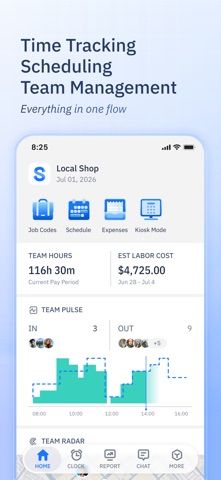
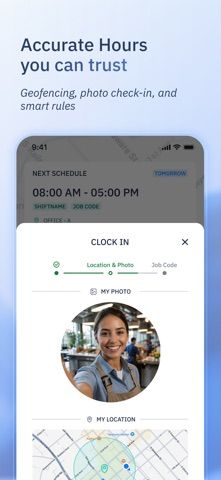
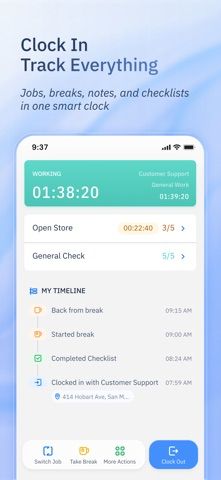
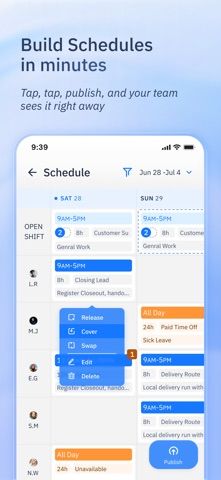
ShiftFlow is a time and attendance app for teams that need to coordinate work schedules and hours. The listing describes shift planning, employee availability, clock-ins with GPS or geofencing, selfie check-ins, job codes, time-off requests, team chat, and timesheet exports to CSV or PDF. Managers can see who is currently clocked in, while workers can review shifts and submit hours. This is a team-management system rather than a personal productivity planner; an employer may need to set up an account and workflow before staff can use it. GPS and selfie check-ins involve sensitive location and image data, so organizations should explain their policies and permissions to employees. Confirm payroll and retention details with the provider before adoption.
ShiftFlow: Track Team Hours
Schedule team shifts, verify clock-ins, track job hours, and export timesheets from a workforce app.
Overview
A closer look at ShiftFlow: Track Team Hours.
A closer look
App screenshots
Choose with confidence
The useful details.
What it does
- Create shifts and manage team availability.
- Record clock-ins with supported GPS, geofencing, or selfie checks.
- Track job codes, expenses, and time-off requests.
- Export timesheets as CSV or PDF and message team members.
A good fit for
- Small teams that need shared scheduling and time tracking.
Worth knowing
- An employer account and configured workflow may be required.
- Review employee privacy, location, image, and payroll policies before use.
Frequently asked questions
Answers based on the app’s official listing and reviewed information.
What is ShiftFlow: Track Team Hours used for?
Schedule team shifts, verify clock-ins, track job hours, and export timesheets from a workforce app.
What can you do with ShiftFlow: Track Team Hours?
Create shifts and manage team availability. Record clock-ins with supported GPS, geofencing, or selfie checks. Track job codes, expenses, and time-off requests. Export timesheets as CSV or PDF and message team members.
Who is ShiftFlow: Track Team Hours designed for?
Small teams that need shared scheduling and time tracking.
What should you know before downloading ShiftFlow: Track Team Hours?
An employer account and configured workflow may be required. Review employee privacy, location, image, and payroll policies before use.
Does ShiftFlow: Track Team Hours include paid features?
The reviewed listing does not confirm current in-app purchase options.
Which platforms support ShiftFlow: Track Team Hours?
Greatooly's reviewed app information lists iOS.
Researched from official sources; this is not a hands-on review. Last checked 2026-11-03.
Keep exploring
More apps that might be a good fit.

HomeKeep Home Inventory
HomeKeep stores a private home inventory on iPhone, tracking item values and warranties with free CSV export and paid PDF reports.

Hold My Juice
Hold My Juice connects family email and calendars to surface school forms, activity changes, deadlines, and schedule conflicts.

Timen - Time Tracking
Timen tracks billable and non-billable work offline, then syncs hours to its web app for invoices, exports, and team reports.