
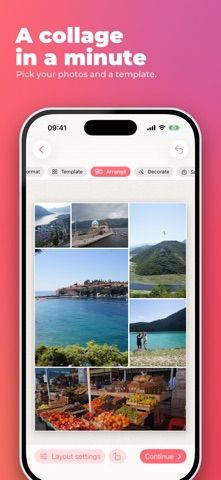
Simple Photo Collage Maker helps turn selected pictures into a collage for printing or social posts. Users can choose common paper and print dimensions, try layouts such as hearts, circles, waves, and seasonal shapes, then export JPEG or PNG files at 72 or 300 dpi. The listing says seasonal templates appear for a limited period around each holiday and remain editable afterward. The app is free to try, but exported results include a watermark after the trial unless the full app is unlocked with a one-time lifetime purchase. There is no subscription according to the listing. It is a focused collage tool rather than a full photo editor, so users seeking detailed retouching or layer controls may need another app.

Simple Photo Collage Maker
A photo collage maker with print sizes, seasonal templates, shape layouts, and high-resolution image export.
By Robinvanholst BVReleased 2026/09/11App Store rating 5.0 (1)Official store informationPublished 2026/11/04Checked 2026-11-04
Overview
A closer look at Simple Photo Collage Maker.
A closer look
App screenshots



Choose with confidence
The useful details.
What it does
- Arranges photos in standard print sizes and social-media formats.
- Offers seasonal templates and shape masks with editable crops.
- Exports JPEG or PNG at 72 or 300 dpi.
A good fit for
- People making quick photo collages for prints, photo books, or social posts.
- Users who want holiday layouts and a one-time unlock option.
Worth knowing
- The free trial adds a watermark to final exports; the full app requires a one-time purchase, and seasonal templates are only available during limited periods.
Frequently asked questions
Answers based on the app’s official listing and reviewed information.
What is Simple Photo Collage Maker used for?
A photo collage maker with print sizes, seasonal templates, shape layouts, and high-resolution image export.
What can you do with Simple Photo Collage Maker?
Arranges photos in standard print sizes and social-media formats. Offers seasonal templates and shape masks with editable crops. Exports JPEG or PNG at 72 or 300 dpi.
Who is Simple Photo Collage Maker designed for?
People making quick photo collages for prints, photo books, or social posts. Users who want holiday layouts and a one-time unlock option.
What should you know before downloading Simple Photo Collage Maker?
The free trial adds a watermark to final exports; the full app requires a one-time purchase, and seasonal templates are only available during limited periods.
Does Simple Photo Collage Maker include paid features?
A one-time lifetime purchase removes the export watermark; current price is shown in the app.
Which platforms support Simple Photo Collage Maker?
Greatooly's reviewed app information lists iOS.
Researched from official sources; this is not a hands-on review. Last checked 2026-11-04.
Keep exploring
More apps that might be a good fit.

Verde: AI Backyard Design Plan
Verde turns photos of gardens, balconies, and rooms into AI redesigns that account for existing structures and practical dimensions.

RoomMakeover: AI Room Design
RoomMakeover previews AI interior-design ideas from room photos, with style controls, credit packs, and Pro plans.

Zu3D
Zu3D combines stop-motion capture, drawing, video editing, green-screen effects, sound, and export tools for animated films.