
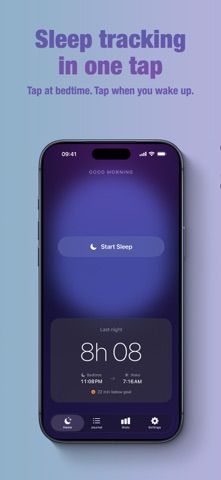
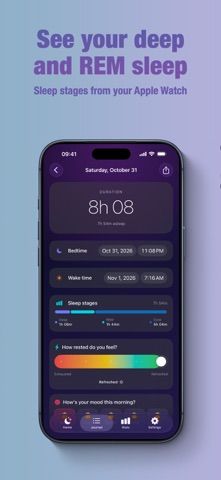
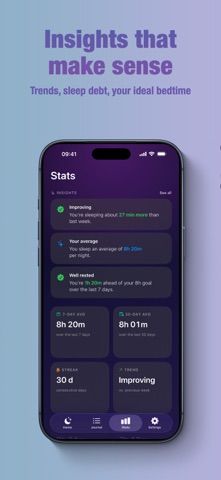
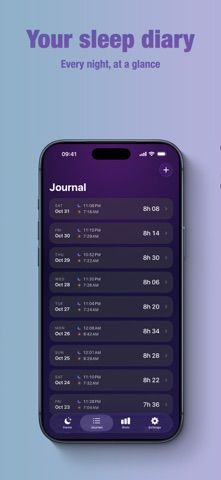
Sleepy Log is a sleep tracker and journal for people who want a simple record of their nights without setting up an account. Start a session when you go to bed and end it in the morning, or use Apple Watch and optional Apple Health integration to add sleep sessions. The app presents sleep trends, regularity, sleep debt, averages, streaks, and mood notes, with reminders and a day-by-day schedule. Users can add past nights manually and export their records as CSV or JSON. The US App Store lists it as a $2.99 paid download with no subscription. Apple lists iOS 26.2 or later for iPhone and iPad; Apple Watch features require a compatible watchOS version.
Sleepy Log - Sleep Journal
Track sleep with quick bedtime and wake-up logs, Apple Health sync, sleep trends, and a private journal.
By Martin Le CueReleased 2026/05/06App Store rating 5.0 (2)Official store informationPublished 2026/11/19Checked 2026-11-19
Overview
A closer look at Sleepy Log - Sleep Journal.
A closer look
App screenshots
Choose with confidence
The useful details.
What it does
- Start and stop a sleep session with a simple bedtime and wake-up log on iPhone or Apple Watch.
- Review sleep trends, regularity, sleep debt, averages, streaks, and journal notes.
- Optionally sync sleep sessions with Apple Health and set reminders for bedtime and wake-up.
- Add past nights manually and export records to CSV or JSON.
A good fit for
- People who want a straightforward sleep diary with trend summaries.
- Apple Watch users who prefer to log or review sleep from their wrist.
Worth knowing
- The US App Store lists a $2.99 upfront price and requires iOS 26.2 or later; it is not a free download.
- Sleep records and insights are self-tracking tools and are not a medical diagnosis or treatment.
Frequently asked questions
Answers based on the app’s official listing and reviewed information.
How do I record a night of sleep?
Tap Start Sleep when you go to bed and Wake Up in the morning. You can also enter a past night manually.
Can I use Sleepy Log with Apple Watch?
Yes. The App Store listing supports Apple Watch, where you can start, stop, and log a sleep session.
Does it sync with Apple Health?
Yes. Apple Health sync is optional and can write sleep sessions to the Health app.
What sleep insights does it show?
The listing describes trends, regularity, sleep debt, bedtime patterns, averages, streaks, and mood notes.
Can I export my sleep history?
Yes. The listing says you can export your records as CSV or JSON from Settings.
Is Sleepy Log free?
No. The current US App Store lists the app for $2.99 as a paid download and does not list a subscription.
Researched from official sources; this is not a hands-on review. Last checked 2026-11-19.
Keep exploring
More apps that might be a good fit.
Stillnote: Meditation Timer
Time meditation sessions, write short reflections, review practice history, and sync optional mindful minutes through Apple Health.
Beginner Workout at Home
Follow short, equipment-free home workouts, track routines and streaks, and scan meals for calorie estimates.
Diaper Tower: Baby Tracker
Log diaper changes, follow inventory, and build a playful milestone tower for each child on iPhone and Apple Watch.