
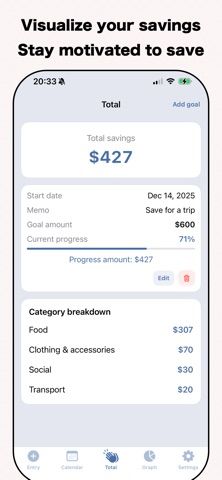
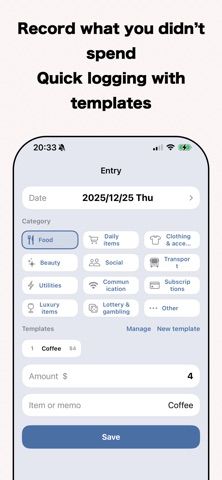
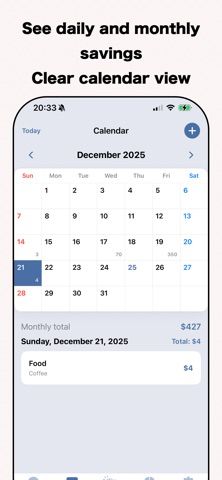
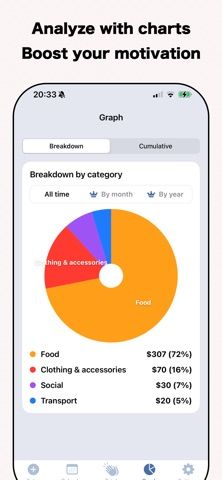
Smart Savings Tracker is built around the money someone chooses not to spend. Log the amount saved after skipping a purchase, optionally reuse frequent items from templates, and organize entries around multiple savings goals. A calendar, pie charts, line charts, monthly reports, and a home-screen widget make progress easier to review. Daily reminders and streaks can help turn a one-time decision into a repeatable habit. Premium adds iCloud backup, passcode or Face ID protection, CSV export, and category customization. The US App Store lists Savings Premium for $4.99 but does not specify a billing period in the price row, so check the purchase screen. Apple says usage, identifiers, and diagnostics may be collected for advertising, though they are marked as not linked to the user. Requires iOS 16.0 or later.

Smart Savings Tracker
A savings-habit app for logging money saved by skipping purchases, setting multiple goals, and reviewing progress in charts and reports.
Overview
A closer look at Smart Savings Tracker.
A closer look
App screenshots
Choose with confidence
The useful details.
What it does
- Record money saved by skipping a purchase and reuse common entries as templates.
- Set multiple savings goals and see estimated completion dates.
- Review progress through a calendar, pie charts, line charts, and monthly reports.
- Build a daily streak and check the current month from a home-screen widget.
- Use Premium for iCloud backup, device protection, CSV export, and category customization.
A good fit for
- People who want to reward themselves for skipping impulse purchases.
- Users who want several goals and simple visual progress reports.
- Anyone who prefers habit-based savings tracking over bank-linked budgeting.
Worth knowing
- Requires iOS 16.0 or later on iPhone or iPad.
- Savings entries are self-reported; the app does not transfer or reserve money.
- iCloud backup, device lock, CSV export, and custom categories are Premium features.
- Apple’s privacy label says identifiers, usage data, and diagnostics may be used for third-party advertising; the $4.99 Premium row does not state its billing period.
Frequently asked questions
Answers based on the app’s official listing and reviewed information.
What does Smart Savings Tracker record?
It records money you chose not to spend and groups the entries toward one or more savings goals.
Can I have multiple savings goals?
Yes. The listing describes creating several goals and viewing predicted completion dates for them.
What reports are available?
The app includes a calendar, pie charts, line charts, monthly reports, a home-screen widget, and daily streaks.
Does the app automatically save money for me?
No. It logs amounts that you report saving; it does not transfer money or connect to a bank.
How much is Savings Premium?
The US App Store lists Savings Premium for $4.99 but does not specify the billing period. Check the in-app purchase screen before buying.
Which devices support Smart Savings Tracker?
Apple lists iOS 16.0 or later for iPhone and iPad.
Researched from official sources; this is not a hands-on review. Last checked 2026-11-19.
Keep exploring
More apps that might be a good fit.

SpendZero: No Spend Challenge
SpendZero: No Spend Challenge is an iPhone app for no-spend challenge. It is presented as a tool for tracking spending pauses or no-buy challenges.

Otti: No Spend Challenge
Otti: No Spend Challenge is an iPhone app for no-spend challenge. It is presented as a tool for tracking spending pauses or no-buy challenges.

NoSpend: No Spend Challenge
NoSpend: No Spend Challenge is an iPhone app for no-spend challenge. It is presented as a tool for tracking spending pauses or no-buy challenges.